
project management · Oct 6, 2026
How to Manage Multiple Projects Without Losing the Thread
Last updated: October 6, 2026
Learning how to manage multiple projects starts with an unfair fact: five projects cost more than five times one project, because every switch between them has a reload cost that grows with complexity. The fix is structural, not motivational. Run every project in one workspace, work from one cross-project view of your own tasks, and let roll-up views answer status questions so you don't have to. This guide covers the switch-cost math, why the master spreadsheet everyone builds always rots, the six-step single-workspace system, and a worked three-project week in Quire.
- What does it take to manage multiple projects at once?
- Why do multiple projects feel heavier than the sum of their parts?
- Why does the master spreadsheet always fail?
- How do you manage multiple projects in one workspace?
- What does a three-project week look like in practice?
- Where does task management software help most?
- Key takeaways
- Frequently asked questions
Count the tabs you'd need open to answer one question: what's due this week, across everything you run? For most people juggling several projects, it's one per project, a spreadsheet, and a chat thread where somebody once mentioned a date.
None of those projects is the problem on its own. The wear comes from the gaps: re-reading old comments, re-checking dates, and the ping that drags you out of one project to report on another.
Most advice on how to manage multiple projects assumes the fix is discipline: better habits, stricter time-blocking, more willpower. After watching enough teams try, I'd put my money on structure instead. No task management software will set your priorities for you, but the right structure stops you paying a reload tax every time you glance at a different project. That's what this guide builds, step by step, with a worked example at the end.
What does it take to manage multiple projects at once?
Managing multiple projects well takes three things: one place where every project lives, one view that shows your own work across all of them, and roll-up views that answer status questions without a meeting. Everything else, prioritization, scheduling, saying no, gets dramatically easier once those three exist. Without them, you become the integration layer, and human integration layers burn out.
Multi-project management: running several concurrent projects through one shared structure, so that priorities, workloads, and status can be read across all projects at once instead of being reassembled from each one separately.
Notice what's missing from that definition: heroics. The skill is real, but most of what looks like skill from the outside is a setup decision made once. The people who seem effortlessly on top of four projects are usually not superhuman. They've stopped re-entering the same information in four places, and they've stopped paying full price for every switch.
That's also the honest pitch for doing this in a tool built for it. If you'd rather watch the mechanics than read them, this 65-minute Quire webinar covers the workspace fundamentals, and the clip below opens right on its cross-project collaboration chapter.
In this session23:32 Cross-project collaboration
Why do multiple projects feel heavier than the sum of their parts?
Because you pay for the switching, not only for the work. In a series of four experiments, a study by Rubinstein, Meyer, and Evans found that every switch between tasks carried a time cost, and that the cost grew with the complexity of the rules being switched between. A project is about the heaviest rule set a working person carries. Different goals, different people, different vocabulary, different politics.
So the math of a five-project plate is worse than it looks. You budgeted for five projects' worth of work. You didn't budget for the reloads between them, and each reload evicts one project's context to page in another's.
The tax shows up in small, familiar ways. Reading the last three comments to remember where a discussion stood. Opening a spreadsheet to check a date you knew yesterday. Asking a teammate something they already answered, in a channel you were in.
None of that is a character flaw. It's what unmanaged switching costs. Which means the two structural fixes follow directly: make switches cheaper (shared structure, so less reloading) and make them rarer (batching, so fewer reloads). The system below does both.
Why does the master spreadsheet always fail?
The master spreadsheet fails because it's a copy, and copies rot. At some point every multi-project team builds the same artifact: one spreadsheet listing every project, its status, its owner, and its next milestone. Someone volunteers to keep it updated. (They will not.)
The real state of each project lives wherever the work happens, and the spreadsheet holds a hand-typed summary of what that state was the last time somebody had a spare half hour. Every row ages from the moment it's typed. By week three, the sheet answers questions about the past with the confidence of the present, and people quietly stop trusting it while still dutifully updating it. The worst of both.
A view is different from a copy. A view reads the live work and aggregates it; nobody maintains it, so it can't fall behind. That distinction, copy versus view, is the single most useful test when you're choosing how to run several projects:
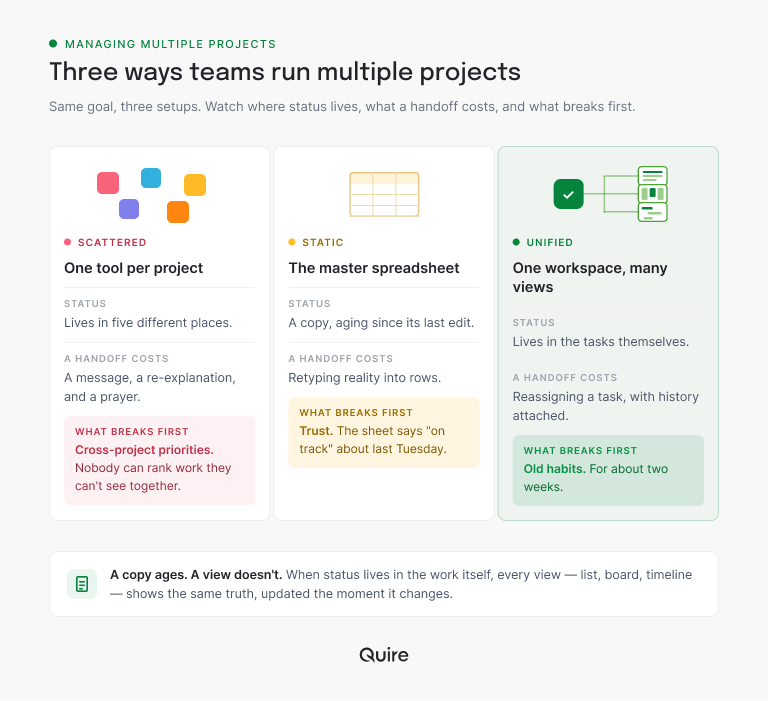
The pattern in that picture is the whole argument. Scattered tools lose the ranking, the spreadsheet loses the trust, and the shared workspace only has to outlast your team's old habits.
In practice, "many views" means every recurring multi-project question has one place in Quire where its answer already lives:
| The question | Where the answer lives in Quire | Who opens it |
|---|---|---|
| What's on my plate, across everything? | My Tasks, grouped by project, sorted by priority | You, first thing Monday |
| What's due this week anywhere? | A Smart Folder holding the projects you run | The lead, at Friday planning |
| Is this project on track? | The project's Overview tab | A director or stakeholder |
| What does one group need to do next? | A sublist cut from the parent project | That group, every day |
| What breaks if this task slips? | The task's dependencies | Whoever owns the next task in line |
How do you manage multiple projects in one workspace?
The six steps below are one system, and the order matters: structure first, views second, habits last. Habits built on top of scattered structure collapse the first busy week.
1. Put every project in one workspace
One tool per project feels tidy and costs you the whole game, because cross-project questions ("who's overloaded?", "what's due this week anywhere?") can't be answered inside any single project. In Quire, every active project sits in the same workspace, side by side. Nothing needs exporting or re-entering to be compared.
This is also the step teams resist most, because each project's owner likes their own setup. Keep the setups; projects in one workspace can still run different views and workflows. What has to be shared is the container, not the style.
Each project still runs its own lifecycle inside the shared workspace: the project management life cycle walks through those five phases, from initiation to closure.
2. Nest inside projects instead of multiplying them
When a project grows a new workstream, the reflex is to create a new project for it. Resist. Every new top-level project is a new switching destination, and the reload tax collects per project, not per task. Quire's nested task tree means a workstream can live as a branch inside its parent project, as deep as the work goes, with its own owner and dates.
Sublists handle the other version of this problem: the same project seen by a different group. A sublist is a filtered slice of a project, so the design team can work their corner without anyone duplicating the project for them.
For real setups of that pattern, six real-world sublist use cases show how teams carve one project into working views instead of clones.
3. Start the day in one cross-project view
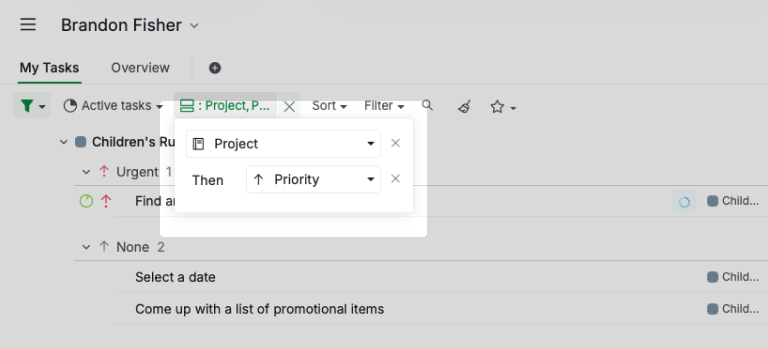
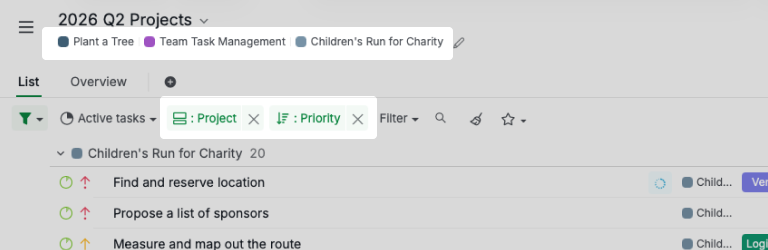
The touring habit, opening each project in turn to see what it wants from you, is a morning-long switch marathon. Replace it with one list. Quire's My Tasks gathers your assignments from every project into a single view, grouped by project and sorted by priority or due date, so Monday starts with one screen instead of five tabs.
This is also where prioritization across projects becomes real instead of aspirational. Five projects each have a top priority; your day doesn't. One ranked list forces the question "what actually comes first, everywhere?" and answers it before the pings start.
Want to feel the difference this week? Start a free Quire project for each of your current three, add just this week's tasks with owners and dates, and open My Tasks tomorrow morning. You'll have your cross-project Monday list before your first coffee goes cold.
4. Roll up instead of reporting up
Status reporting is the multi-project tax nobody itemizes: a weekly ritual, per project, of turning work into prose for people who need ten seconds of truth. Roll-up views delete most of it. A Smart Folder in Quire aggregates chosen projects into one live view, so "everything due this week, everywhere" is a folder you open, not a report you write.
For the people above you, each project's Overview tab does the ten-second version: health, task status and upcoming deadlines on one screen, read straight from the live tasks. Custom fields make this stronger: standardize project information, like a status field or a risk flag, and reporting and filtering stay consistent across every project instead of meaning something different in each one.
The roll-up pattern has a whole post of its own: Smart Folders in Quire, one view across every project, without maintaining a copy of anything.
5. Sequence the collisions
Multiple projects collide in two places: shared dependencies and shared people. The launch can't start until the website ships; the designer both projects rely on has exactly one October. Both collisions are invisible in per-project planning and obvious the moment the projects share a structure.
Make dependencies explicit between tasks, so a slipped date surfaces downstream on the day it slips, not in the week it detonates. Task dependencies carry that thinking further. And before committing any new date, look at the shared person's whole plate, not the slice of them your project sees.
If your best people are always the overloaded ones, the workload math post covers how to see and fix cross-project load before it becomes a resignation letter.
6. Batch your switches
The structure above makes switches cheaper. This last step makes them rarer. Give each project contiguous blocks, mornings for the launch, Tuesday afternoons for onboarding, instead of alternating by whichever ping arrived last. The research earlier in this post is blunt on this point: fewer, fatter blocks lose less time to reloading than many thin slices.
Quire's Peekaboo helps the discipline along: temporarily hide the tasks that aren't this block's business, and they return when scheduled. Out of view stops meaning out of control once the structure holds the memory for you.
What does a three-project week look like in practice?
Take a marketing ops lead running three concurrent projects: a product launch, a website refresh, and the monthly content calendar. Here's the system above, running for real.
All three live as projects in one Quire workspace. The launch has a nested branch for the event, the website project carries a design sublist, and the content calendar runs on recurring monthly tasks. Monday, 9:00am: she opens My Tasks, grouped by project and sorted by priority, and sees the week across all three projects in one list. Eleven tasks, three of them hers to delegate. No touring.
Wednesday, the web developer flags a slip on the landing page. The launch's announcement task depends on it, so the slip surfaces on the launch board the same day, and she moves the announcement two days out. A collision, seen three weeks early, costing exactly one drag.
Friday used to be report-assembly day. Now her Smart Folder "Due next week, everywhere" is the plan, and her director reads each project's Overview instead of a written summary. She filters the Smart Folder down to the designer's tasks before agreeing to a new banner request (he's full; it waits), and closes the week without opening a spreadsheet.
The parts are boring on purpose. That's the point: nothing in this week depends on her memory holding.
Where does task management software help most?
Task management software fixes the two structural problems: visibility and switch cost. The right task management software collapses the reload tax, keeps one version of the truth, and answers status questions while you sleep. Whether project four should exist at all stays a human call, and that's the right split: the tool holds the memory, you hold the judgment.
One boundary is worth naming before you commit this far. If your actual problem is choosing which projects deserve to exist, that's a portfolio question, one level up from this post.
For the job this post describes, though, the fit is direct. Running several concurrent projects through one structure, with task management software built around nested hierarchy and cross-project views, is the exact ground Quire was built for.
When the question becomes which projects to run rather than how to run them: project portfolio management covers selection and governance. Client-work chaos has its own playbook in agency project management.

Key takeaways
Managing multiple projects is a structure problem wearing a discipline costume. The switching between projects, not the projects themselves, is what makes three feel like six, and the reload cost is measurable, documented, and mostly avoidable. One workspace, one cross-project view of your own plate, and roll-up views for everyone who asks "where are we?" remove the tax at its source. The master spreadsheet can't do this, because a copy ages and a view doesn't.
Start smaller than feels serious: your current projects, this week's tasks, owners and dates, one morning with My Tasks. The system proves itself inside a week, because the first collision it catches pays for the setup. Sign up for Quire and put all of your projects in one place, this week.
Frequently asked questions
How do you manage multiple projects at the same time?
One workspace for every project, one cross-project view of your own work, and roll-up views for status. In Quire: nested projects, read through My Tasks and Smart Folders.
Why is managing multiple projects so tiring?
Every switch between projects has a measurable reload cost that grows with complexity (Rubinstein, Meyer, and Evans clocked it across four experiments). Five projects cost five projects plus every switch between them.
How many projects can one person manage at once?
No magic number, and hours are the wrong unit. The ceiling is set by switching and meeting load, and shared structure is what raises it.
What is the best way to prioritize across multiple projects?
One priority scale spanning all projects, in one ranked view. Five separate number-one priorities is how urgent-everywhere weeks happen.
Do I need task management software to run multiple projects?
One project on a list is fine. The moment work crosses project lines, shared people, dependencies, status requests, the structure pays for itself. If "where are we on everything?" takes over a minute, it's missing.
How do teams stay productive at work while running several projects?
By making status readable without interrupting anyone. When projects report into shared views, Fridays stop being report-assembly day, and deep work stops losing to status pings.
