
features · Mar 28, 2024
Meet Quire Sublist 2.0: Enhancing Your Productivity with Lists Within Lists
Last updated: August 10, 2026
Quire Sublist 2.0 adds two things to saved filtered views: you can now duplicate a Sublist instead of rebuilding the filter, and you can create Sublists at the Organization, Folder, My Tasks, and Smart Folder level, not just inside one project. Workspace-level Sublists are on Professional and higher plans.
A shared project list is honest. It shows everything everyone is doing, which is exactly why it can be paralyzing to look at. You open a 200-task project to find your six tasks for today, and the other 194 are right there, waving for attention.
That waving has a cost. According to the American Psychological Association, the mental switching between unrelated tasks can eat up to 40% of someone's productive time. Every teammate's task on your screen is a switching cost you pay just by scrolling past it. Quire Sublists exist to remove it, by letting you scope the shared list down to your slice without deleting anyone else's.
Learn more on what Quire Sublist is and why it can help your productivity.
What are Quire Sublists, and why do they matter?
Give a filter a name and Quire keeps it for you. You decide what you want to see (tasks due this week, tasks assigned to you, tasks with a certain tag), name that view, and come back to it whenever you want. The master list underneath never changes. The Sublist is just your window onto it.
That sounds small until you live in a busy project. Three patterns make it earn its keep:
- It scopes the work. Instead of one overwhelming list, you carve out subsets by priority, deadline, or phase, and focus on one without losing the rest.
- It keeps the team honest. The shared list stays the single source of truth. A teammate's Sublist doesn't fork the data, so nobody ends up working from a stale copy.
- It hands off cleanly. As a project manager, you can drag the tasks that need doing first into a Sublist for a teammate who'd otherwise drown in the full scope.
For a step-by-step guide on how to best utilize Quire Sublist, please visit our guide.
Want to watch someone build one? The beginners webinar carves a Sublist out of a live project, and the player below opens right on it.
In this session27:28 Sublists, Document View, and Charts for project info
How do you duplicate a Sublist?
Here's the first half of Sublist 2.0. If you've ever rebuilt the same "due this week, assigned to me" filter across three different projects, you know the small tax of recreating it each time. Now you duplicate an existing Sublist with a couple of clicks, then tweak the copy.
It's a quiet feature with an outsized payoff: less retyping, fewer filter mistakes, and the same view applied consistently wherever you need it. (Nobody ever asked for the thrill of rebuilding a filter from memory.)
How do you create Sublists for your organization, folders, and Smart Folders?
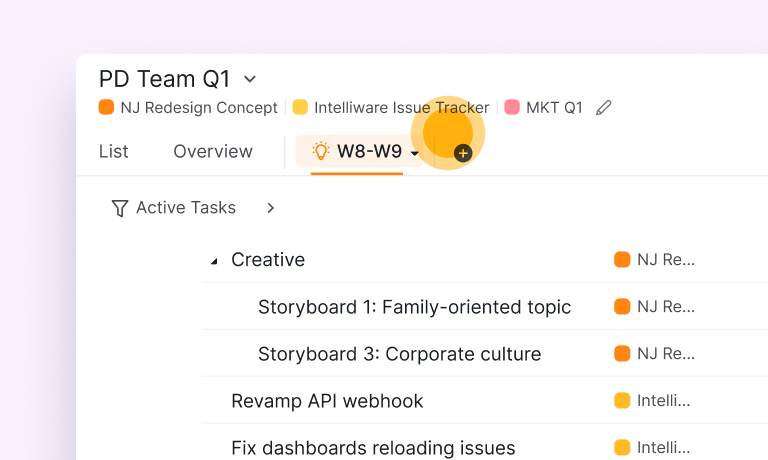
The second half is bigger. Sublists used to live inside a single project. Now you can create them at the Organization, Folder, My Tasks, and Smart Folder level too.
That matters because real work doesn't stay inside one project. A Smart Folder might pull tasks from five projects into one cross-project view, and now that view can carry its own saved Sublists. You get to organize tasks hierarchically across your whole workspace, not just within the walls of one project.
The practical result is that you can run several workflows side by side without them bleeding into each other. Your "this week across all client projects" Sublist sits next to your "blocked, waiting on someone" Sublist, and each stays scoped to exactly what you defined.
Sublists for Organization, Folders, My Tasks, and Smart Folders are available on Professional and higher subscription plans. More information can be found on our pricing page.
What is the quickest way to create a Sublist?
One more route has landed since 2.0 shipped, and it starts from a place you're already standing in half the time anyway: a filtered list.
Set your conditions in the filter bar, then hit the star menu on the right of that bar and pick Create sublist. Give it a name, choose an icon, decide who can open it, create.
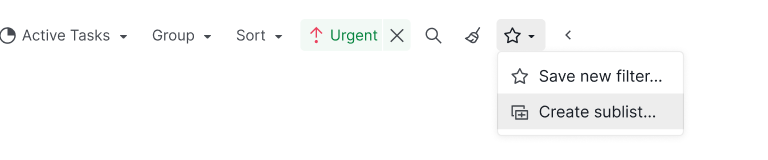
Those conditions then stay attached to the Sublist. Any task created afterward that meets them joins the view without a human deciding to put it there, which is the whole gap between this and the drag-tasks-in approach. (Two weeks into a manual Sublist, nobody is still dragging.)
It also stacks neatly with duplication. Build your "blocked, waiting on someone" view once from a filter, duplicate it into the other three projects, and every copy keeps itself current instead of quietly going stale.
When is a Sublist the wrong tool?
A Sublist scopes attention. It does not restructure ownership, and confusing the two causes grief.
If a set of tasks genuinely belongs to a different project or a different owner, don't bury the rest behind a filter and call it solved. Move or transfer those tasks instead. A Sublist that's really standing in for "these should be their own project" tends to drift out of date, because the structure it's faking isn't real.
Use a Sublist when the slice is a view (today's work, my tasks, this tag). Use a real move when the slice is structural (this belongs elsewhere). Keep that line clear and Sublists stay a relief instead of a hiding place.
Ready to try Sublists 2.0?
Open a project you actually find overwhelming, filter it to "assigned to me, due this week," save that view as a Sublist from the star menu, then duplicate it into another project. If you manage cross-project work, try a Smart Folder Sublist next. For more real-world Sublist use cases, see how other teams have set theirs up. Most people feel the difference the first time a 200-task list shrinks to the handful that's theirs today.
So why wait? Try Sublists and see how much quieter your list gets.
Frequently Asked Questions
What is a Quire Sublist?
A named filter sitting over a bigger task list. You scope it down, name it, and switch back any time while the master list stays shared.
What is new in Sublist 2.0?
You can duplicate a Sublist instead of rebuilding the filter, and create Sublists at the Organization, Folder, My Tasks, and Smart Folder level.
How do you duplicate a Sublist?
Open an existing Sublist, choose duplicate, then adjust the copy's filter or name. It saves rebuilding the same view across projects.
Which plan includes workspace-level Sublists?
Sublists for Organization, Folders, My Tasks, and Smart Folders are on Professional and higher plans.
When is a Sublist the wrong tool?
When the slice is structural rather than a view. If tasks belong to a different project or owner, move or transfer them instead.
