
features · Jan 17, 2020
Quire Sublist: Bridge the Gap between Team To Do Lists and Personal Productivity
Last updated: October 21, 2026
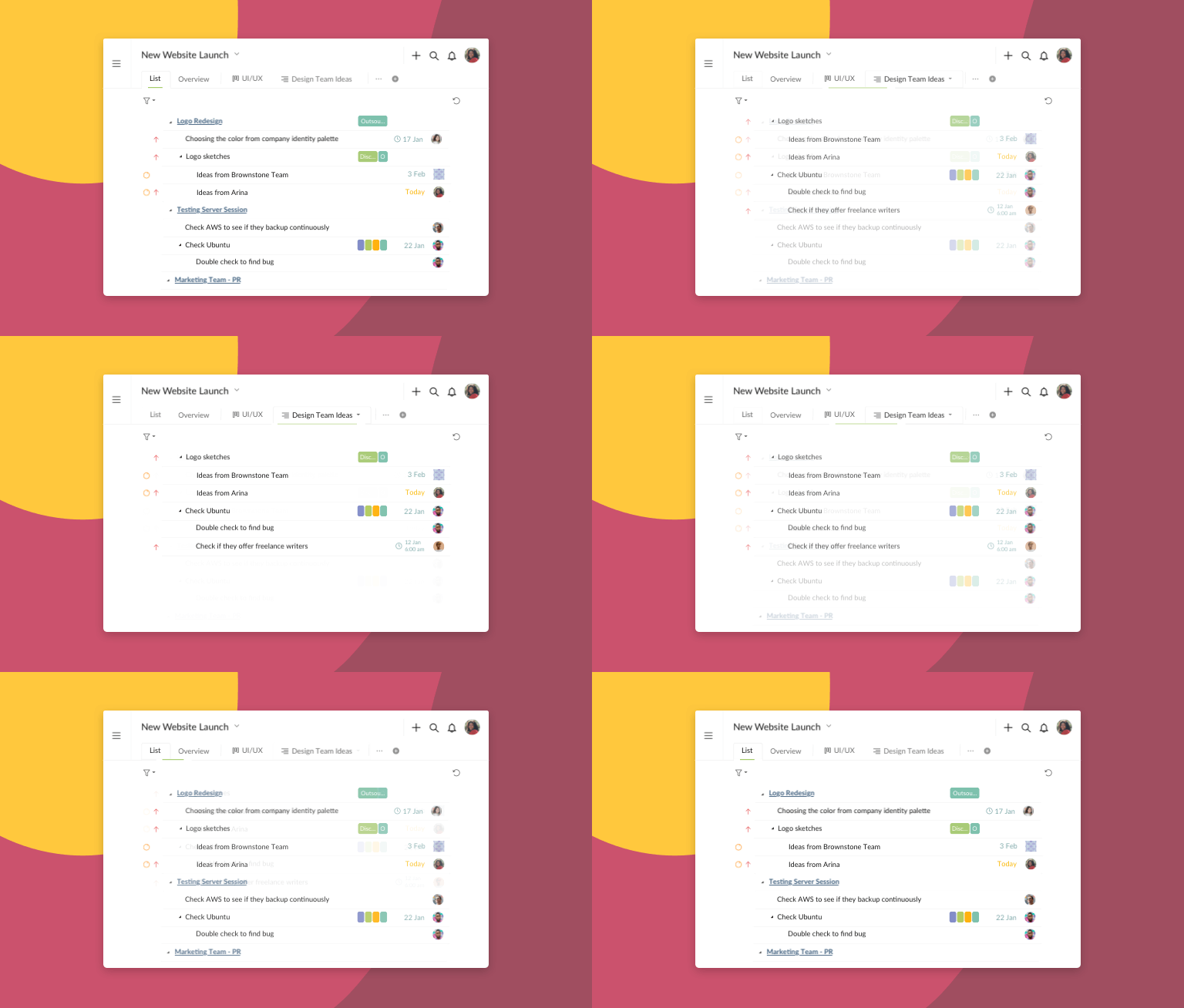
A Quire Sublist is a saved, named, filtered view of your project's master task list. Filter the project down to what you care about, click the star icon in the filter bar, and save it as a Sublist. The filter stays on as the Sublist's conditions, so tasks that match later are added for you. The master list stays the team's source of truth. Two Sublists per project on the Free plan.
- What is a Quire Sublist?
- Why does one shared list stop working as the team grows?
- How does a Sublist actually help?
- How do you build a Sublist from a filter you already applied?
- When should you use a Sublist instead of a separate project?
- How do teams actually use Sublists day to day?
- How do you keep an ambitious plan from burying you?
- Sublist or separate project: which should you use?
- Frequently Asked Questions
You open your team's project on a Monday morning and there it is: 214 tasks staring back at you. The designer's queue, the QA backlog, three things marketing filed under a milestone you've never touched.
Somewhere in that wall is the small handful of work that's actually yours today. Good luck spotting it before the first Slack ping lands.
Nobody here is being sloppy. The list is just shared.
When a whole team plans in one place, the list grows, and a long list is a loud one. Everyone's work sits in the same column, so most of what you see on any given day belongs to somebody else.
Quire Sublist is the fix. It lets each person carve out their own focused view of the project without pulling a single task out of the team's master list.
Real research backs this up, not just a hunch.
In Deep Work, Cal Newport argues that valuable work needs long, unbroken focus, and the usual thief is visible clutter: everyone else's tasks waving for your attention.
Gloria Mark's team at UC Irvine measured the recovery cost. Once something pulls you off task, getting the original thread back runs about 23 minutes.
So a screen full of work that isn't yours isn't free. It quietly bills you 23 minutes a pop.
David Allen's Getting Things Done gets there from the other side: a system you trust only works when you can shrink it to what's in front of you right now.
That's the whole job of a Sublist. It turns a shared 200-task project into your own 20-task view, without walking away from the plan everyone else is on.
Read more on how to avoid burnout at work.
What is a Quire Sublist?
Sublist: in Quire, a saved, named, filtered view of a project's master task list. It shows only the tasks that match its conditions, such as assignee, tag, priority or due date, sits as its own tab beside the master list, and updates on its own because it holds the same tasks, not copies.
You choose the tasks you want to see, by assignee, tag, priority, due date, or any mix of filters, then name the view and keep it.
It lives as its own tab right next to the master list, so switching back to the full picture is one click, not a rebuild.
Three things make it more than a fancy filter.
It's yours. A Sublist is per-user. Your My week view and your teammate's Design QA view can sit on the same project without stepping on each other. Nobody's tidying breaks anybody else's screen.
It's saved and named. A regular filter is a moment. You set it, you use it, it's gone when you leave. A Sublist persists. You come back tomorrow and it's exactly where you left it, still showing the same slice of work.
It stays live. A Sublist isn't a copy. It's a window. When a task in the master list changes owner, due date, or status, your Sublist updates with it, because it's the same task, just viewed through your filter. Nothing to sync, nothing to reconcile.
Every plan includes Sublists. The Free plan gives you two per project, which is enough to find out whether the habit sticks, and the paid tiers raise the cap from there.
Related: Smart Folders in Quire: One View Across Every Project — the cross-project version of the same idea, for when your focus spans more than one project.
Seeing it done helps more than reading about it. The beginners webinar splits a live project into Sublists around the 27-minute mark.
In this session27:28 Sublists, Document View, and Charts for project info
Why does one shared list stop working as the team grows?
A five-person project with forty tasks is fine. Everyone can hold the whole thing in their head. The trouble starts when the team and the backlog both grow, and the same list that felt organized at forty tasks feels like a spreadsheet you inherited at two hundred.
The core issue is that one plan reads differently to every person on it. The same proposal and action plan can leave each teammate quietly unsure which parts are actually theirs to move.
A manager scanning that list sees strategy. A specialist sees noise with three of their tasks buried in it.
No amount of communication fully closes that gap, either. However clearly the plan is written, people interpret a to-do list through their own role. What's urgent to the person who wrote it may be background to the person reading it.
So folks either build elaborate personal tag systems to cope, or they just scroll past the wall every morning and hope they didn't miss anything. (You've done the scroll-and-hope. We all have.)
Giving each person a view they can shape themselves is the quiet fix nobody asks for by name but everybody wants.
How does a Sublist actually help?
Here's where it earns its keep. A Sublist doesn't add features you have to learn. It removes things you don't need to see.
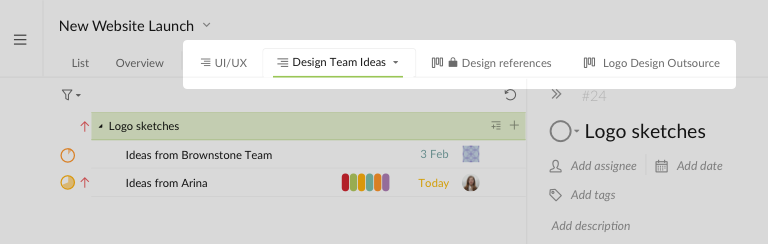
You can run several Sublists side by side on a single project, each with its own view permission. Say you spin up a Sublist named Design Reference and drop in every task and subtask tied to that work.
Instead of building a matrix of tags that drives the whole project a little bit insane, you get one clean view of the right tasks at the right time, with everything else out of frame.
The same task can live in more than one Sublist, too. A single design task might belong in your personal This week view and the shared Design Reference view at once.
It's not duplicated, it's just visible from more than one angle, the way one book can sit on two reading lists.
And you're never trapped in the narrow view. Switch back to the master list any time to see everything the team shares and the big-picture shape of the project. Focus when you want to focus, zoom out when you need the whole map.
Learn more on how to create a Sublist.
How do you build a Sublist from a filter you already applied?
You filter a project down to Urgent, look at the eleven tasks still standing, and think "I want to keep this." Until recently that meant creating the Sublist separately, then dragging those eleven tasks in one at a time.
The filter bar handles it now. Apply the filters you want, click the star icon at the end of the bar, and pick Create sublist.
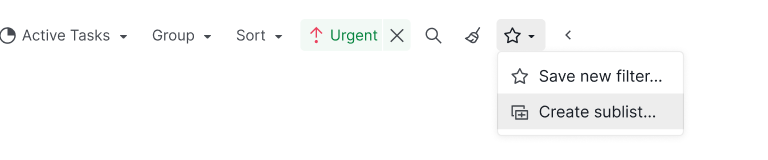
Quire asks for a name, an icon if you want one, and who can open it. Hit Create and the new Sublist opens.
The filter doesn't get thrown away once the list exists. It stays on as the Sublist's pre-set conditions, so a task that matches next Tuesday is added without anyone touching it. Tag something Urgent in the afternoon and it's waiting in that Sublist by the time you look.
One thing to know before you build one. In a Sublist with conditions, the conditions decide what belongs, so membership follows the task rather than a drag.
Change the task and the Sublist follows: change the priority, change the tag, and the view catches up on its own.
That draws a clean line between the two ways of filling a Sublist. Drag tasks in by hand when the slice is a judgment call nobody could write a rule for, like the six things you personally want to finish before Friday.
Build it from a filter when the rule is obvious, and the Sublist keeps itself current while you get on with the work.
Related: See What Matters to You with Filter for every filter and sort you can compose before you save the view.
When should you use a Sublist instead of a separate project?
This is the fork most people hit once they get comfortable with Sublists: if I want a focused view, why not just spin up a new project?
Reach for a Sublist when the tasks already belong to an existing project and you just want a cleaner window into a subset of them. Nothing gets copied, nothing gets duplicated, and the view stays tied to the real work.
Reach for a separate project when the work has genuinely different scope, ownership, or a life of its own. A different client, a different budget, a different timeline.
The tell is what happens when things change. A Sublist updates itself the moment the master list does, because it's the same tasks. A separate project doesn't.
Split the work into its own project and you've signed up to keep two things in sync by hand, which is exactly the chore Sublists exist to spare you.
How do teams actually use Sublists day to day?
The best way to see the point is to watch a team put it to work. A few patterns show up again and again.
The focused personal view. You pick your own tasks across the project, name it My focus, and that's the screen you open every morning. No scrolling past the QA backlog to find your three things.
The shared milestone view. Team managers use this one constantly. Pick the tasks tied to Phase 1 of a product launch, name the Sublist Phase 1, and share it with just the people on that phase. Everyone sees the same slice, everyone knows what's relevant to the milestone, and nobody loses access to the master list underneath.
The external team view. Bring in a client or a contractor and share a single Sublist with them instead of the entire project. They see exactly the tasks that concern them and nothing behind the curtain. Same task data, tighter door.
Related: 20 Hidden Quire Features You Should Know — Sublist is one of several features many long-time users miss.
Sublists also pair nicely with MyTasks II, which gathers everything assigned to you across every project into one place. MyTasks answers "what's on my plate everywhere," Sublist answers "what matters on this project right now."
Together they mean you're planning your day around the right work instead of reacting to whatever's loudest.
Learn more about Quire MyTasks II.
How do you keep an ambitious plan from burying you?
Dream big on the master list. Let it grow. Let every teammate pile in their ideas until the whole shape of the goal is on the board. That part should be ambitious, and a little unruly.
Then, when it's time to actually work, shrink your view down to what's in front of you. That's the whole idea behind Quire from the start: every big dream needs a doable starting point ([our early take on it is here]
(https://quire.io/blog/p/To-Do-List-and-Kanban-What-Project-Management-Did-Wrong.html)). You can plan the whole world, but you make it real one focused task at a time.
Quire was among the first tools to let you keep saved, permission-scoped views inside a single master list, and they're the third piece of a set.
Nested task lists break the big goal into doable steps. The Kanban Board shows you where each step stands. Sublists decide what you look at while you work. Structure, flow, focus.
We hope Sublist ends up in a few of your success stories, whether you're planning a company offsite or building an actual rocket. Helping you focus, get things done, and reach the goal has been the point since day one.
Try building your first Sublist on a project that already feels a little too crowded, and tell us how it went on X @quire_io or at feedback@quire.io. What would your first one be named?
Sublist or separate project: which should you use?
This is the fork most people hit. Here is the quick call.
| Sublist | Separate project | |
|---|---|---|
| Use when | Tasks already live in one project and you want a focused subset | The work has its own scope, owner, budget, or timeline |
| The data | Same tasks, nothing copied or duplicated | A distinct set of tasks of its own |
| Stays in sync? | Yes, updates the moment the master list changes | No, you keep two things aligned by hand |
| Best for | A personal focus view, a milestone slice, a client-facing window | A different client or effort with a life of its own |
Frequently Asked Questions
What is a Sublist in Quire?
A saved, named, filtered view of a project's master task list, showing only the tasks that match its conditions. It sits beside the master list as its own tab and holds the same tasks, not copies, so it updates on its own.
How is a Sublist different from a regular filter?
A filter is temporary and resets when you leave. A Sublist is saved, named, and persists across sessions, and you can share it with specific teammates or your external team.
How do Sublists support team collaboration?
You can keep a Sublist private or share it with select teammates or your external team, like a Phase 1 view shared only with the people working on Phase 1, with its own permissions separate from the master project.
Are Quire Sublists available on all subscription plans?
Yes, every tier has them, but the count per project varies: two on the Free plan, 20 on Professional, 50 on Premium, uncapped on Enterprise.
How do you turn a filter into a Sublist in Quire?
Apply your filters, click the star icon at the end of the filter bar, and pick Create sublist. The filter becomes the Sublist's pre-set conditions, so matching tasks are added for you afterward.
When should you use a Sublist instead of a separate project?
Use a Sublist when the tasks already belong to an existing project and you just want a focused view. Use a separate project when the work has genuinely different scope or ownership, since a Sublist updates automatically and a separate project doesn't.
