
project management · Oct 20, 2026
Switching Project Management Tools Without Losing Your History

Last updated: October 20, 2026
Switching project management tools fails at history, not features. Sort every project before any export: active work moves, finished work freezes read-only, stalled work restarts clean. Then pilot one project, move team by team, and set a read-only date for the old tool. Quire's import keeps your nested structure intact, so the move pile lands working.
- What breaks when switching project management tools?
- Why do teams switch too late?
- Which history should move? The three-bucket rule
- How do you sequence the migration?
- How do you run the switch as a project in Quire?
- What should a task management software trial test first?
- How does the import into Quire work?
- When is switching project management tools the wrong move?
- Key takeaways
- Frequently asked questions
Nobody switches project management tools for fun. By the time a team is seriously shopping, the current tool has already cost them. The workarounds have workarounds, and somebody maintains a spreadsheet that apologizes for the gaps.
And still the switch gets postponed, usually with the same sentence. "We can't lose three years of history."
Fair. That fear deserves a real answer, not a pep talk.
This guide is the plan for switching project management tools without losing what matters. It covers four things:
- which history moves, and which honestly shouldn't
- the sequencing that keeps work running during the change
- what to test while you're still comparing task management software
- how the import into Quire treats the structure you spent years building
What breaks when switching project management tools?
Switching project management tools breaks history, ownership and connective tissue, and almost never features. Any serious tool covers the basics your team uses daily.
What goes missing in a bad migration is harder to see:
- The archive. Three years of decisions and the context behind them.
- The ownership trail. Who's holding what, mid-flight.
- The invisible wiring. Integrations, recurring reports and automations nobody documented, because they always just ran.
Project management tool migration: moving a team's active work, working structure and necessary history from one tool to another, on a schedule that never leaves a project split between two sources of truth. A migration is judged by what still works a month later, not by how fast the export ran.
Notice the word necessary in front of history. That's where switches stall. Teams implicitly commit to moving everything, discover that everything is enormous, and the migration turns into a project too big to schedule.
The way out is deciding, before any export, that most history doesn't need to move at all.
Why do teams switch too late?
Because staying put is the brain's default option. According to decision analysts John Hammond, Ralph Keeney and Howard Raiffa in Harvard Business Review, the status-quo trap biases us toward keeping the current situation even when better alternatives exist.
Their warning fits tool decisions uncomfortably well. The longer an existing structure stays in place, the more entrenched it gets, and the harder it becomes to change.
The lab backs them up. In a series of decision-making experiments, Samuelson and Zeckhauser found that people disproportionately stick with the status quo. Their data on real choices (health plans, retirement programs) showed the same pull outside the lab.
The tool you have wins ties it didn't earn.
So the average team doesn't switch when the evidence says switch. It switches one budget cycle after the pain got personal for whoever signs off. If you're still arguing the case, two earlier posts do the diagnostic work properly.
Start with the symptoms: signs you've outgrown your project management tool tells you whether the tool or the process is failing, before you spend a single migration hour.
Then run the selection quickly: how to evaluate a PM tool without a 6-month trial compresses the shortlist into a two-week sprint instead of a committee season.
Status quo bias has a mirror image worth naming. Some teams switch on a schedule, every eighteen months or so, chasing the fresh-start feeling more than a fix. If this is your third switch in four years, the section on when not to switch is for you.
Which history should move? The three-bucket rule
Every project in the old tool goes into exactly one bucket. The sorting takes an afternoon, not a quarter.
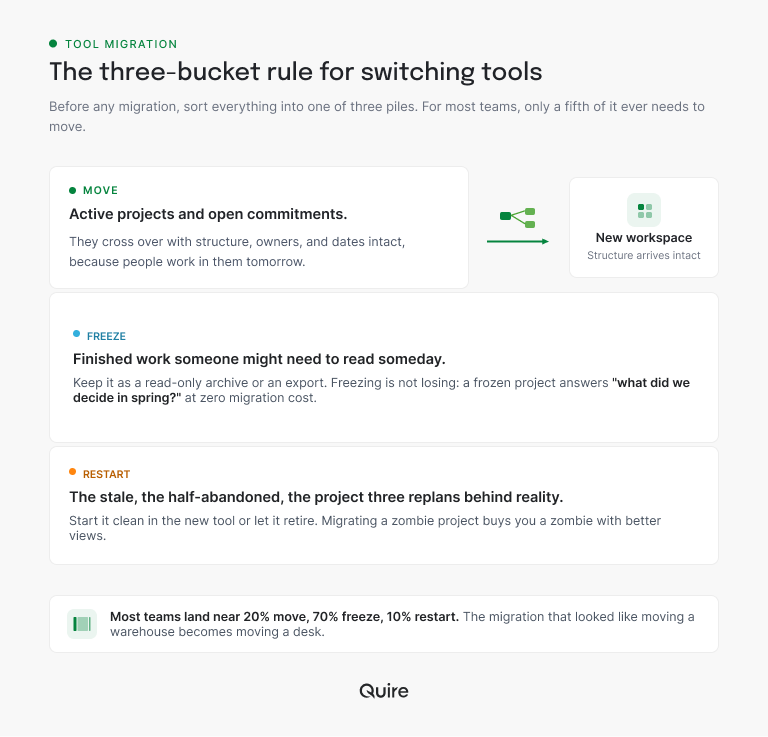
Move. Active projects and anything with open commitments. These cross over with structure, owners and dates intact, because people work in them tomorrow.
Freeze. Finished work someone might need to read someday. Keep it as a read-only archive, either an export or the old tool's free tier if it has one.
Freezing is not losing. A frozen project answers "what did we decide in the spring campaign?" as well as a migrated one does, at zero migration cost.
Restart. The stale, the half-abandoned, the project three replans behind reality. These restart clean in the new tool or retire with dignity. Migrating a zombie project buys you a zombie with better views. (It won't come back to life over there either.)
Run the sort and the move pile tends to be the smallest. Picture a workspace with 50 projects, 10 still live, 35 finished and 5 stalled. That's 20% move, 70% freeze and 10% restart, and the migration that looked like moving a warehouse becomes moving a desk.
How do you sequence the migration?
Pilot first, then team by team, and never all at once. The comparison is stark enough for a table.
| Approach | Calendar cost | What you lose | When it fits |
|---|---|---|---|
| Big-bang (everyone, one weekend) | Short but chaotic | Two weeks of productivity to confusion, plus goodwill | One shared project, low stakes, no deadline landing mid-move |
| Phased (pilot, then team by team) | 2-6 weeks of overlap | Almost nothing, because issues surface small | Several live projects with handoffs between teams |
| Parallel running (both tools, indefinitely) | Endless | The truth, because every project has two versions | Never. It's the migration that never commits |
The pilot deserves its reputation. One real, medium-sized project runs in the new tool for a week or two, worked by people who volunteered.
It surfaces the permission surprises and naming-convention arguments while they're cheap. And it gives every later team a working example instead of a memo.
Isn't one big-bang weekend simpler?
It is simpler, for the person scheduling it. One push, one announcement, done.
Everyone else spends the next two weeks asking where things went, and the migration's reputation never recovers from its first Monday. Phased looks slower on the calendar and is faster in accumulated working hours, every time we've watched it play out.
Then each team moves its own projects, with one named owner per move. The old tool goes read-only behind them on a date announced from the start.
That last clause carries the whole plan. While the old tool still accepts edits, it competes for the truth, and half the team will keep feeding it.
How do you run the switch as a project in Quire?
Make the migration plan itself your pilot. It's real work, it's medium-sized, and every team touches it, which is exactly what a pilot needs.
Here's the plan as one Quire project:
- One task per team. Name it for the team, assign the move's owner, and set the team's move date as the due date.
- One subtask per old project under its team, with a Bucket custom field set to Move, Freeze or Restart.
- Three subtasks under every Move project. Export, import into Quire, check the structure arrived. Each gets its own assignee and due date.
- A last task called "Old tool goes read-only." Due on the date you announced, assigned to whoever holds the old tool's admin keys.
Filter by Bucket and the freeze pile becomes your archive checklist. Sort by due date and you have the sequence from the table above, with names attached.
The nesting is the point. Team, project and step sit three levels deep, which is the shape most migration spreadsheets flatten. Start the project free this week, and by the time the sort is done, your pilot is already underway.
What should a task management software trial test first?
Demos show the tool on its best day. The trial's job is your worst one. Three tests, in order of how often they're skipped:
Import your ugliest project. Not the tidy one. The one with five levels of nesting, forty attachments and a structure only its owner understands.
If it arrives intact, the move bucket is safe. If it arrives flattened, you've learned the single most expensive fact before paying for it.
Recreate your most awkward permission. The client who sees one project. The contractor who sees two. Whatever arrangement makes your current admin sigh, build it in the trial. In Quire, that's the job of External Team, whose members see only the tasks assigned to them.
Produce the report your manager asks for monthly. If assembling it takes an export and a spreadsheet, you've imported your old Friday problem into a new tool.
In Quire, you build that report once as a Dashboard View from widgets, task lists and charts (Professional plans and higher), and stop rebuilding it every month.
Comparing more than one candidate? The comparison hub does the head-to-head work, so your trial time goes to the three tests above.
How does the import into Quire work?
Quire's import brings a whole project across in one motion and keeps its parent-child structure, subtasks and sub-subtasks included. Your hierarchy doesn't get flattened into a long list.
For a team leaving a tool because their work outgrew flat lists, that fidelity is the difference between arriving and starting over.
The mechanics live in their own guide, four steps from new project to imported file. One planning note belongs here instead. Run the import per project as each team moves, not as one giant pull, so every import lands with an owner watching it.
The step-by-step lives here: import your data from other project management software, structure preserved, four steps.
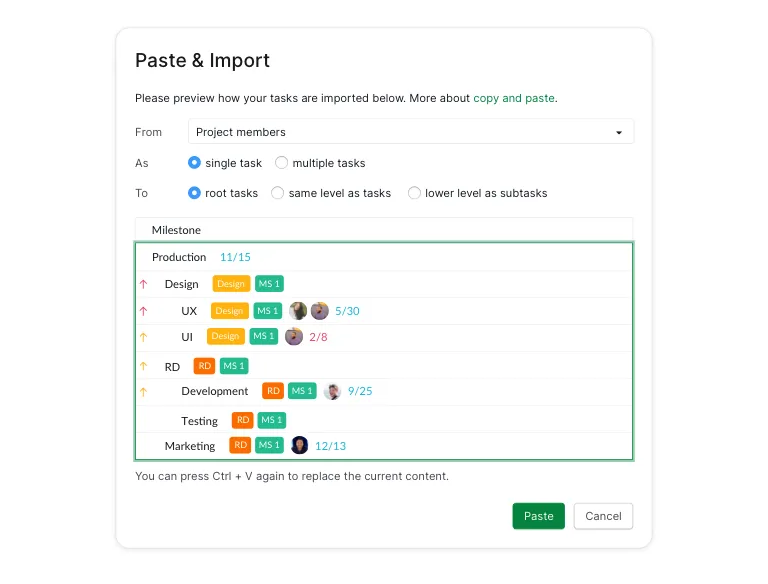
Not everything worth keeping lives in a tool with an export. A checklist in a doc, rows in a spreadsheet or an outline in an email can come across by copy and paste. Quire previews how the pasted lines will land, as root tasks or nested as subtasks, before it creates anything.
After the import, the restart bucket gets the better treatment. Fresh projects start from the Quire templates library, with owners and priorities set on arrival instead of inherited from a project nobody touched since spring.
When is switching project management tools the wrong move?
When the problem would follow you. Before you book a migration, run a quick self-diagnosis:
- Do tasks have owners?
- Do priorities exist anywhere outside the team lead's head?
- Does anyone update statuses without being chased?
If those answers are no, the friction lives in the process. The shiniest task management software on the market will reproduce it with better fonts.
Switch when the tool blocks the shape of the work. Hierarchy that flattens what your projects need nested. Views your workflow wants but can't have. Cross-project visibility that only exists as manual assembly.
None of those improve with discipline, because they were never about discipline.
A word to the serial switchers, too. A team's third tool in four years usually needs a decision-maker, not a migration. Pick against real criteria, commit for two years, and let the tool become boring. Boring is what infrastructure is supposed to be.
Tool walls tend to show up in a predictable order as work spreads across more projects and handoffs. The scale-aware playbook maps which coordination problems arrive at which stage.
Key takeaways
- Most history shouldn't move. Active work moves, readable history freezes, and stalled projects restart or retire.
- Sequence it pilot-first and team by team, with an announced read-only date for the old tool.
- Spend the trial on your worst cases. Your ugliest project, your most awkward permission and your monthly report beat the demo's greatest hits.
- Fix the process first if that's the real problem. Owners, priorities and statuses travel with you either way.
If the diagnosis genuinely points at the tool, run the test that settles it. Sign up for Quire, import the messiest project you own, and check whether your hierarchy arrived standing. That's the whole audition.
Frequently asked questions
How do you switch project management tools without losing data?
Sort history into three buckets before any export. Active work moves, reference history freezes read-only, and stale projects restart. In Quire the import preserves nested structure, so the move bucket lands working.
How long does switching project management tools take?
Two to six weeks of overlap for most teams, with a one-to-two-week pilot and then team-by-team moves. The import itself takes minutes per project. The calendar time is adoption.
Should we migrate old completed projects?
Usually no. Freeze them read-only in an export or archive. Migrating closed work pays real effort for history nobody opens.
How do we get the team to actually adopt the new tool?
Pilot first, move team by team with a named owner per move, and retire the old tool on a pre-announced date. While the old tool accepts edits, it competes for the truth.
When is switching project management tools a mistake?
When the problem is process (no owners, no priorities, dead statuses), which any new task management software reproduces. Switch when the tool blocks the work's shape, like flattened hierarchy, missing views or manual cross-project visibility.
How do teams stay productive at work during a tool migration?
One source of truth per project, always. Each project moves wholly and the old copy goes read-only immediately. A Quire import arrives with its structure intact, so work resumes the same afternoon.
