
project management · Nov 10, 2026
What Is a Backlog? One Ordered List, and How to Keep It Honest

Last updated: November 10, 2026
A backlog is one ordered list of everything a team might do, ranked so the top item is the next one pulled. The product backlog is the long list, and the sprint backlog is the slice taken from its top. Backlogs rot through zombie items, duplicates and an unowned order, and weekly refinement keeps them honest. The second half runs the whole method in Quire's free Product Backlog template.
- What is a backlog?
- Product backlog vs sprint backlog: which one are you looking at?
- Why do backlogs rot?
- What does backlog refinement actually do?
- What comes with the Quire Product Backlog template?
- What is a backlog worth in a spreadsheet, a wiki page or task management software?
- How does a request travel through the backlog in Quire?
- What do you change in the first hour after duplicating it?
- Key takeaways
- Frequently asked questions
A backlog is one ordered list of everything the team might do, ranked so the item at the top is the next thing anyone pulls. That's the whole definition. Most teams could recite it.
It stays true for about six weeks. Then a support lead pastes forty feature requests into the bottom, an engineer starts a private "real backlog" in a doc, and the item at the top has been at the top since spring because nobody dares delete it.
The list still exists. It just stopped being an answer to "what's next?"
So the question "what is a backlog" has two parts. What it is, which takes a paragraph, and how to keep it honest, which takes a ritual, a few fields and one place where the order can't fork.
This post covers both, then builds the honest version in Quire, the same task management software the sprint already runs in.
What is a backlog?
A backlog is a single, ordered list of candidate work, and the order is the product. Anyone can write down everything a product might need. The backlog's job is to say which of those things comes first, and to keep saying it as the world changes.
Backlog: one ordered list of everything a team might work on, ranked so that the item at the top is the next one to be pulled into active work. Most items on it are options, not commitments.
Three words in that definition do the work. One, because two lists means two versions of "next." Ordered, because a list where everything is High priority has no order at all. Might, because most of a backlog is work the team hasn't promised, which is exactly what makes it cheap to keep.
That cheapness matters, because most ideas don't survive contact with real users.
According to Ron Kohavi, who ran Microsoft's Analysis & Experimentation team, and Harvard Business School professor Stefan Thomke, only about 10% to 20% of experiments at Google and Bing generate positive results. They laid out the numbers in Harvard Business Review.
And those were ideas good enough to test. A backlog that treats every entry as a promise is mostly promising misses, so the honest version keeps them as options until one earns the top.
The 2020 Scrum Guide puts it formally: the Product Backlog is "the single source of work undertaken by the Scrum Team." It adds that items usually earn their place at the top only after refining activities, which is the ritual we'll get to. You can read the full text at scrumguides.org.
Notice what the definition leaves out. There's no deadline in it. A backlog item doesn't have a due date until it's pulled, and that absence is the point: dates belong to the sprint, options belong to the backlog.
If the roles around the backlog are new to you (who orders it, who sizes it, who protects it), start with what a Scrum Master does and how Scrum works, then come back for the list itself.
Product backlog vs sprint backlog: which one are you looking at?
The product backlog is the long list of everything the product might need; the sprint backlog is the short list the team pulled from its top for the current sprint. They're different objects with different owners, and most confusion about backlogs comes from using one word for both.
The product backlog belongs to the product owner. It's long, it's ranked, and most of it will never be built. Its commitment is the product goal, the direction the top of the list is pointing.
The sprint backlog belongs to the developers. It's short, it has a start and an end, and it contains the items they selected at sprint planning plus their plan for getting each one done. Its commitment is the sprint goal. Once the sprint starts, nobody outside the team adds to it.
Then there's the third sense, the one your finance colleague means. In plain English a backlog is work you're behind on: a backlog of invoices, a backlog of support tickets. That's the opposite of the agile meaning. A support backlog is overdue; a product backlog is mostly un-promised.
If someone says "the backlog is huge" with alarm, ask which one they mean before you panic.
Here's the useful test. If deleting an item would break a promise to someone, it's on the sprint backlog. If deleting it would only lose an option, it's on the product backlog. (If deleting it would make three people relieved, it belongs in the Icebox, and we'll get there.)
Put the three meanings side by side and the confusion mostly sorts itself out.
| What you're asking | Product backlog | Sprint backlog | Backlog of overdue work |
|---|---|---|---|
| Who owns it | The product owner | The developers | Whoever is behind on it |
| How long it is | Long, and most of it never gets built | Short, sized to one sprint | As long as the delay |
| Time horizon | Open-ended, with no due dates until an item is pulled | One sprint, with a start and an end | Already past due |
| What it commits to | The product goal | The sprint goal | Nothing, because it's a debt rather than a plan |
| Who adds to it | Anyone can suggest, and the product owner orders | Only the team, once the sprint starts | Whatever arrives faster than it's cleared |
| Where it lives in Quire | The project, ordered by section | The Current Sprint sublist | Tasks past their due date, wherever they sit |
One list, two views: the product backlog is the project, and the sprint backlog is a sublist you add items to. Both hold the same tasks, so moving an item into the sprint doesn't copy it anywhere and the order never forks.
Sprint planning is where the sprint backlog gets built from the top of this list. Sprint planning meetings that fit the sprint you actually run has the two-hour agenda and the capacity math for that hand-off.
Why do backlogs rot?
Backlogs rot for three reasons: items nobody will build never leave, the same request arrives under five names, and nobody owns the order. Each one is small on its own. Together they turn a ranked list into a landfill with a scroll bar.
Zombie items first. Tomasz, the product manager in this story, has an item called "Explore recurring task templates" that entered the list fourteen months ago. Nobody will build it this year. Nobody will delete it either, because deleting feels like a decision and leaving it feels free.
It isn't free. Every planning meeting scrolls past it, and every new hire reads it as a plan.
Duplicates second. "Dark mode" arrives from sales as "dark theme for demos," from support as "reduce eye strain at night," and from a user as "why is everything white." Three items, one need, and the count that would have made it the obvious next feature is split three ways.
The signal is there. It's just been divided by three.
Third, and worst, the unowned order. When anyone can drag an item to the top, the top reflects whoever dragged last. Engineers stop trusting it and start choosing by gut. The product owner stops maintaining it because nobody reads it. Now you have a list that's technically ordered and practically random.
Is there a version of "everything is high priority" that isn't rot? Not really. If more than a third of the list is High or Urgent, the priority field has stopped carrying information, and the team is back to choosing by whoever shouts in standup.
The standup is where a rotten backlog shows up first, as three people each "working on the top item" and meaning three different items. A daily standup template that survives a real team assumes the list underneath it is honest; this post is how you get there.
What does backlog refinement actually do?
Refinement is the ongoing work of taking items near the top of the backlog and adding what they need to be buildable, and it's the only ritual that keeps the list honest. Older teams call it grooming. Same activity, newer name, and the name changed partly because "grooming" made it sound cosmetic when it's structural.
What does an item need before it's ready? The list is shorter than people fear.
- A user story that says who wants it and why.
- Acceptance criteria someone could actually test.
- An estimate small enough to finish inside one sprint, or a split until it is.
- A decision on anything it depends on.
- For anything user-facing, a designer's nod.
That set is usually written down as a Definition of Ready, and it does two jobs at once. It stops half-baked items being pulled into sprints, and it gives refinement a finish line, so the meeting knows when to stop.
Refinement also fixes two of the three rot causes on its own. Sizing an item forces you to notice it's really three items, or that it duplicates one above it.
Writing the user story forces you to ask who wanted it. "Nobody, anymore" is a valid answer, and it sends the item to the Icebox or closes it outright.
What refinement can't do is own the order. That's the product owner's job, and it's a job, not a field. The ritual just makes sure that when they re-rank, they're ranking items that are real.
Timebox it. An hour a week with the whole team, working from the top down, stopping when the ready section holds about two sprints of work. Refining item forty-three is not diligence. It's decorating a room you may never walk into.
Refinement decides what enters the sprint; the retrospective decides what the sprint taught you. Sprint retrospectives that actually change the next sprint is the other half of the loop.
What comes with the Quire Product Backlog template?
The Quire Product Backlog template is one project whose five sections form a readiness ladder, with the fields to rank by and the sublists to pull from already built.
You'll find the Product Backlog template in the Project Management section of the templates library, with sample items that show the shape before your own requests land in it.
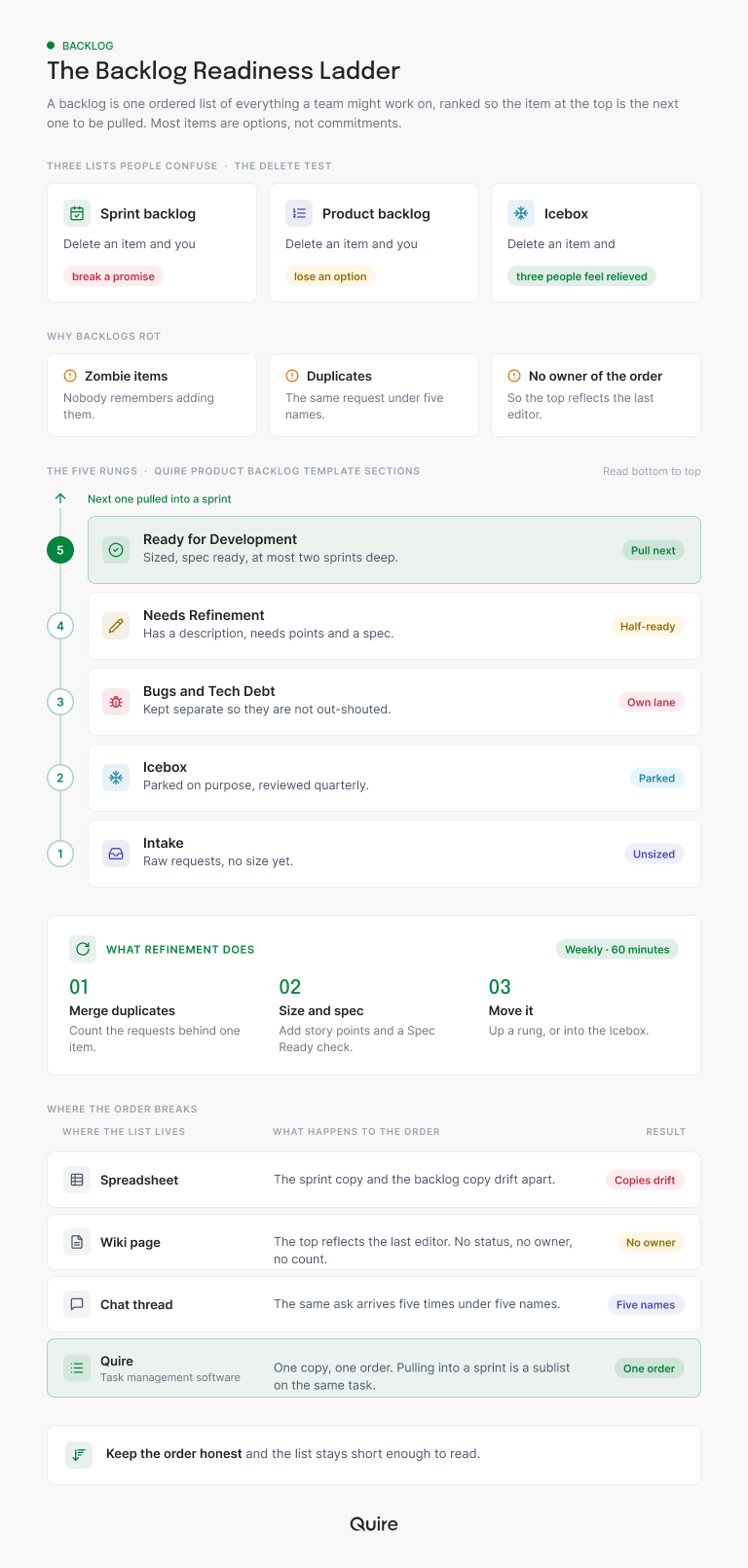
The five sections, top to bottom, are Ready for Development, Needs Refinement, Bugs & Tech Debt, Intake for new requests, and an Icebox for someday-maybe ideas. An item enters at Intake and climbs as it gets clearer. Only the top section carries dates and estimates; everything below it stays deliberately cheap to maintain.
The statuses run To-do, Ready for Dev, In progress, In review, Completed, plus two that do the honesty work: Blocked, for items waiting on something outside the team, and Won't do, for requests you've decided against and want on record so they stop resurfacing.
Six custom fields carry the ranking evidence. Story Points is a whole number. Customer Requests is a count of how many customers actually asked, and sorting on it ends a surprising number of arguments.
Feature Area names the part of the product (Onboarding, Billing, Integrations and so on). Impact Area names the expected outcome: Activation, Retention, Revenue, Performance, Support Load or Security. Sprint is a select with Backlog, Icebox and three numbered sprints.
The sixth field is a checkbox called Spec Ready. It's the Definition of Ready made clickable: nothing moves into Ready for Development unchecked.
Two sublists sit on top of all this. Current Sprint holds what the team committed to this sprint, and Next Sprint holds the tentative plan reviewed at planning. Both hold the project's own tasks rather than copies, so adding an item to a sprint never duplicates it.
And the template ships with a "How to use this template" document that spells out the Definition of Ready, a Definition of Done, and four rituals: a weekly 30-minute triage, a weekly hour of refinement, sprint planning, and a quarterly Icebox review.
Start a free project, duplicate the template, add your first ten requests to Intake, and you'll have a ranked, sortable backlog before your next planning meeting.
What is a backlog worth in a spreadsheet, a wiki page or task management software?
Any of the three can hold a list, but task management software is the one that keeps the order attached to the work as it moves. A backlog has to survive one specific moment, the moment an item gets pulled into a sprint.
That's where a spreadsheet or a wiki page forks the list into two copies, as the bottom panel of the ladder above shows. The bigger difference is what refinement costs in each home, and refinement is the ritual that keeps a backlog honest.
Spreadsheet. Refinement means re-sorting rows after every edit, with estimates in a column nobody trusts. Copy a row onto the sprint board and the two copies start to drift.
Wiki page. Refinement means rewriting prose. Acceptance criteria end up buried in paragraphs, and the top of the page reflects whoever edited it last.
Chat thread. Nobody refines a thread, so items get sized in the planning meeting instead. That's how a one-hour meeting turns into three.
Task management software like Quire. Refinement is a description, three subtasks and a checkbox on the item that will actually be built. Pulling it into a sprint adds the same task to a sublist, so there's one copy and one order.
That's the case for keeping a backlog in Quire. The order, the evidence and the item stay one object from intake to done, and the cheapest place to refine work is on the work itself.
Titles alone make a thin backlog, and the thinness shows up at sprint planning rather than at intake. The 2014 post Make your Product Backlog Speak the Whole Story makes the case for a tree-structured backlog in Quire, and it's aged well.
How does a request travel through the backlog in Quire?
One request, four weeks, one task the whole way. Here's Tomasz running a real item through the template, so you can see where each field earns its keep.
A support engineer forwards a ticket: four customer accounts want to change due dates on several cards at once from the Board.
Tomasz adds a task under Intake named "Request: bulk edit due dates from the Board," sets Feature Area to Dashboard & Views and Impact Area to Support Load, and types 4 into Customer Requests.
Sprint stays at Backlog. Story Points stays empty; nobody has sized it, so nobody pretends to.
Friday is triage, a recurring 30-minute Quire task Tomasz shares with the tech lead. They open Table view sorted by Priority, then Customer Requests.
Three Intake items turn out to be duplicates of "Request: dark mode for the web app," which already carries 63 requests. Those get closed as Won't do with a comment pointing at the original, and the original's count goes up.
The bulk-edit request has a clear owner and a real need, so Tomasz drags it up into Needs Refinement, assigns the tech lead, and sets a due date for the refinement itself, not for the build.
The next Wednesday is refinement, the hour with the whole team. The tech lead writes the user story in the task description: as a project lead, I want to change the due date on several selected cards at once, so that a slipped milestone takes one edit instead of twenty.
Three acceptance criteria go in as subtasks, each testable. The team sizes it at 5 story points. A designer confirms the selection pattern already exists. Spec Ready gets its tick.
Tomasz moves the task into Ready for Development and sets the status to Ready for Dev.
Over the following week, seven more customers ask for the same thing through support. Tomasz bumps Customer Requests to 11 and links their tickets in a comment on the same task, instead of opening seven new ones.
At sprint planning the team pulls from the top of Ready for Development. The bulk-edit request is third from the top by Priority, and its 11 requests put it ahead of a 9-request item with the same points. Tomasz sets Sprint to Sprint 25 and adds it to the Next Sprint sublist.
When Sprint 25 starts, it moves into Current Sprint, the developer sets it to In progress, and the daily standup runs from Board view grouped by Status.
Count the copies of that request across four weeks. One. Count the places its order lived. One. That's what "honest" means in practice. People still disagreed, but there was only ever one list to disagree about.
Before each refinement session, add up the Story Points sitting in Ready for Development and divide by what the team usually finishes in a sprint. If the answer passes two, skip refinement that week and let planning catch up.
What do you change in the first hour after duplicating it?
Copy it as is, then change four things in the first hour. The template is a shape, not a plan, and the shape is right for most product teams. The labels aren't, and they shouldn't be.
To copy it, open the Product Backlog template and use Duplicate from the project menu (the little dropdown beside the project's name). You get a brand-new project of your own, sections, fields, statuses and sublists included. The template stays where it was for the next team.
Then, in order:
- Delete the sample items, keep the five sections. The ladder is the part that works everywhere, and the examples are only there to show you the shape.
- Rename the Sprint options. Sprint 24, 25 and 26 become your numbering, or month names if your team plans monthly rather than in sprints.
- Replace the Feature Area options with the real surfaces of your product. Eight is plenty; more than that and nobody picks the right one.
- Replace the assignees with your own team, and set the Friday triage to recur.
One thing to leave alone: the Won't do status. Teams are tempted to delete it because it feels negative. It's the opposite. It's how a decision becomes visible so the same request stops arriving as new.
If your team runs full Scrum rather than a backlog with sprints attached, the Agile template is the next step.
It adds an Epic field to group the ordered backlog, keeps story points as a real field, and puts the five ceremonies on a recurring schedule, so the backlog you just built has a home for its planning, standup, review and retrospective.
The Product Backlog is one of the templates in the project management templates roundup, which covers what each one is for and what to change first. If your sprint runs on a board, Kanban boards past three columns shows how the Board view of this same project earns its columns.

Key takeaways
A backlog is one ordered list of everything the team might do, and the order is the whole point.
The product backlog is the long list, owned by the product owner; the sprint backlog is the slice pulled from its top, owned by the developers. The pile of overdue work is a different thing wearing the same name.
Backlogs rot in three ways: items nobody will build never leave, duplicates split the evidence, and nobody owns the order. Refinement is the weekly ritual that fixes the first two, and a named product owner with a Definition of Ready fixes the third.
In Quire the template makes the ladder visible: Intake at the bottom, Ready for Development at the top, Story Points and Customer Requests to rank by, Spec Ready as the gate, and sprint sublists on the same tasks. One request, one task, one order, from the support ticket to the sprint board.
Want a backlog your team actually trusts? Start free at quire.io/signup, duplicate the Product Backlog template, and put your first ten requests into Intake before Friday's triage.
Frequently asked questions
What is a backlog in simple terms?
One ordered list of everything a team might do, ranked so the item at the top is the next thing anyone pulls. It isn't a to-do list, because most of it is unpromised, and it isn't a pile of overdue work.
In Quire a backlog is a project whose sections form a readiness ladder, intake at the bottom, sprint-ready at the top.
What is the difference between a product backlog and a sprint backlog?
The product backlog is the long ranked list of everything the product could use, owned by the product owner. The sprint backlog is the short list pulled from its top for the current sprint, plus the plan for getting it done.
In Quire the project is the product backlog and the Current Sprint sublist is the sprint backlog, so pulling an item never copies it.
What is backlog refinement, and is it the same as backlog grooming?
Same activity, newer name. Refinement is the ongoing work of taking items near the top of the backlog and adding what they need to be buildable: a user story, testable acceptance criteria, an estimate, a decision on dependencies.
In the Quire Product Backlog template the finish line is the Spec Ready checkbox, and an item moves into Ready for Development only once it's checked.
How do you stop a backlog from becoming a wish list?
Keep one list, cap the top section, and give every item a way out.
In Quire that means one project with the order visible in Table view, about two sprints of work in Ready for Development, a weekly triage that empties Intake, and a Won't do status for the requests you've decided against, so they stop coming back.
How do you prioritize a backlog when everything is high priority?
Sort on evidence instead of adjectives. The Quire Product Backlog template carries a Customer Requests number and an Impact Area on every item, so Table view sorted by Priority and then Customer Requests shows where the noise is.
If more than a third of the list is High or Urgent, priority has stopped meaning anything, and re-ranking on those two columns is the fix.
How does an honest backlog help a team be more productive at work?
It ends the daily argument about what to do next. When the top of the list is genuinely the next thing to pull, developers start work instead of waiting for a decision.
Task management software like Quire keeps that order on the same tasks the team plans, tracks and reviews, which lets a team be productive at work rather than merely busy.
