
workstyle · Aug 27, 2026
20+ Project Management Templates Your Team Will Actually Use
Last updated: October 21, 2026
Quire's gallery holds 20+ free project management templates, and every one of them is listed below with what it contains and when to reach for it. Choose by the shape of the work: finite project, repeating cycle, or staged pipeline. Copy one by opening it and choosing Duplicate from the project menu, which takes under a minute and brings the whole hierarchy with it. Then judge it by what you delete in week one, because a template is a starting point rather than a rulebook.
- What are project management templates, and what makes one worth using?
- How do you choose a project management template?
- Which templates should you start with in your first fortnight?
- Which project management templates fit work with a deadline?
- Which templates run a productivity method for you?
- Which templates cover business and operations?
- Which templates suit marketing and creative deadlines?
- What happens after you copy a template into Quire?
- Key takeaways
- Frequently Asked Questions
There is a specific kind of tired that comes from building the same project structure for the fourth time.
You know the shape already. Kickoff, requirements, design, build, review, launch. You know roughly who owns what and roughly which parts always slip. And yet there you are on a Monday, staring at an empty project, typing "Kickoff" into the first row like it's a novel idea.
That's the gap project management templates close. Not the strategy, not the thinking. The forty minutes of retyping structure you already know, before any of the real work starts.
So here is the whole library, one template at a time: every template in Quire's gallery as of August 2026, what each one actually contains, and the kind of work it suits. Skip to the group that matches your week.
What are project management templates, and what makes one worth using?
Project management template: a pre-built project structure that already contains the tasks, phases and fields a specific kind of work needs, so you copy it instead of starting from an empty screen. A good one gives you the skeleton and leaves the meat to you.
Quire's gallery holds 20+ free project management templates in five groups: Start Here, Project Management, Productivity Methods, Business & Operations, and Marketing & Creative. Each arrives with its tasks and fields in place, so you copy it instead of building from scratch. A template earns its keep because a written-down structure catches the steps a busy person reliably forgets.
The most-cited evidence for that sits well outside project management. Haynes and colleagues introduced a 19-item surgical safety checklist across eight hospitals and, writing in the New England Journal of Medicine in 2009, found that inpatient complications fell from 11.0% to 7.0% and the death rate from 1.5% to 0.8%.
Same surgeons, same skill. Better recall of the boring steps.
A project template is that trick at much lower stakes. It won't make anyone smarter. It stops the team rediscovering, in week three, that nobody set up the review step.
What separates a template worth copying from clutter is whether it's smaller than you expect. A good one gives you the skeleton and leaves the meat to you. A bad one arrives with 60 pre-written tasks, half of which don't apply, and you spend longer deleting than you would have spent building.
For the feature tour rather than the catalog, see how Quire Templates make a project kickstart easy.
If you would rather watch three of these templates being opened and worked through than read about them, the session below does exactly that, with chapter links so you can jump to the one you came for.
In this session16:16 Marketing Campaign template walkthrough25:15 Event Planning template walkthrough32:28 Agile and Scrum template walkthrough43:51 Hidden gems: Smart Folders, Documents, Charts, Recurring Tasks, Peekaboo, Time Tracking
How do you choose a project management template?
Before the list, the shortcut. Choose by the shape of the work, not the size of your team, and three shapes cover nearly everything.
If the work has a clear start and finish, you want a project template. If it repeats on a cycle, you want a planner. And if each item waits for a decision before it advances, you want a pipeline.
| Shape of the work | How you recognize it | Where to start | The view that suits it |
|---|---|---|---|
| Finite project | One start, one end, a date somebody cares about | Project Starter, Work Breakdown Structure | Timeline, for whether the dates still hold |
| Repeating cycle | The same shape every week or month, no end date | Weekly Planner, Team Task Management | Calendar, because availability is the constraint |
| Staged pipeline | Each item waits on a decision before it advances | Design Pipeline, Customer Relationship Pipeline | Board, for what is moving and what is stuck |
| Method, not a project | You want to run a system rather than ship something | GTD, Eisenhower Matrix, OKRs | List, for the full tree in one place |
When two feel equally right, take the smaller one: adding structure later costs a few minutes, while deleting structure from something people already work inside costs a conversation.
One thing worth saying plainly before you start copying. A template is not a methodology. Taking the Agile Project template does not make a team agile, and taking OKRs does not fix goals nobody believes in. The template gives you scaffolding; the habits are still yours to build.
Which templates should you start with in your first fortnight?
New to Quire? Ignore the rest of the library for now. These four cover most of what a team needs early on.
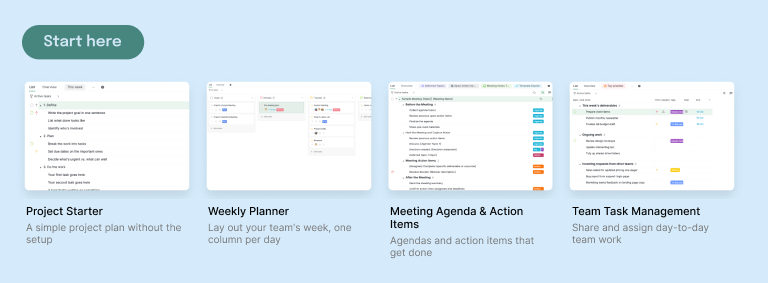
1. Project Starter. A plain project plan with none of the setup: a few phases, a handful of tasks, room for yours. It's the thinnest template in the gallery and that's the point, because it's the easiest to bend into whatever you actually do. Take this one if you genuinely can't decide, and take it especially if your last tool made you fill in fourteen fields before you could write a task.
2. Weekly Planner. Your week in a single view, with the days as structure and your commitments underneath. Good for work that arrives in a rhythm rather than as projects: a support rota, a content week, a research cadence. Also the quiet fix for people who keep a to-do list that has no relationship to what day it is.
3. Meeting Agenda & Action Items. An agenda that produces owned follow-ups instead of evaporating the moment the call ends. Each agenda item can hold the decision made and the tasks it created, as nested subtasks with real assignees. If your team's recurring complaint is "we agreed something about this in a meeting, didn't we?", start here rather than with a project template.
4. Team Task Management. Shared day-to-day work, assigned and visible, without pretending it's a project with a deadline. This is the one for teams whose actual need is "who is doing what this week", which is a genuinely different question from "when does this ship". Pairs well with Weekly Planner if you want both the week and the workload.
To turn one of your own finished projects into a reusable starting point, see how to make project and task templates in Quire.
Which project management templates fit work with a deadline?
For work that has a beginning, an end, and usually a date somebody cares about.
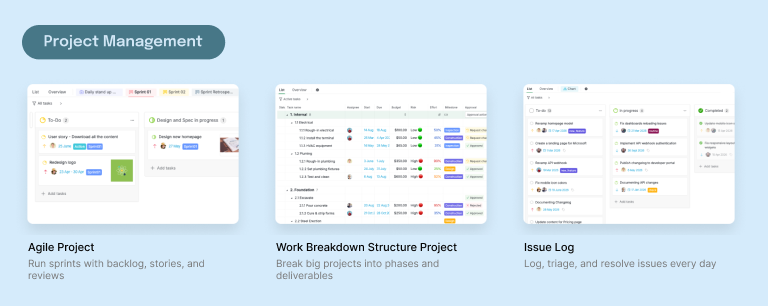
5. Agile Project. Sprints with a backlog, stories, and review steps already laid out, so a team can run its first sprint without arguing about the board first.
What you get is the sprint workflow and its hierarchy, ready to run from the first planning session. There's a step-by-step build of the Agile board if you want the sprint setup in detail.
6. Work Breakdown Structure. A big project split into numbered levels: areas, then the components inside each, then the work packages underneath, sized for one person to own. This is the template that shows off nested tasks most directly, because a WBS is a tree by definition and Quire lets it stay one instead of flattening into a list. The sample is a building fit-out, numbered 1.1.1 through 3.2.5.
7. Issue Log. One flat list of everything the team currently owes, sorted by priority rather than filed into phases. No sections, no nesting, three statuses: a list you have to expand is a list nobody reads. Every item gets a priority, a person rather than a team, and a tag for the kind of work, so a board grouped by assignee shows who is carrying what.
8. Construction Schedule. Build phases from permits through inspections to handover, with the dependencies that make construction unforgiving. Worth opening even if you will never pour concrete: it's the most detailed template in the library, and it's a good demonstration of how deep the nesting can go before a project stops being readable.
9. Resource Management. A request queue for shared capacity: work arrives from somewhere in the business, someone owns it, and you can see who is carrying what and which department asked. Requestor is the person who asked, not the person doing it, and moving a request from Requested to Approved is the moment someone commits capacity. A %Progress field with color bands and a separate Current Status keep the review honest.
10. Product Roadmap. Features tracked from idea through to shipped, grouped across releases rather than dumped in one backlog. Good for teams who need to answer "what's coming and roughly when" without maintaining a separate roadmap deck that drifts from the tasks by week two.
11. Daily Standup Meeting. A 15-minute standup that works live or async, with a slot per person and a place for blockers to be recorded rather than mentioned and forgotten. The async part matters more than it sounds for teams across time zones, where the meeting is the thing that quietly stopped working. The standup guide covers running it async properly.
12. Sprint Retrospective. A retro with a voted agenda, six statuses, and action items that carry an owner and a date instead of dying in the notes. The sublists are the part that matters, because they track whether last sprint's actions actually happened before this sprint's retro starts. How the voting and the carry-over sublists work is written up in full.
13. Risk Register. Risks scored on a 5x5 matrix, one owner each, with mitigation tracked as subtasks rather than a column of good intentions. The fixed review cadence is what keeps a register from becoming a document written once during planning and never opened again. The risk register guide shows how the 5x5 scoring is wired up.
14. RAID Log. Risks, assumptions, issues, and dependencies in one log, ranked by impact, with the four kept deliberately apart. Most teams conflate a risk with an issue, which is exactly the distinction the log exists to enforce: a risk might happen, an issue already has. The RAID log guide goes through keeping the four categories honest.
15. Project Charter. Six sections that get a project approved before anyone starts work, with dependencies in Timeline view and cost and effort as fields. Built-in approvals handle the sign-off, so the charter is a gate rather than a document that circulates and quietly expires. Setting up the sign-off gate is covered in the charter guide.
16. Communication Plan. Six phases and a Table view matrix of audience, channel, and frequency, so who hears what gets decided once instead of re-argued every update. Approvals sit before you send. Worth reaching for the moment a project has more stakeholders than the person running it can hold in their head. The communication plan guide builds the audience matrix column by column.
17. Product Backlog. Five buckets, from intake through refinement to ready for development, with bugs and tech debt separated out and an icebox for the ideas nobody wants to delete but nobody is doing either. The icebox is the honest part, because most backlogs are one long list only because there was nowhere socially acceptable to put a maybe.
Three of these have full write-ups: what a work breakdown structure is and how to build one, a standup template that survives contact with a real team, and how to worry about your project on purpose with a risk register.
The Product Roadmap one is walked through in full, horizon by horizon, in product roadmap planning in five stages, including the seven-point ship checklist it carries.
So is the Sprint Retrospective one: sprint retrospectives that actually change the next sprint shows what its carry-over sublist is really for.

Which templates run a productivity method for you?
Personal systems, pre-built, so you run the method instead of spending a weekend assembling it. Weekly Planner is filed here too.
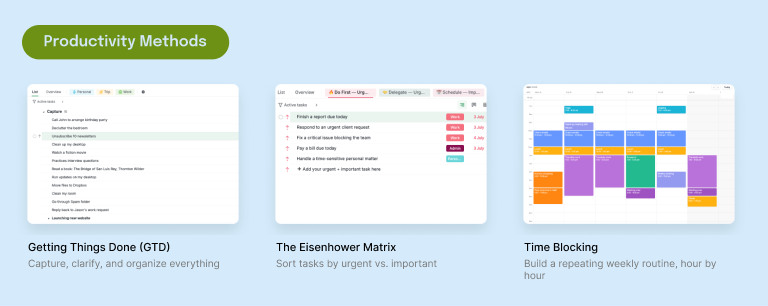
18. Getting Things Done (GTD). The full capture, clarify, organize, reflect loop, with an inbox that's meant to be emptied and next-action lists that are meant to be short. GTD lives or dies on the weekly review, so the template includes it as a recurring commitment rather than leaving it as a nice idea you read about once. The GTD guide sets up the inbox and the review cadence.
19. The Eisenhower Matrix. Four quadrants sorting work by urgent against important, which is less about the grid and more about admitting how much of quadrant one is self-inflicted. Useful as a one-off triage when a backlog has gone feral, and useful as a habit if you can be honest about the "important, not urgent" column actually getting time.
20. Time Blocking. Every hour of the day given a job, so the calendar reflects intention rather than whoever booked you first. Best paired with Calendar view, where the blocks are visible against real commitments. Fair warning that this is the template most likely to expose that you have committed to about nine hours of work in an eight-hour day.
21. OKRs. Objectives with key results underneath them, structured so the results are measurable and the objectives don't quietly multiply. The nesting helps here: key results sit as subtasks under their objective, and the work that serves them nests under that, so you can see whether anything is actually moving a number. The OKR guide shows how progress rolls up from the work underneath.
Deep dives on two of these: an OKR template your team won't quietly abandon by Q2, and the Eisenhower Matrix for people whose entire day feels urgent.
Which templates cover business and operations?
Pipelines, money, approvals, and metrics. The work that runs the business rather than the projects.
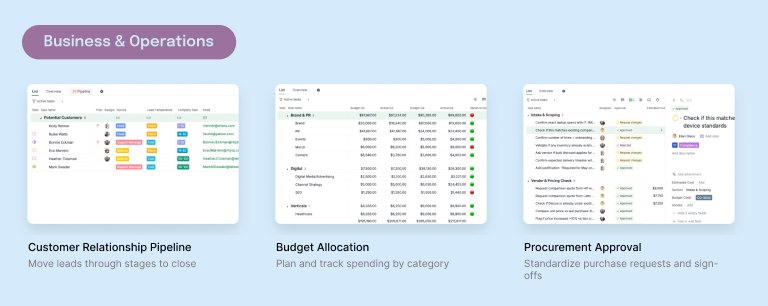
22. Customer Relationship Pipeline. A sales pipeline that doubles as a customer database. The List tab holds every contact as a task, with Company, Email, Phone, Source and Lead Temperature on the card. The Pipeline sublist shows the same records as a board, one column per stage, and dragging a card across changes the record's status, so the two views never drift. The pipeline guide walks through naming the stages.
23. Budget Allocation. Spending planned and tracked by category, with the numbers living next to the work they pay for. The Custom Fields do the lifting here, holding planned against actual so the variance is visible without exporting anything to a spreadsheet that then becomes the real source of truth.
24. Procurement Approval. Purchase requests standardized with the sign-offs they need, in order, so nobody has to remember who approves what above which amount. The point of this one is fewer conversations, not more process: the template encodes the rule once so it stops being tribal knowledge.
25. KPI Performance Tracker. A delivery scorecard rather than a metrics dashboard: every task is scored on whether it finished before its due date (plus 1 before, minus 1 after, minus 2 still open and overdue), and the points total per person. A task with no due date scores nothing, so watch for those. The charts in the KPI Performance document read the totals live, per person, by tag and by status.
26. Expense Tracker. A month of spending bucketed by category, each with a budget and a rollup showing how much of it you have used. Each expense is a task with Spending, Date and Payment Method. Each category row carries a Monthly Budget, a Total Spending, and an Overview that divides one by the other: 0.94 means 94% used. The sample is a renter's month, rent to Netflix. Read Overview weekly, not monthly.
27. 30-60-90 Day Plan. A new hire's first three months as three phases, tracked in Table view, with review gates at day 7, 30, 60, and 90. The day 7 gate is the one most onboarding plans skip, and the one that catches a bad start while it is still cheap to fix. The 30-60-90 guide lays out what belongs in each phase.
28. Strategic Roadmap. Objectives at the top, initiatives underneath, laid out on a timeline with milestones and owners. This is the company-level cousin of the Product Roadmap: same shape, different altitude, and the one to take when the question is what the business is doing this year rather than what ships next release. Putting quarterly gates on the timeline is covered in the roadmap guide.
The approval flow gets its own walkthrough in the procurement template guide.
Which templates suit marketing and creative deadlines?
Campaign and content work, where the date is usually external and does not negotiate.
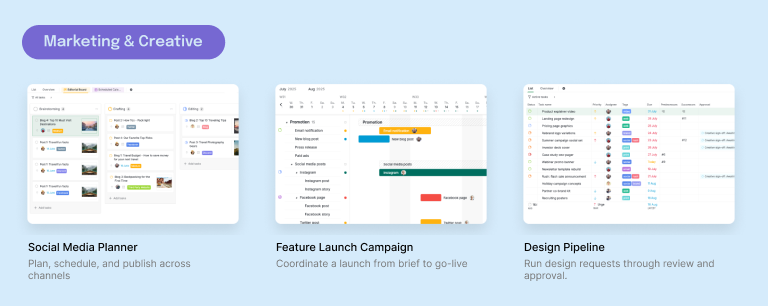
29. Social Media Planner. Content planned, scheduled, and published across channels, with each post carrying its own copy, asset, and approval as subtasks. Handles the thing that actually breaks social calendars, which is that one post is really five small dependent jobs and only the publish date is visible in most tools.
The production workflow behind this template gets its own write-up: the social media workflow, five jobs behind every post puts the caption, asset and approval deadlines on the calendar beside each publish date.
30. Product Launch Checklist. A checklist for taking one new feature to market: the brief with the product team, the promotion across every channel, and the results afterward. Promotion holds one parent task per channel (email, blog, press, paid ads, social), and the statuses run To-do, In progress, Validated, Scheduled, Completed, with Postponed for anything parked. Set the real launch date and work backward: Promotion lands before it, Campaign Analytics happens after.
31. Design Pipeline. Design requests run through intake, work, review, and approval, which keeps "can you just tweak this quickly" from arriving as a direct message and vanishing. The stage structure is the value: it makes the queue visible, so prioritizing becomes a decision someone makes rather than whoever asked most recently.
The workflow this template runs, from the six answers a request needs to the round counter and the single approver, is walked through in the design approval process guide.
32. Marketing Campaign. One campaign across every channel it touches, in six phases: strategy and brief, content production, review and approval, launch week, in-flight optimization, and the measurement retro at the end.
That last phase is the first thing cut when a launch runs late, which is why it is a phase here rather than a task somebody is supposed to remember. The full walkthrough is in how to launch a marketing campaign, which gives away the seven-point launch-day checklist.
33. Team Brainstorm. Ideas collected on a board around one focus question, then grouped by theme, prioritized, and given owners. The template's real job is keeping the two halves apart: generate without judging, then judge without generating. Mixing them is why most brainstorms produce a long list and no decisions. The brainstorm guide covers grouping and voting once the ideas are in.
What happens after you copy a template into Quire?
Copying takes under a minute, and it happens at the project level rather than task by task. Open the template, click the dropdown beside its title, open More, and choose Duplicate.
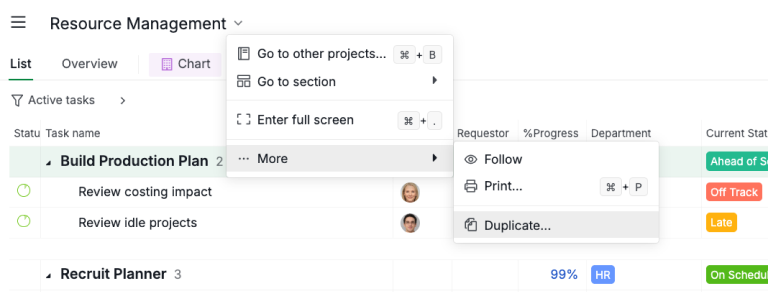
Give your copy a name, pick the organization it should live in, and click Create.
The whole structure comes with it, which matters more than it sounds: a template's value is mostly in its hierarchy, and a copy that flattened everything into one list would have thrown away the part you wanted.
Your copy is yours to butcher, and the original template stays clean for the next project.
Then comes the part that decides whether the template sticks. Delete first. Go through what arrived and cut anything that doesn't apply, before you add a single task of your own.
Templates are written for a general case, so the first honest edit is always a subtraction. If you find yourself deleting almost all of it, that's useful information rather than a failure: wrong template, try a thinner one.
After that, adapt rather than rebuild. Nest your own subtasks under the phases that came with the template, so your specifics live inside a structure that already holds.
Add one or two Custom Fields if the work needs a dimension the template didn't guess, like a client name or an approval state, and resist adding six. Set Milestones on the phase boundaries you actually report against.
Then pick your view by the question you're asking: Board for what's moving this week, List for the full tree, Timeline for whether the dates still hold, Calendar when people's availability is the real constraint. Same tasks underneath all four.
Want to feel the difference in ten minutes? Start a free project, copy Project Starter into it, delete the third of it that doesn't match your work, and add your own subtasks under what's left. You'll have a working plan before you'd normally have finished naming the columns.
One honest note on the library as a whole. These are curated templates rather than a marketplace of thousands, which is a deliberate trade: less to browse, but nothing to evaluate either. If your team's need is a very specific niche board, you'll likely start from Project Starter and build it rather than finding it ready-made.
If what you need is one solid plan rather than a library, start with the project plan template that doesn't fall apart in week two. Still choosing the tool itself? Compare the best task management software and task trackers first.
Key takeaways
Every project management template above exists to delete the blank-screen hour at the start of a project, not to tell you how to work.
Pick by the shape of the work: project templates for finite work with a deadline, planners for repeating cycles, pipelines for staged work where each item waits on a decision.
When two look equally good, take the thinner one, because structure is cheap to add and expensive to remove once people are working inside it.
The real test comes in week one, and it's a subtraction. A template you trimmed down to fit is doing its job. A template you kept whole out of politeness becomes a checklist nobody finishes, and it quietly teaches the team that the project plan is decoration. Copy it, cut it, then nest your own work inside what survives.
Want to skip the setup on your next project? Start free at quire.io/signup, copy Project Starter, and delete your way to a plan that fits.
Frequently Asked Questions
What are project management templates?
Pre-built project structures containing the tasks, phases, and fields a kind of work needs, so you copy them instead of starting from an empty screen. Quire ships 20+, grouped by the job they do. The point is skipping setup, not being told how to work.
How many templates does Quire have?
More than 20 ready-to-use templates, across five groups: a Start Here set, Project Management, Productivity Methods, Business & Operations, and Marketing & Creative. They range from a thin Project Starter to a full Construction Schedule build, and the library keeps growing.
How do you use a Quire template?
Open the template, click the dropdown beside its title, then More, then Duplicate. Name your copy, pick the organization it should live in, and click Create. It takes under a minute, the nesting comes with it, and the original template stays untouched.
Which project management template should you start with?
Pick by the shape of the work, not team size. Clear start and end: Project Starter or Work Breakdown Structure. Repeats weekly: Weekly Planner or Team Task Management. Moves through stages: Design Pipeline or Customer Relationship Pipeline. When torn, take the smaller one.
Are project management templates worth it, or should you build your own?
Use a template for the parts that are the same every time, and build your own for the parts that are genuinely yours. Any template encodes someone else's assumptions, so the real test is what you delete in week one. Delete most of it and the template was wrong for you.
Do templates actually help a team be more productive at work?
They remove the blank-screen tax at the start of every project. Teams are more productive at work when the first hour goes on the work rather than rebuilding a structure someone already designed. In Quire a copied template keeps its nested subtasks and fields, so you adapt a real plan instead of inventing one under pressure.
