
project management · Jul 28, 2026
The Risk Register: How to Worry About Your Project on Purpose

Last updated: October 21, 2026
A risk register is a living list of what could go wrong on a project, scored by likelihood and impact, with an owner and a planned response for each. Score risks one-to-five on both scales and multiply. Tag every risk avoid, reduce, transfer, or accept. Keep it where the work lives so it doesn't die in a folder. The template and the method are below.
- The risk register template (copy this one)
- What is a risk register?
- Why do good projects still get blindsided?
- How do you score a risk?
- What's the difference between a risk register, a risk matrix, and a risk log?
- What are the four ways to respond to a risk?
- How do you keep a risk register alive?
- What does a filled-in risk register template look like?
- What are the most common risk register mistakes?
- Key takeaways
- Frequently asked questions
Think back to the last project that went sideways on you. Now be honest about one thing: did the problem that sank it really come out of nowhere?
Probably not. Trace it back and the risk was usually sitting there in plain sight. Someone flagged it once in a kickoff. Two people fretted about it over lunch. The integration nobody tested, the contractor who was overbooked, the sign-off that never came. Everyone half-knew. Nobody owned it.
A risk register template closes exactly that gap: the space between "half-knew" and "did something about it." It isn't a crystal ball. It's a way to worry about your project on purpose, out loud, as a team, while there's still time to act. So the thing that waited for the worst possible week finally gets caught in daylight instead.
This post is the template and the method behind it: what goes in a register, how to score a risk so you focus on the ones that matter, the four things you can actually do about any risk, and how to keep the whole thing breathing instead of letting it gather dust in a shared drive.
The risk register template (copy this one)
Seven columns. The first four describe the risk; the last three manage it.
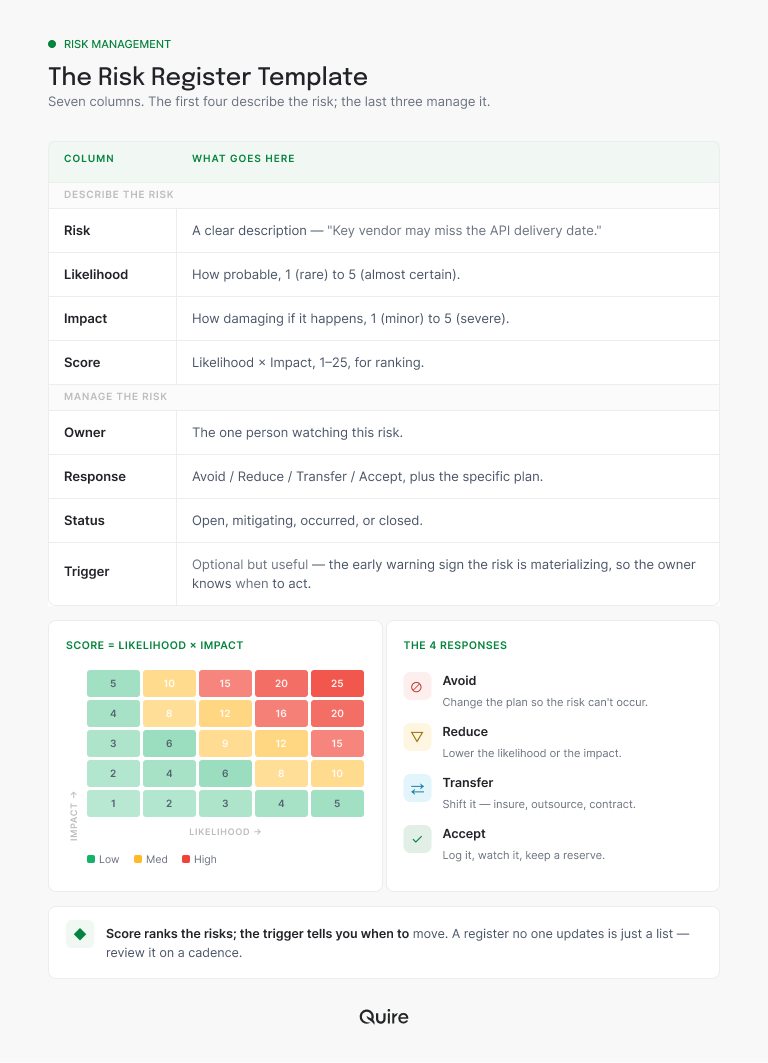
Two of the columns do more work than the rest. The owner turns a worry into somebody's job, and the response turns it into a course of action. A register with rough descriptions but clear owners will still function. A register with beautiful descriptions and no owners is a wish list with formatting.
The eighth row, the trigger, is the one to add once the basics feel routine: the early warning sign a risk is starting to happen, so the owner knows when to act and not just what to do. Set the columns up as custom fields in Quire rather than a static spreadsheet, and you can sort your whole register by score in one click.
Want the click-by-click? Quire's risk register guide builds the whole thing: the 5x5 custom fields, the formula that scores each row, mitigation as subtasks under the risk it belongs to, and the review cadence that keeps the register from going quiet. This post is the thinking; the guide is the build.
Hard to name risks against work you haven't mapped yet: break the project down first with a work breakdown structure, then register the risks that hang off each piece.
What is a risk register?
Risk register: a living list of what could go wrong on a project, with how likely each risk is, how bad it would be, who owns it, and the plan if it happens. Scored as likelihood times impact, it turns the low hum of team worry into a ranked, owned, trackable document.
Here's the reframe that makes it click. A risk register is just writing down what keeps you up at night, then handing each worry a person and a plan before it gets the chance to actually happen. Saying a risk out loud, in front of the team, is most of the value. The rest is making sure someone is watching it.
Why do good projects still get blindsided?
Because a risk that lives only in someone's head isn't being managed. It's being felt. And feelings don't come with owners or response plans.
Three things quietly turn a known risk into a surprise. It never got written down, so it stayed a private worry instead of a team concern. Or it got written down once, in a kickoff doc nobody reopened, so it aged out of memory.
Or it got named but never owned, so everyone assumed someone else was on it. All three end the same way, with a room full of people saying "yeah, I was kind of worried about that too."
The damage is measurable, and it's not evenly spread.
A study of 1,471 IT projects by Bent Flyvbjerg and Alexander Budzier, published in Harvard Business Review, found that the average project ran 27% over budget, but one in six turned into what the authors called a black swan, with cost overruns averaging 200% and schedule overruns near 70%.
Averages don't sink projects. Outliers do, and much of a register's job is to spot which of your risks could become one.
The fix isn't getting smarter at predicting trouble. Most teams already sense their risks fine. The fix is having one place where named risks live, get owners, and get looked at again, so "half-knew" becomes "tracked and handled."
How do you score a risk?
Two numbers, multiplied. A risk score is likelihood, rated 1 to 5, multiplied by impact, rated 1 to 5, giving a number from 1 to 25 that sets the risk's priority. Scores of 6 and under are low priority, 8 to 12 is medium, and 15 and up is the red zone where every risk needs a named owner and an active mitigation plan.
The score isn't precision. It's prioritization. A risk that's both likely and severe (a 5 and a 5, scoring 25) needs a real plan today. A risk that's rare and minor (a 1 and a 2) you can usually just accept and forget. Without scores, every worry on the list feels equally loud, which means the genuinely dangerous ones never get the room they need.
This is also the part your tool should be doing for you. In Quire, make likelihood and impact number fields and the score a formula column, and the register re-ranks itself every time you re-score a risk. No spreadsheet formulas to babysit, no sorting by hand, and the reddest row is always sitting at the top when you open the project.
What's the difference between a risk register, a risk matrix, and a risk log?
Same family, three different jobs: the register is the working document, the matrix is a picture of it, and a log is the lighter list the register grew out of. If you keep only one, keep the register.
The matrix is what you get when you plot every risk's likelihood against its impact on a grid, colored red, amber, and green. It's the view for spotting your dangerous corner fast, and for briefing stakeholders who don't need row-level detail.
"Risk log" is mostly an older name for the same discipline (PRINCE2 called its register a risk log for years), though in practice teams use it for a looser list: risks captured and dated, but not scored or owned.
| Risk register | Risk matrix | Risk log | |
|---|---|---|---|
| The job | Manage every risk end to end | Show where danger clusters, at a glance | Capture risks quickly, without ceremony |
| The format | One row per risk: description, scores, owner, response, status | A likelihood-by-impact grid, color-coded | A running list, often just a description and a date |
| Strongest at | Making sure every risk has an owner and a plan | Prioritizing attention and briefing stakeholders | Getting a small project honest, fast |
| Where it falls short | Goes stale without a review rhythm | Shows position, not the plan behind it | No scores or owners, so nothing is truly managed |
Want the red-amber-green view without building it by hand: set up a project dashboard, and your highest-scoring risks surface at the top instead of hiding on page two.
There's a fourth member of the family worth knowing. A RAID log widens the net to risks, assumptions, issues, and decisions on one board, which gives the assumption nobody wrote down somewhere to live before it graduates into an issue.
What are the four ways to respond to a risk?
You can do exactly four things about a risk: avoid it, reduce it, transfer it, or accept it. Tagging every row with one of the four is what turns a list of worries into a plan.
- Avoid. Change the plan so the risk can't happen. Drop the risky feature, pick the proven vendor. The risk goes to zero because you removed its cause.
- Reduce. Lower the likelihood or the impact. Test the integration early, add a buffer to the timeline. The risk still exists, just smaller.
- Transfer. Move it onto someone else. Insurance, a vendor contract with penalties, handing the risky piece to specialists who do it all day.
- Accept. Decide it's small enough to live with, and keep a backup ready. Accepting a risk on purpose is fine. Accepting it by ignoring it is how projects sink.
Some frameworks add a fifth entry, escalate, but escalation isn't a different way to treat a risk. It's routing the decision to someone with the authority to pick one of the four. The risk still ends up avoided, reduced, transferred, or accepted, just by a different desk.
What's not on the list: "we'll figure it out." That's not a response, it's a deferral, and the teams that rely on it tend to do their figuring out at exactly the moment they have the least time to figure anything.
How do you keep a risk register alive?
Two habits keep a register alive: it sits somewhere the team already looks, and its responses are real tasks with owners instead of sentences in a cell. Skip either and you get the standard failure mode.
The register is born in a kickoff workshop, full of color-coding and good energy, and then it goes quiet. Three months later the project hits something that's right there on row nine of a document nobody has opened since week one.
The review that prevents this needs fifteen minutes a week, same slot, three questions per red row:
- Has the likelihood moved since last week?
- Has the trigger fired?
- Is the mitigation task actually progressing, or just assigned?
Anything longer turns into a meeting people start skipping, and a skipped review is how registers die.
In Quire, the clean way to run this is to make each risk a task. Custom fields hold likelihood, impact, and the calculated score, so the register sorts by what's most dangerous (several custom fields plus a formula column is a paid-plan feature, worth it once risk tracking is a habit).
From there the response plan becomes actual tasks with owners and due dates instead of a note, so mitigation shows up in someone's real workload rather than living as theory. Save the whole structure as a template, and every new project starts with a risk register instead of a blank page and good intentions.
The Risk Register is one of thirteen project management templates in the gallery: 20+ project management templates your team will actually use lists them all.
What does a filled-in risk register template look like?
Templates stay abstract until you run one real risk across the columns. Here is one, filled in the way it actually lives in Quire: the risk is a task, the columns are its fields, and the response is work you can hand to someone.
| Column | This risk, filled in | The mistake it avoids |
|---|---|---|
| Risk | The only engineer who really knows the payments code is booked on another project for three of our six weeks. In Quire that sentence is the task name, filed in a "Risk register" sublist. | A worry too vague to act on |
| Likelihood | 4 out of 5. The other project is already running hot, and it has first claim on her time. | Gut feel with no scale |
| Impact | 5 out of 5. If she's pulled away the payments revamp stalls, and the launch behind it stalls too. | Everything rated critical |
| Score | 20. A formula column multiplies the two fields, so the row sorts itself straight into the red corner. | Hand-sorting the list |
| Owner | The tech lead, who sits in both projects' planning. As the task's assignee, the risk shows up in their My Tasks instead of a doc nobody reopens. | Shared ownership, so nobody watches |
| Response | Reduce. Pair a second engineer on the payments code this week, added as subtasks with their own owners and dates. Fallback: descope the revamp to phase two and ship the launch. | "Monitor closely" as a plan |
| Trigger | The other project slips past week two. Set that as the risk task's due date, so the check-in happens on schedule instead of from memory. | Acting only after it lands |
| Status | Mitigating, until the pairing sessions land and the knowledge stops living in one person's head. | Set-and-forget register |
One row, and a fuzzy background worry has become a scored, owned, planned thing with an early-warning sign attached. Do that for the ten risks you can already half-feel, and most of your project's "surprises" stop surprising anyone. Want to see it without ceremony? Start a free Quire project, add those ten risks as tasks with likelihood and impact fields, and you'll have a living register before your next status meeting.
What are the most common risk register mistakes?
The ones that quietly turn a register into theater:
- Building it once and freezing it. Risks shift as the project moves. A register reviewed only at kickoff is a photo of a moving car.
- No owners. An unowned risk is one nobody is actually watching. Every row needs a name on it.
- Vague responses. "Monitor closely" is not a plan. Say what you'll do, and when you'll do it.
- Listing only the dramatic, unlikely stuff. The boring, probable risks (a key person on leave, a dependency slipping a week) do more damage than the cinematic ones.
- Scoring everything a 25. If every risk is red, you haven't prioritized. You've just written a panic list with a spreadsheet's confidence.
That first one is the quiet killer. The hard part of risk management was never spotting risks. It's the unglamorous discipline of opening the list again next week.
Risk tends to pile up right as a team is scaling and juggling more projects at once: the project management playbook for growing teams covers the stage-by-stage version, because more projects running at once means more risks than any single register was built to hold.
Key takeaways
A risk register is how you worry about your project on purpose. Name what could go wrong, score it on likelihood and impact, give each risk one owner, and tag it with a response: avoid, reduce, transfer, or accept. The scoring keeps your attention on the risks that are both likely and damaging instead of spreading it evenly across every worry.
But the register only earns its keep if it stays alive. Keep it where the work lives, make the responses real tasks with owners, and look at it on a rhythm, so the risks you half-sense get handled in daylight instead of at the worst possible hour.
Got a project worth de-risking? Start free at quire.io/signup and build a risk register that lives with the work, scored, owned, and impossible to forget in a folder.
Frequently asked questions
What is a risk register?
A living list of what could go wrong on a project, with each risk's likelihood, impact, owner, and response plan. It turns vague team worry into something shared and trackable.
What goes in a risk register?
Seven columns: risk description, likelihood, impact, combined score, owner, response, and status. The owner and response columns are what turn a list of worries into an actual plan.
How do you score project risk?
Rate likelihood and impact each from one to five and multiply for a score out of twenty-five. The score ranks your risks so you focus on the ones that are both probable and damaging.
What are the four ways to respond to a risk?
Avoid it, reduce it, transfer it, or accept it with a backup ready. Every risk should carry one of these four. "We'll figure it out" doesn't count.
What's the difference between a risk register and a risk matrix?
The matrix is the likelihood-versus-impact grid that shows where risks sit. The register is the full list with descriptions, owners, and responses. The matrix is one view of the register's data.
What is the difference between a risk and an issue?
A risk is something that could happen; an issue is something that already has. When a trigger fires, the risk becomes an issue and the conversation switches from planning the response to executing it.
Can you run a risk register in Excel or Google Sheets?
You can start there. Spreadsheets break down at the follow-through, because a mitigation plan in a cell is not a task anyone owns and nothing warns you when a trigger fires. In a project tool, each response is a real assigned task next to the work it protects.
