
project management · Nov 3, 2026
The Product Launch Checklist That Crosses Team Lines

Last updated: November 3, 2026
A product launch checklist is one readiness list four teams share, not four task lists that end on the same day. It runs on four gates, built, positioned, supported and sold, each with an owner who can say yes. Launch day is a few dated checks; the thirty days after get their own section. Quire's Product Launch Checklist template holds all of it in one project.
- What is a product launch checklist?
- Which four readiness gates belong on a product launch checklist?
- What belongs on launch day, and what belongs in the thirty days after?
- What comes with the Quire Product Launch Checklist template?
- Slide, shared doc or task management software: where does a product launch checklist hold?
- How does one feature launch run in Quire, end to end?
- Which five things change before you replace a sample task?
- Key takeaways
- Frequently asked questions
Three days before go-live, four teams are ready. Product says the export feature has passed QA. Marketing has the announcement email scheduled. Support has drafted the help article. Sales has a deck with one slide that still says "coming soon."
Then someone in the launch channel asks the only question that matters, and nobody can answer it: what's still open?
Each team can answer for itself. Nobody can answer for the launch, because there is no product launch checklist the four of them share, just a spreadsheet, a calendar, a doc and a slide.
That is the failure the checklist exists to prevent, and it's why it has to cross team lines rather than live inside one of them. One list, one owner per line, one date everyone is working back from.
This post is the version of that list you can copy:
- the four readiness gates and who owns each
- what belongs on launch day, and what belongs in the thirty days after
- how it runs inside task management software, specifically Quire's Product Launch Checklist template, from the brief to the results
Two neighbors on this blog cover the edges. How Quire Helps Cross-Functional Teams Launch a Marketing Campaign owns the campaign itself, the channels and the creative. Product Roadmap Planning owns the road from idea to release.
This one owns the stretch between them: the go-live readiness that no single team can sign off alone.
What is a product launch checklist?
Product launch checklist: the single list of everything that must be true before a product or feature goes live, spanning product, marketing, support and sales, with an owner, a date and a current state on every line.
A product launch checklist is a readiness list, not a task list, and the difference is who it answers to. A task list answers to the person doing the work. A readiness list answers to the date, and it has one job: to make "are we ready?" a question with a single answer.
That is why it fails when each team keeps its own copy. Four copies mean four definitions of ready:
- Product's ends at "shipped to production."
- Marketing's ends at "announcement sent."
- Support's ends at "article published."
- Sales's ends whenever the deck stops saying "coming soon."
All four can be complete while the launch is not.
The fix is structural rather than heroic. Put the four lists in one place, give every line an owner and a state, and hang the whole thing off one go-live date. In a project that's a milestone with tasks working back from it. On a slide, it's a wish.
The four-layer operating model behind this (ownership, visibility, handoffs, rhythm) is laid out in Cross-Functional Project Management: The Complete Playbook. This post is that model applied to one date.
Which four readiness gates belong on a product launch checklist?
Built, positioned, supported, sold, and each gate has one owner who can say yes. The gates are the columns your four teams already think in; the checklist just makes them look at the same wall.
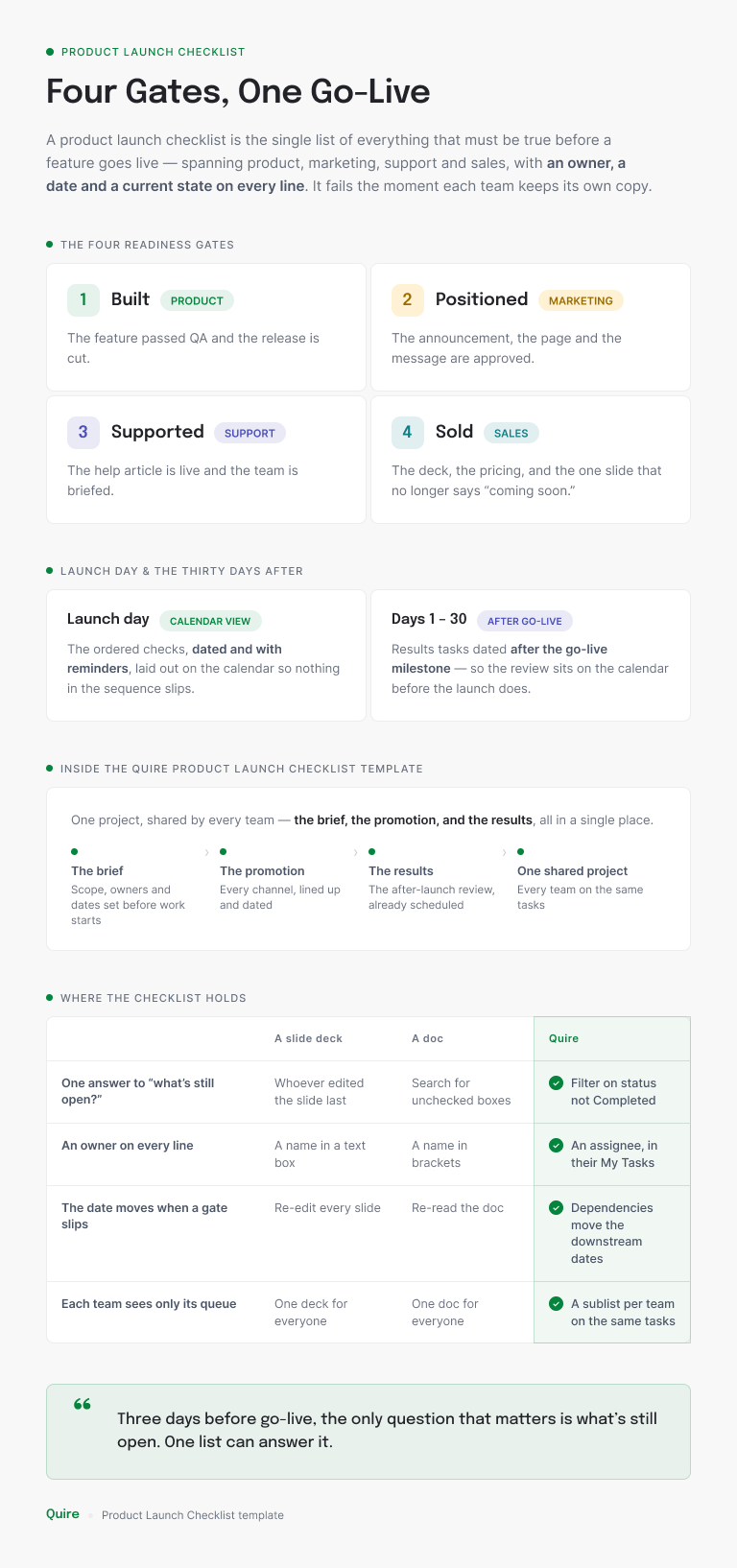
Built is product's gate. The feature works in production behind a flag, QA has signed off, the rollback plan exists, and the feature brief every other team is working from has been signed off too.
That last one matters more than it sounds. Marketing writing to a draft brief is how the announcement ends up describing a button that got renamed.
Positioned is marketing's gate. The message, the pricing and the announcement are approved, the assets exist for every channel you actually use, and the blog post is at least in review. Approved is a word with a person attached, so name the approver on the checklist rather than in a thread.
Supported is the gate most checklists skip, and it's the one customers hit first. The help article, the in-app tooltip, the support macros and a briefing for whoever answers tickets in launch week. If support learns about the feature from the announcement email, the checklist had a hole in it.
Sold is sales's gate: the deck, the demo script, the pricing page and the objections doc, all updated to the version that shipped. It's also the gate that most often lands after go-live, which is fine as long as everyone chose that rather than discovered it.
Why it takes a fifth owner: in a study of 95 teams in 25 leading corporations, Behnam Tabrizi found that nearly 75% of cross-functional teams were dysfunctional, failing on at least three of his five criteria (Harvard Business Review).
His piece opens on a three-division project that most of the team knew was a dead end two years before the company pulled the plug. A launch is smaller, and the mechanism is the same: four teams, each locally fine, nobody owning the whole.
So the fifth owner is the list itself. One person, often a product marketer or a project manager, who owns no gate and watches all four. Their job is to get the answer to "what's still open?" from the list rather than from a round of messages.
The moment a gate hands to the next one is where launches slip: brief to design, design to announcement, feature to help article. The Handoff Gap explains why that moment breaks and how to make the receiver explicit.
What belongs on launch day, and what belongs in the thirty days after?
Launch day is a short list of dated checks; the thirty days after are where the launch pays off, and they need their own section. Most checklists are heavy on the day and empty afterwards, which is backwards.
Here is the stretch from launch morning to day 30 as one list, with the team that owns each line:
| When | Check | Owner | Where it lives in Quire |
|---|---|---|---|
| Launch morning | Flip the feature flag, then watch the error rate for an hour | Product | A dated task with a reminder shared with the list owner |
| Launch morning | Tell support the flag is on | Product | The next dated task, a successor of the flag flip |
| Launch day | Send the announcement email and publish the blog post | Marketing | Scheduled until it goes out, Completed once it has |
| Launch day | Post in the community | Marketing | A dated task with a reminder |
| Week 1 | Usage against the target in the brief | Product | A weekly Launch metrics check-in, set to repeat |
| Weeks 2 to 4 | Deals and demos that mention the feature | Sales | The template's Sales result task, dated after go-live |
| Day 30 | Campaign numbers and support-ticket themes | Marketing and support | The Campaign result task, dated after go-live |
Each launch-day line is a task with a time and an owner, not a line in a doc, because the person doing it before anyone else is awake shouldn't have to ask who owns the next one. (Someone is always up early for a launch. Usually the person who said it would be quiet.)
The thirty days after are three questions: did it get used, did it get sold, and what did customers say?
That's the campaign result and the sales result, plus the support-ticket themes that tell you what the help article missed. Put them on dates. A results task with no date gets written the week before the next launch, from memory.
Add the weekly launch metrics check-in as a recurring task for the first month. Quire creates the next one each time you complete the current one, so the follow-through outlives the week the team moves on to the next thing.
Start a free Quire project, add the four gates as sections and a milestone named Go-live, and you'll have a shared product launch checklist before your next standup ends.
What comes with the Quire Product Launch Checklist template?
Three sections, a go-live milestone, six statuses and a set of approval tags, built around a sample three-week feature launch. It sits in the Marketing & Creative section of the Quire template library as Product Launch Checklist.
Its own one-line description says it plainly: one new feature taken to market, from the brief through every promotion channel to the results afterwards.
Planning holds the product brief, written with the product team, then the promotion material design that follows from it, and a milestone called Brief signed off. Nothing downstream gets produced until that milestone is done, which makes it the built gate and the start of the positioned gate in two tasks.
Promotion is one parent task per channel: email notification, new blog post, press release, paid ads and social media posts. Social breaks down again into a child per platform (Instagram, Facebook, Twitter, Discord, LinkedIn, YouTube).
The platforms that need more than one asset break down once more. Instagram holds a post and a story, and so does Facebook. That's nested subtasks doing the job a spreadsheet would need three tabs for.
Between Promotion and the results sits the milestone the whole project hangs from: Feature goes live. Set it to your date and everything in Promotion has to land before it. Everything in Campaign Analytics, the Campaign result and the Sales result, happens after.
Six statuses move each task along: To-do, then In progress, Validated and Scheduled, ending at Completed. Postponed sits off to the side for work you park.
The template's own notes make one point worth repeating: Completed is the only status that counts as done, so a post sitting in Scheduled still reads as open work. It hasn't published yet.
Tags carry the approval state and the kind of work. Design, Product Team and On going say what a task is; Awaiting approval, Approved and Revision needed say where sign-off stands. Filter on Awaiting approval and you have the agenda for your review meeting.
When you want a formal request rather than a tag, Quire's built-in Approvals take over that job (more on that in the walk-through).
Two sublists come ready: Promotion, saved as a Board, and Social Media, saved as a Timeline. The first is the marketing lead's queue; the second is the calendar the social manager works from. Both show the same tasks as the main list rather than copies of them.
The template is one of the ready-made projects in 20+ Project Management Templates Your Team Will Actually Use, and its marketing sibling, with a seven-point launch-day list of its own, is in How Quire Helps Cross-Functional Teams Launch a Marketing Campaign.
Slide, shared doc or task management software: where does a product launch checklist hold?
It holds wherever a line can carry an owner, a date and a state at once, and task management software does all three without someone retyping. The slide and the doc both work for a while. The bottom of the infographic above shows where each one gives out on four everyday needs, and launch week adds two more:
- Launch-day checks in order. A slide holds them on slide nine and a doc as a numbered list. In Quire they are dated tasks with reminders, laid out in Calendar view.
- The thirty days after. A deck needs a new deck, and a doc grows a section nobody reopens. In Quire the results tasks sit dated after the go-live milestone.
Read all six as a test for the launch you're running now. If one thing slipping means someone has to re-edit something by hand, the checklist is a picture of the work rather than the work.
The slide still has a job: the kickoff and the readout. It just stops being the checklist the day after kickoff, and the doc follows it a week later when the fourth team stops opening it.
The go-live milestone is the one date the whole list works back from. Project Milestones: How to Set Them and How Many You Need covers how many a launch wants and what makes a milestone real rather than decorative.
How does one feature launch run in Quire, end to end?
Ines owns the launch of a new export feature, four teams touch it, and the whole thing runs in one duplicated project. Here's the walk-through, in the order she does it.
She opens the Product Launch Checklist template, opens the project menu (the dropdown beside the project name) and chooses Duplicate. Quire creates a new project in her organization with the three sections, the six statuses and the approval tags already in place.
She renames it Export launch and sets the Feature goes live milestone to the real date.
Then she adds the two sections a cross-team launch needs on top: Support readiness and Sales enablement, next to Planning and Promotion. Four teams, four sections, one project.
Under Support readiness go the help article, the in-app tooltip, the macros and a launch-week briefing. Under Sales enablement go the deck, the demo script and the pricing page.
Every task gets an assignee, a start and a due date. She adds a Select custom field called Gate with four options, Built, Positioned, Supported and Sold, and a Checkbox field called Day-of check for the handful of tasks that can only happen on launch day.
Group the project by Gate and the checklist reads as four blocks, one per team. That's the readiness view her manager kept asking for and the slide never quite managed.
Now the dependencies. The help article depends on Brief signed off. The announcement email depends on the help article, because support has to be able to answer what marketing is about to promise. The sales deck depends on the pricing page.
When the brief slips two days, the line from it to the help article turns red on the Timeline, and the squeeze on the announcement shows a fortnight out rather than on launch morning. Ines drags the help article two days later and the conflict clears.
She also switches on the project setting that stops anyone completing a task whose predecessor hasn't finished. Nobody can mark the announcement done ahead of the help article it depends on.
Dependencies are the part of a launch checklist that keeps the handoffs honest. What Are the 7 Best Practices for Managing Task Dependencies? covers how to set them up so they flag a squeeze early.
Sign-off moves from tags to Quire's Approvals. The brief and the announcement copy, the two tasks that need a formal yes, each get a real approval request with the approver's name on it. The approver answers Approve, Request changes or Reject on the task itself.
The Awaiting approval tag stays for the lighter reviews that just need a second pair of eyes.
Each team gets a sublist built from a filter on its section, so the support lead opens Support readiness and sees four tasks rather than the whole project. A fifth sublist, Launch week, filters on the Day-of check box, and Ines reads it in Board view every morning that week.
The Day-of tasks carry reminders: notify the owner the morning of, shared with Ines. After go-live, the Campaign result and Sales result tasks sit dated in Campaign Analytics, a weekly Launch metrics check-in repeats for a month, and the thirty days after have a place to live.
When the next feature comes around, she duplicates Export launch rather than the template, because the two extra sections and the Gate field are now hers. That is the whole product launch checklist, and nobody typed a status into a slide.
Which five things change before you replace a sample task?
Five, in this order, and all of them before the first real task goes in. The template is a feature launch as a marketing team runs it; the cross-team version adds a little more.
- The date. Set the Feature goes live milestone before anything else and let the Timeline show you what it squeezes.
- The sections. Add one per team that owns a gate; Support readiness and Sales enablement are the usual two. Keep Planning, Promotion and Campaign Analytics as they are.
- The channels. Social media posts ships with six platforms, and the template's own guidance is to delete the ones you don't publish to. An empty Discord task on a checklist is a false open item every single morning.
- The owners. Give every task in Planning a named assignee before production starts. The brief with no owner is the one that gets signed off by nobody.
- The sign-off. Keep the tags for informal review, and move the two or three decisions that need a formal yes into Quire's Approvals.
Timeline, Table and Calendar views, task dependencies and recurring tasks come with Quire's Professional plan and up, and Approvals with Premium and up. Sections, milestones, tags, sublists and Board view are part of every plan.

Key takeaways
A product launch checklist is a readiness list four teams share, not four task lists that happen to end on the same day. Built, positioned, supported and sold each get an owner who can say yes, one more person owns the list, and everything hangs off a single go-live milestone.
Launch day is a short list of dated checks. The thirty days after are where the launch pays off, so they get a section, dates and a recurring check-in rather than a memory.
Quire's Product Launch Checklist template gives you the brief, the promotion by channel and the results. You add a section per team, a Gate field, dependencies between the handoffs and a sublist per lead. After that, "what's still open?" is a filter rather than a question.
Want one answer to "are we ready?" three days before go-live? Start free at quire.io/signup, duplicate the Product Launch Checklist template, and set the Feature goes live milestone to your real date.
Frequently asked questions
What is a product launch checklist?
The single list of everything that has to be true before a feature or product goes live, owned across product, marketing, support and sales. In Quire it is a project with sections for the gates and a milestone for the go-live date.
What should a product launch checklist include?
Four readiness gates (built, positioned, supported, sold), the launch-day checks as dated tasks, and the thirty days after as a section of their own.
Who owns a product launch checklist?
One person owns the list and one person owns each gate. In Quire that is an assignee on every task and a sublist per team.
What is the difference between a product launch checklist and a go-to-market plan?
The go-to-market plan decides who the launch is for and what it says. The checklist proves those decisions got done before the date.
How far before launch should the checklist start?
The day the launch date is set, working backwards from it. Quire's Timeline view shows which gate is squeezed before it slips.
How does a shared launch checklist make four teams more productive at work?
It removes the round of "are you done yet?" messages. In task management software like Quire, the marketer sees the help article go Completed without asking, so every team is more productive at work on its own gate.
