
workstyle · Sep 8, 2026
How Quire Helps Cross-Functional Teams Launch a Marketing Campaign
Last updated: October 21, 2026
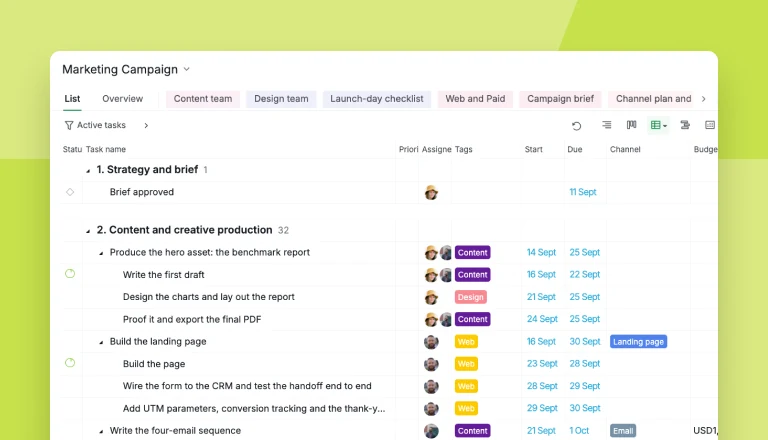
Launching a marketing campaign is a coordination problem before it's a creative one: five functions, one date, and handoffs that fail quietly. A plan that holds has six phases and four gates: brief, production, review, launch week, in-flight optimization, and a review with real numbers. Quire's Marketing Campaign template ships with all of it built, including a seven-point launch-day checklist, a sublist per function so each team sees only its own queue, and Target against Actual fields so the channel plan becomes the scoreboard.
- How do you run a campaign launch?
- What actually breaks when a campaign goes out?
- What has to exist at the end of each campaign phase?
- What is inside Quire's Marketing Campaign template?
- How do five teams work from one plan without tripping over each other?
- How do you track a campaign after it goes live?
- What should you change before you use the template?
- Key takeaways
- Frequently asked questions
The announcement email went out on schedule. The blog post is live. The paid ads are spending. And the pricing page still shows last quarter's plan names, because the one task nobody owned was the one everybody assumed somebody else had.
None of that is a creative failure. The copy was good, the design was good, the media plan was sound. What broke was the space between five teams who each did their own job well.
Most advice on how to launch a marketing campaign starts with goals and audiences. Useful, and rarely the part that fails.
So this is the other half: six phases, what has to exist at the end of each one, and a ready-made Quire project you can copy instead of building it from an empty screen for the fourth time.
How do you run a campaign launch?
Six phases, four gates. A campaign launch runs brief, production, review, launch week, in-flight optimization, and a retro with real numbers. The rollout passes four gates: brief approved, creative locked, go live, results reviewed. Every asset is one owned, dated task, a seven-point checklist runs the day before go-live, and the promised number sits next to the real one.
The phase-by-phase version, with the test for whether each phase is really finished, is in the table two sections down.
What actually breaks when a campaign goes out?
Marketing campaign launch: the coordinated release of one campaign across the functions that feed it, typically product, content, design, PR and paid media, onto a single public date. What breaks is almost never any one function; it's the work between them, which belongs to nobody by default.
A marketing campaign launch fails in the handoffs, not the ideas. Five functions feed one date: product, content, design, PR, paid media. Each can be excellent, and the work between them still belongs to nobody.
Behnam Tabrizi's research at Stanford, published in Harvard Business Review, found 75% of cross-functional teams are dysfunctional on the basics: budget, schedule, spec. A campaign team is one of those with a public deadline.
The failure has three shapes:
- Work moves by announcement, so context dies in transit and resurfaces as a launch-day bug.
- Status lives in one person's head, so somebody spends launch week rebuilding it into a document that's stale before it's read.
- Approvals happen in chat, where "looks good" never says which version.
We have shipped launches at Quire on a spreadsheet, a chat channel and one very tired person's memory. It worked. That person spent a weekend recovering from a job title they never applied for: human middleware.
This is one workflow inside a bigger discipline: the cross-functional project management playbook covers the whole operating model for work that crosses team lines, from ownership frameworks to communication rhythms.
If you would rather watch a campaign plan get built than read about one, this Quire webinar does it live. The clip below opens on the marketing chapter.
In this session16:16 Marketing Campaign template walkthrough
What has to exist at the end of each campaign phase?
Something the next function can pick up without asking you a question. A campaign plan is a sequence of states, each with a gate you can fail.
Here is the shape, with the test for whether a phase is actually finished.
| Phase | Finished means | Gate |
|---|---|---|
| 1. Strategy and brief | A copywriter could start from the brief alone, with no meeting | Brief approved |
| 2. Production | Every asset that ships is one owned, dated task with its sub-work underneath | Nothing formal |
| 3. Review and approval | Brand, legal and the sponsor have all said yes, in writing, on the task | Creative locked |
| 4. Launch week | The checklist is green before anyone presses publish | Go live |
| 5. In-flight optimization | Somebody owns the weekly decision to change something | Nothing formal |
| 6. Measurement and retro | The promised number sits next to the real one, and the retro is written down | Results reviewed |
Two phases in that table are the ones teams skip. Review gets no dates, so it becomes a surprise queue in the last 48 hours.
And in-flight optimization gets no owner, because everyone treats launch day as the finish line rather than the start of the part where the money is spent.
The gates are the reason to run this in a task tool rather than a document. In Quire each one is a milestone with a date, each phase is a section, and the "finished means" column is a task you can refuse to check off.
The handoff failure has its own anatomy worth reading before you plan a launch: where cross-team projects actually break maps the silent handoff and the four-question test that catches it.
What is inside Quire's Marketing Campaign template?
Start with the ready-to-use workflow: Quire's Marketing Campaign template is a real project you copy, with the six phases above already built as sections and the four gates already sitting in the timeline as milestones.
The worked example inside it is a gated-report campaign, because that shape covers most of what an integrated campaign has to coordinate:
- a benchmark report as the offer, and a landing page behind a form;
- a four-email sequence, paid and organic social, and an ungated SEO post;
- a webinar, and sales follow-up after it.
Swap the offer and the channel list for yours and the structure still holds.
What you actually get:
- Sections per phase, so the plan reads in the order the work happens rather than as one flat backlog.
- Nested tasks with the sub-work underneath. "Build the landing page" holds copy, design, build, the form-to-CRM test, and the tracking task, which is how "the landing page" stops being one opaque to-do that's 80% done for a fortnight.
- Function tags on every task (Content, Design, Web, Paid Media, Social, PR, Sales Enablement, Data, Legal) so ownership is visible before real names are assigned.
- An In review status alongside To-do, In progress and Blocked, so a thing waiting on a reviewer looks different from a thing nobody has started.
- Custom fields that carry the campaign data: Channel, Budget, Target, Actual, and a Launch-critical checkbox.
- A Campaign brief document with the goal, audience, offer, messaging table, channel split and owner list already laid out as blanks to fill.
- Milestones on the four gates, so the date everything works backwards from is a real object in the timeline instead of a line in a deck.
- Two tracking tabs, a Campaign health dashboard and a Channel plan and results insight, which do different jobs and are worth not confusing. More on both below.
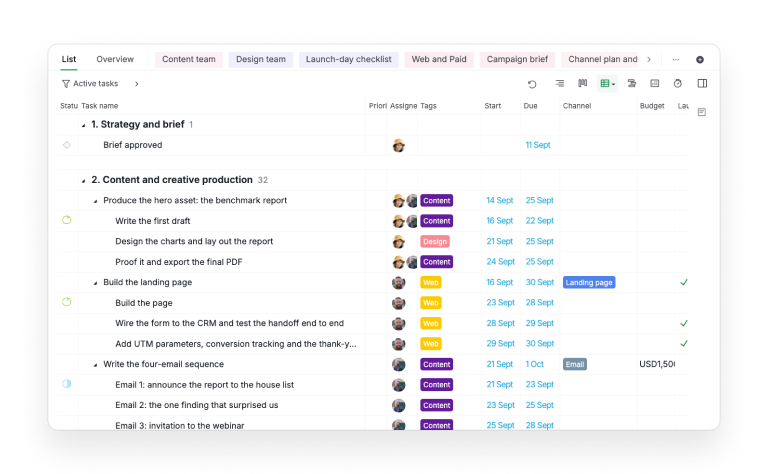
A tag in Quire belongs to the project it was made in, unless you tick Visible to all projects and make it a global tag, shared across every project in the organization. Worth doing for function tags, which mean the same thing on every campaign.
The single most useful thing in it is the pre-launch checklist, which sits the day before go-live and reads as seven yes-or-no questions, each with an owner:
- The landing page is live on the real URL, with no staging leftovers.
- The form submits and the lead lands in the CRM with the right source.
- The asset downloads from the thank-you page.
- Conversion tracking fires and shows up in the dashboard.
- Every ad and email link carries the right UTM.
- Pricing and product copy on the site match the campaign's claims.
- Sales is briefed and the follow-up sequence is armed.
Item six is the pricing page from the first paragraph of this article. It costs eleven seconds to check the day before and a full morning to explain afterwards.
Copying happens at the project level, not task by task, so the whole tree arrives in one move. Open the template, and from the dropdown beside its title pick More, then Duplicate.
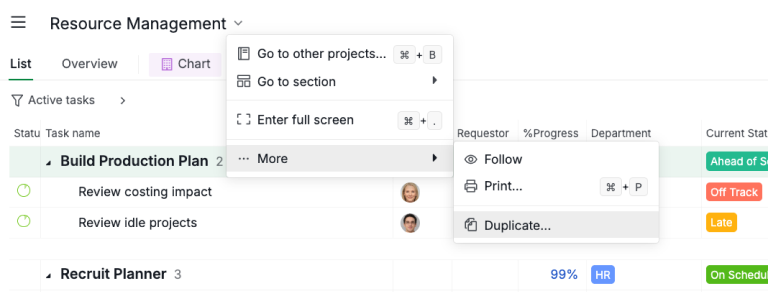
Name the copy, point it at whichever organization you want it in, then Create. Under a minute, and the nesting survives the trip, which is the part you actually wanted.
Then bend it. Swap the channel list, move the launch milestone to your real date, and delete whatever you won't do. A template you never prune turns into a guilt list.
This is one of 33 in the library, so if a launch isn't what you're planning this week, the full roundup of project management templates has the sprint, pipeline and operations structures listed out one by one.
How do five teams work from one plan without tripping over each other?
Give each function a filtered view of the same task tree, rather than its own tracker. The designer opens Design team and sees six tasks instead of eighty. The campaign owner opens the full tree and sees everything.
The wrong move is tempting, and this is the phase where teams make it. Production gets busy, the shared project gets noisy, and somebody suggests each team keeps its own tracker.
Two weeks later there are four plans, none of which agree, and a fifth document that exists to reconcile them.
Keep one campaign tree and slice it instead. The template ships with four Quire sublists:
- Content team for the brief, the report, the email sequence, the social copy and the SEO post.
- Design team for the report layout, the ad creative, the social cards and the video.
- Web and Paid for the page build, the form, the tracking, the audiences and the ad platforms.
- Launch-day checklist, which collects only the launch-critical tasks from every phase into one list you open on launch morning.
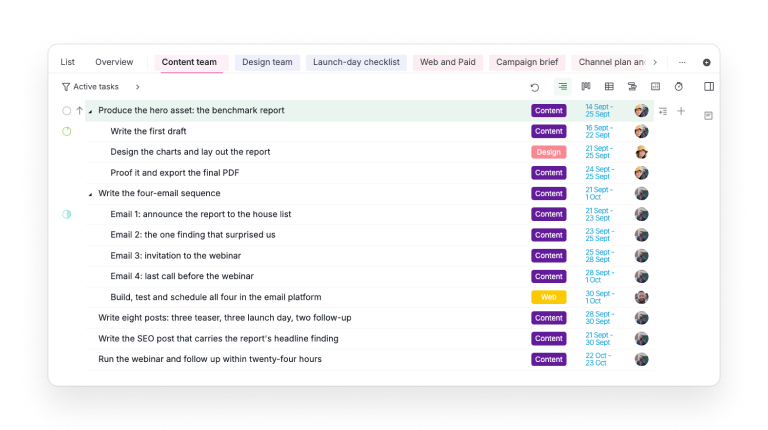
A sublist is a view, not a copy. The tasks live once, in the shared tree, and show up in whichever sublists match them. Nobody is maintaining a second version of the truth, which means nobody has to reconcile one.
Sublists are doing the real work in this section, and they're worth knowing outside a campaign: how Quire sublists work covers the idea on its own, including when a sublist beats giving a team its own project.
That's the thing worth testing when you compare task management software for a campaign team. Most tools make you pick between one noisy list and five disconnected ones.
Tags carry the state that cuts across the tree: which function owns a task now, and what is waiting on a reviewer. Filter the board by the In review status and you have the approval queue, which answers the question every campaign asks twice a day without anybody having to ask it out loud.
Start a free Quire project, duplicate the template, and add one sublist per team. You'll have per-function queues over a shared plan before your next status meeting would have finished its agenda.
If leadership still asks for updates after all this, the fix is the reporting rhythm rather than more meetings: stakeholder updates without the status meeting shows the async pattern that reports straight from the work.
How do you track a campaign after it goes live?
In two places that do different jobs: a Dashboard you read on Monday, and an Insight tab that holds the numbers. Launch day is the start of the spending, so the plan has to keep earning its keep for another month.
The Dashboard is the visual one, assembled from widgets, and it's what you open in the check-in. The template ships with one called Campaign health, carrying the seven widgets that answer a campaign owner's actual questions:
- Approvals and Requests. The approval loop is what really delays launches.
- Blocked Tasks and At-Risk Tasks. Slippage surfaces before somebody has to confess to it.
- Upcoming Tasks. The week ahead.
- Project Health. The whole-campaign read.
- Member Workload. This is where you notice the same designer is quietly carrying three deliverables.
- Tasks Created vs. Completed. Whether the campaign closes work as fast as it opens it.
Dashboard View is on the Professional plan and higher, not Free. Professional allows 2 dashboards of 7 widgets each, which is why Campaign health is full on purpose; Premium raises that to 6 dashboards of 21 widgets, leaving room for extras like a Deadline Calendar. Full details are on our Pricing page.
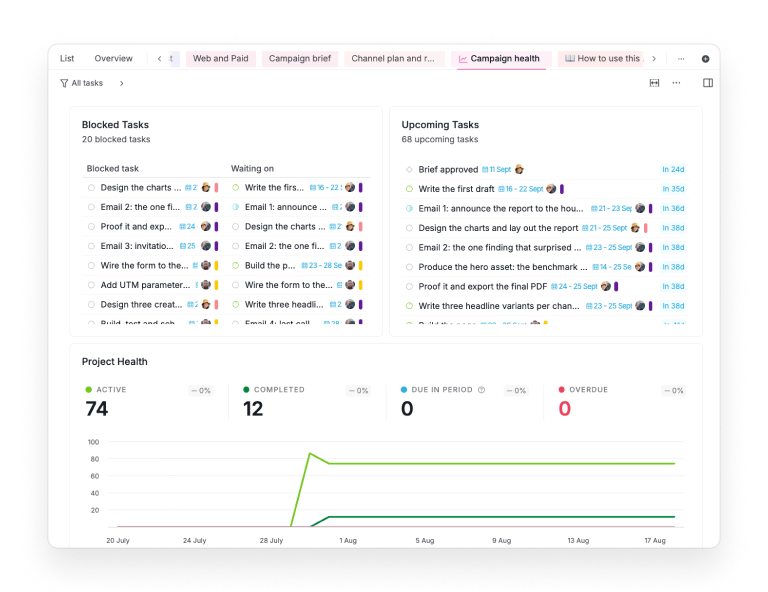
The blocked-tasks widget is the one that earns its place. It doesn't just count what is stuck, it names what each task is waiting on, which turns "why has this not moved" into a question with an answer already attached.
The Insight tab is the numbers one, and it does a different job: it aggregates fields across the whole task list without an export. Switch on Estimate, Target and Actual in the template's Channel plan and results tab, and group by member or by channel.
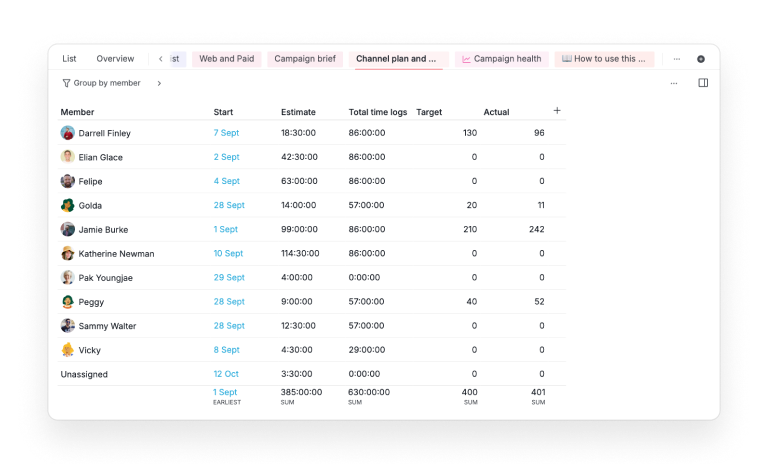
Read the totals row first and the group rows second. In the template's demo data the campaign lands 401 leads against a target of 400, which looks like a clean hit until you see that the mix is wrong underneath it.
The Target and Actual pair is the part worth stealing even if you never touch the template. Put the number you promised on the task that produces the work, then record what actually happened next to it.
A channel sitting at a tenth of its target after seven days is wrong, not warming up. You still have three weeks of budget to move.
The retro then argues with data instead of memory, which is the only version of that meeting anybody learns from.
Reporting on a campaign is the same problem every growing team hits at a larger scale: the coordination tax explains why the effort of explaining the work starts outgrowing the work itself.
What should you change before you use the template?
Three edits, in this order. Give every phase-one task a real named owner, because a task assigned to a function tag belongs to nobody.
Move the go-live milestone to your date and drag the phases around it. Then delete every task you know you won't do, before the plan starts lying to you.
If your marketing is an always-on channel rather than a launch, the weekly version of this structure is in a social media workflow with five jobs behind every post: approval as an owned task and a calendar that shows production, not just publish dates.
Key takeaways
A campaign launch is a coordination problem wearing a marketing costume. The strategy work matters and is rarely what fails; launches break in unowned handoffs, invisible status, and approvals that live in chat.
Six phases with four gates fixes those one at a time: a brief somebody signed, owned and dated production tasks, review with its own dates, a checklist before publish, an owner for the weekly change, and a review that puts the promised number next to the real one.
You don't have to build that from scratch. Duplicate the Marketing Campaign template, fill in the brief, and your next launch starts from a structure that already knows where launches break.
Sign up for Quire and run the whole thing, brief to results, where your whole team can see it.
Frequently asked questions
What should a campaign plan contain?
Six things: the approved brief, an owned and dated task per shipping asset, a per-function view, the approvals that gate go-live, a pre-launch checklist, and a review with real numbers. Quire's Marketing Campaign template arrives with all six built.
What goes on a pre-launch checklist?
Seven yes-or-no checks with owners: page live on the real URL, form delivers to the CRM, asset downloads, tracking fires, UTMs correct, site copy matches the claims, sales briefed. In Quire they live in a Launch-day checklist sublist you work top to bottom.
How do you keep five teams coordinated on one campaign?
One plan, sliced. A Quire sublist per function gives each team a clean queue while every update flows back to the same tree, so nobody maintains a separate status document.
How long does a campaign take to launch?
As long as its slowest dependency. Production sets the pace, approvals add the most unplanned time, which is why review gets its own dated phase instead of being a surprise at the end.
Should you track campaign results in the same place you plan the work?
Yes. Quire's Target and Actual fields sit on the tasks that produced the work, so the channel plan becomes the scoreboard without anyone rebuilding it in a spreadsheet.
How does planning a campaign this way help a team be more productive at work?
It deletes the coordination work that eats production time: chasing status, re-explaining context, reconciling plans. With the brief, assets, approvals and checklist in one Quire project, launch week goes to the launch.
