
workstyle · Sep 22, 2026
Social Media Workflow: 5 Steps, Approvals and a Template
Last updated: October 21, 2026
A content calendar shows the day a post goes out and hides the four jobs that finish first: caption, asset, approval, scheduling. Give each job its own dated task under the post, chain them, and put all of it on the calendar. Quire's social media planning template ships that way, with a Waiting on approval list for the step that delays you.
- Why does a content calendar hide most of the social media workflow?
- Why is one social post never one task?
- Do you need a scheduler or task management software for a social media workflow?
- What comes with the Quire social media template?
- How do you put the social media workflow on the calendar, not just the publish date?
- Where do social media approvals stall, and how do you see it coming?
- What does the charts page tell you at the end of the month?
- How do you adapt the calendar to your own cadence?
- Key takeaways
- Frequently asked questions
Ask a social team what is going out on Thursday and you will get a confident answer. Ask whether the caption has been signed off and you will get a pause, then somebody scrolling back through a chat thread.
A social media workflow is really just the work of closing the distance between those two answers. The date is easy to store, so the calendar holds it with total confidence.
Readiness is stored nowhere, so it gets reconstructed by asking people, which is something nobody thinks to do until the slot has already gone past.
It turns out to be less a discipline problem than a storage one.
Why does a content calendar hide most of the social media workflow?
Social media workflow: the chain of jobs behind a single post, typically write the caption, design the asset, get it approved and schedule it, tracked as separate dated steps. A content calendar records only the publish date, which is why it can read green while the post is not ready.
A content calendar records the day a post publishes, not whether it will be ready. Those are different facts, and only one of them is on the wall.
So the pattern repeats. Monday looks fine because Thursday is three days away. Wednesday afternoon someone checks and finds the asset never got briefed. The post ships late, or it ships without the sign-off, and either way the calendar was green the entire time.
The second cost is quieter, and it is the reason a stalled post is expensive rather than merely annoying. Every time a half-finished post comes back around, whoever picks it up has to reload it: which version was approved, what the hook was, whether the link was swapped.
Researchers at the University of California, Irvine measured exactly this in a study titled, fittingly, The Cost of Interrupted Work. They found that people finish interrupted tasks by speeding up, then pay for it in stress, frustration, time pressure and effort.
A post that gets touched five times is not five minutes of work spread out. It is five reloads.
The mechanic underneath the fix is ordinary nesting: how task bundles and nested tasks work in Quire explains the parent-and-subtask model this whole workflow leans on.
Why is one social post never one task?
Strip a single social post down and there are five things in it, only one of which has ever been on your calendar.
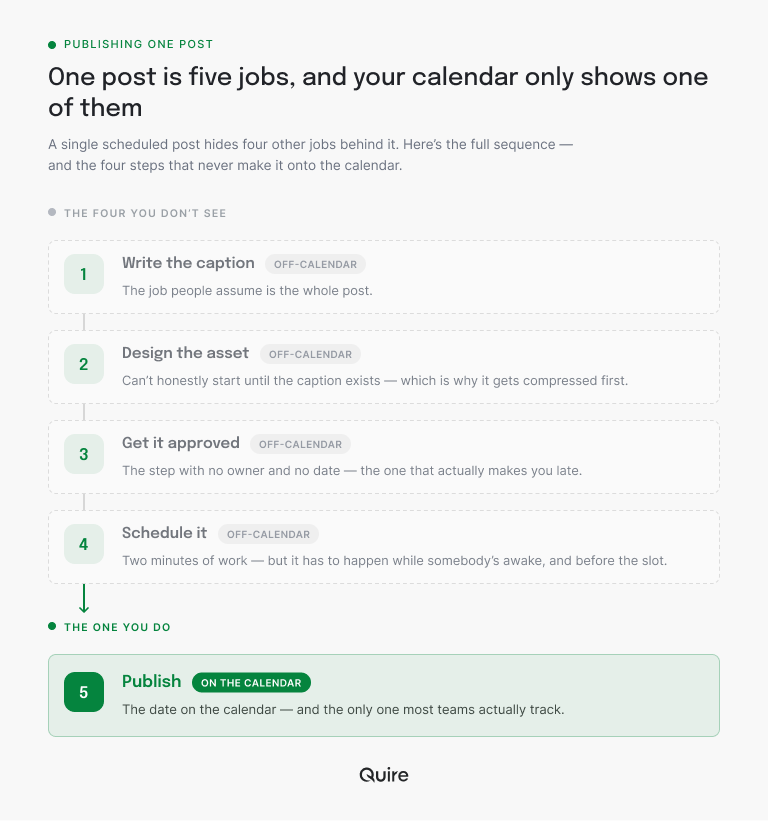
- Write the caption. The job people assume is the whole post.
- Design the asset. Cannot start honestly until the caption exists, which is why it is the first thing to get compressed.
- Get it approved. The step with no owner and no date. More on this below, because it is the one that actually makes you late.
- Schedule it. Two minutes of work that has to happen while somebody is awake and before the slot.
- Publish. The date on the calendar. The only one most teams track.
Four of those five are invisible in a normal calendar. That is the whole problem, stated as plainly as it goes.
In Quire the post is the parent task carrying the publish date, and the four jobs are subtasks with their own owners and their own earlier dates.
The template also chains them as dependencies, so a caption that slips on Monday visibly pushes the asset, the approval and the scheduling instead of quietly eating the buffer nobody admitted was there.
Listing the five jobs is business process mapping at its smallest. If your pipeline has more hands in it than this, that guide covers which map type to draw and the six steps that turn a finished map into faster work.
Do you need a scheduler or task management software for a social media workflow?
Both, and for different jobs: a scheduler owns the last step in the chain, and a work tracker owns the four steps before it. The spreadsheet most teams run the middle from owns nothing, which is why the middle is where the week goes wrong.
| Job behind the post | Spreadsheet calendar | Scheduling tool | Task management software (Quire) |
|---|---|---|---|
| Publish at the slot | A date in a cell | Yes, this is its whole job | The last task in the chain, handed to your scheduler or posted through Quire MCP, CLI or Zapier |
| Caption with an owner and a deadline | A note in the cell, if someone remembers | The final text, once it exists | A dated subtask under the post, assigned to the writer |
| Asset with an owner and a deadline | A link pasted in later | The final file, once it exists | A dated subtask that waits on the caption |
| Approval by a named person | A cell color, if you are lucky | A comment on the draft, in the tools that have one | A task assigned to the approver, collected in a Waiting on approval list |
| A slipped caption moving everything behind it | Nothing moves, and you find out on Wednesday | Nothing moves | Dependencies push the asset, approval and scheduling dates |
| The month read back by channel and stage | A pivot table, rebuilt each time | Publishing stats, after the fact | Charts on the same tasks, no export |
Read the middle four rows and the problem names itself. A scheduler is excellent at the one job it was built for and blind to the rest, and a spreadsheet holds a date per cell and a color if you are lucky.
The rows in between are what task management software exists for, and they are the half of a social media workflow that publishing tools gloss over.
Quire runs the production and hands the finished post to whichever publishing tool you already use, so scheduling stays the last task in the chain rather than a separate system to reconcile. What Quire replaces is the spreadsheet, the chat thread and the three people asking each other where the caption is.
Want the post to go out straight from Quire? The approved caption already sits in a Quire task description. Quire MCP exposes tasks to an AI client and Quire CLI does the same from the terminal, so a script can hand today's caption to Instagram's Content Publishing API. Zapier makes the hop without code.
Two things to know before you start: that API publishes only to Business and Creator accounts, and your image has to be reachable at a URL first.
What comes with the Quire social media template?
Copy it rather than rebuilding it: Quire's social media content planning template is a live project with the structure already in place, using a travel brand as the worked example. Swap the content and the shape holds.
What is in the box:
- Three sections by destination: Articles, Landing Pages and Social Media, so long-form and social live in one plan without being the same thing.
- An eight-stage editorial pipeline as statuses: Brainstorming, On Hold, Drafting, Editing, Ready for Design, Designing, Scheduled, Posted. Ready for Design is the useful one, because it means the copy is signed off and the designer is not guessing.
- A channel tag per platform: Blog, Medium, Third Party Website, Instagram, Twitter, Facebook, Discord. One post adapted to four channels becomes four tagged tasks rather than one vague row.
- A Content Type field separating Blog Post, Landing Page, Social Media and Video, which is what lets you ask how much video you actually committed to this month.
- Posts nested into their jobs, with the caption, asset, approval and scheduling tasks chained in order.
- Three saved views: a Scheduled Calendar, an Editorial Board, and a Waiting on approval list.
- A recurring Monday planning task that walks next week's slots, because a calendar empties quietly.
- A charts page reading the month back, covered further down.
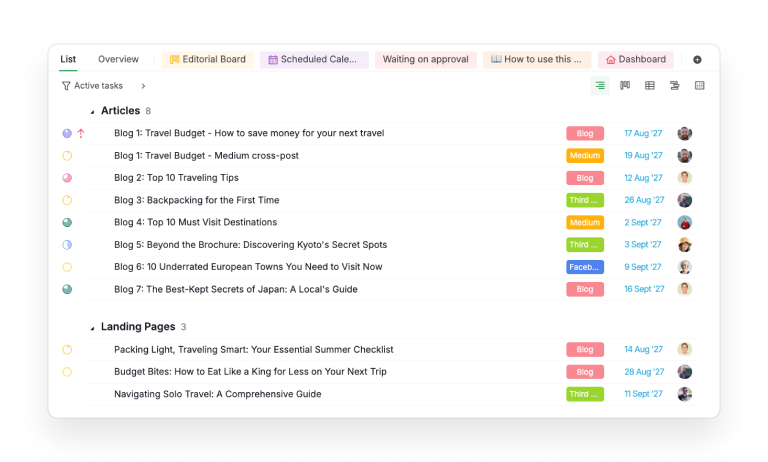
Copying takes one trip through the menu: the dropdown arrow next to the project's name opens More, and Duplicate sits inside it. Then clear the travel content out early, while it is still obviously somebody else's, and keep the statuses, the tags and the views.

This is one of 33 templates in Quire's library; the full roundup of project management templates covers the other 32, grouped by the shape of work each one fits.
How do you put the social media workflow on the calendar, not just the publish date?
Put the jobs on the calendar, not only the posts. Quire's Calendar view draws every task that has a date, and the subtasks have dates. So the caption deadline gets its own square days before the post, the design deadline gets the next one, and finished jobs show struck through as the week fills in.
That changes what the calendar is for. It stops being a publishing schedule you read on the day and becomes a production schedule you read on Monday, which is the only moment the information is still useful.
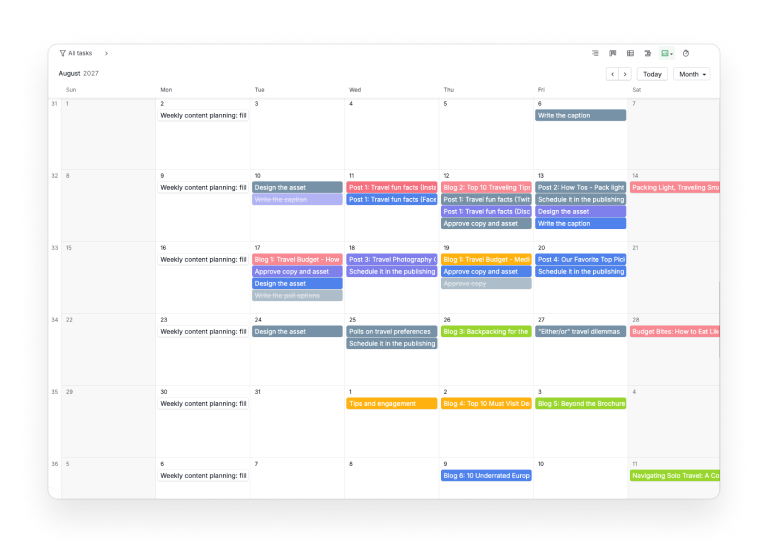
The template's Scheduled Calendar opens in Calendar view rather than as a list, and it covers the articles, the landing pages and the social posts together. Two things fall out of that immediately.
Empty weeks are obvious, because a gap in a month grid is impossible to miss in a way that a gap in a list is not. And a crowded Tuesday is equally obvious, which is usually four channel variants of the same idea landing at once.
Start a free Quire project, put next month's planned posts in with their dates, and open the calendar. The weeks you have not really planned will identify themselves in about ten seconds.
Dates are draggable, which is most of the appeal: how to drag and drop tasks onto your calendar in Quire covers the rescheduling mechanics.
A calendar is one reading of the same tasks, and it has its own failure modes: what a project calendar is for, and when it is the wrong view walks through them.
Where do social media approvals stall, and how do you see it coming?
Approval stalls because it is usually the only step with no owner and no date, so the fix is to make it a task. It ruins content calendars structurally rather than through anybody's fault.
Production tasks have owners because somebody has to make the thing. Approval sits between two people, has no artifact, and lives in a chat message that four people can read without replying.
The template fixes it with three unglamorous moves.
Approval is a task, with a person's name on it and a date before the publish date. Not a status, not a mention, a task somebody is assigned.
The Waiting on approval list is the queue. Everything currently sitting with a reviewer, on one screen. The useful property is length: when that list is longer than a handful, approval has become your bottleneck and every publish date behind it is already fiction.
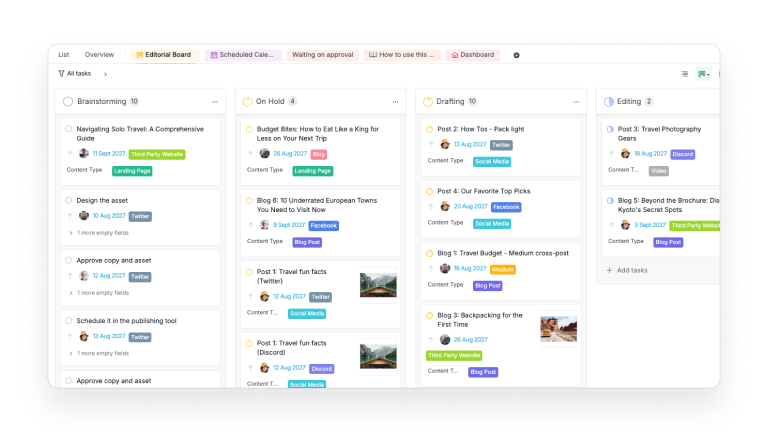
The Editorial Board shows the stage. A Kanban board grouped by editorial status, holding the jobs as well as the posts, so you can watch a pile form at Editing or Ready for Design before it turns into a bad Thursday.
If your sign-off needs to be formal rather than a completed task, Quire has a dedicated feature for it: approvals, for seeking authorization on a task.
What does the charts page tell you at the end of the month?
Where each channel is jammed, which channel you have quietly become, and who is carrying the calendar. The template's charts page, the tab labeled Dashboard, is a Quire document with three charts embedded in it, and it reads the month back rather than forward.
- Post Counts Across Different Platforms, one bar per channel broken down by pipeline stage. This is where a specific channel turns out to be jammed.
- Platform Distribution, the channel split. This is how you notice you have quietly become a Twitter-only brand.
- A per-member count, which is how you notice one person is carrying the calendar.
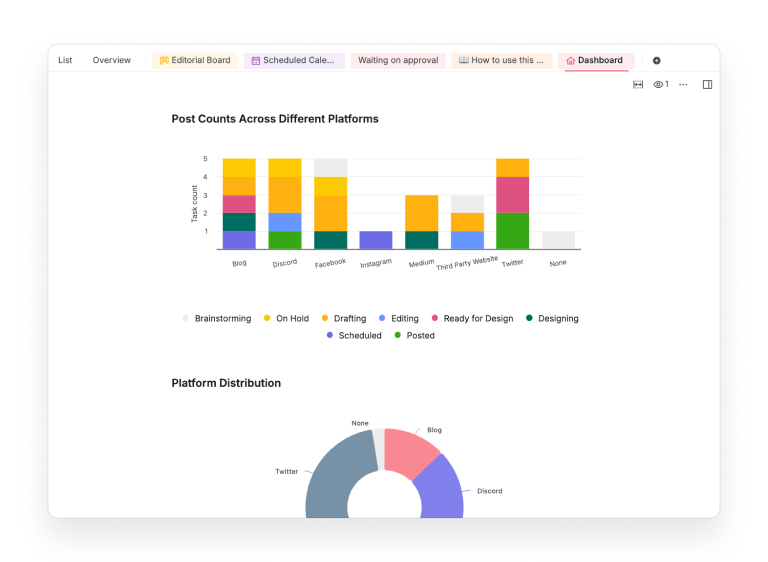
The channel-by-stage chart is the one to look at weekly. A channel with six items all sitting in Drafting is not a busy channel, it is a channel nobody has actually started.
It only works if every task carries its channel tag, subtasks included, or the honest answer hides inside an untagged pile.
How do you adapt the calendar to your own cadence?
Set your real posting rhythm first, then date every job backward from each slot. Every other date hangs off the slot, so the slot goes in before anything else.
Say the post goes out on a Thursday, design needs two days and the caption needs three. Working backward in Quire, the four subtasks under that post get these dates:
- Wednesday, scheduling, assigned to whoever runs the publishing tool.
- Tuesday, approval, assigned to the one person who signs off, so it lands in the Waiting on approval list the moment it is due.
- Monday, the asset, assigned to the designer.
- The Thursday before, the caption, assigned to the writer, five working days ahead of the slot.
Type those dates in once. When the rhythm turns out to be wrong, drag them, and the chain between the jobs keeps the order honest while you do.
Keep the recurring Monday task, since it is the thing that stops the whole plan going quietly empty in November. It is the same move as replacing the status meeting with a written update: the plan gets checked on a rhythm rather than when somebody panics.
If the calendar is for a launch rather than an always-on channel, the campaign version of this structure, with phases and gates instead of a weekly rhythm, is in how to launch a marketing campaign.
Content production is cross-functional work on a weekly loop, writer to designer to approver: the cross-functional project management playbook covers the ownership and handoff layers this calendar leans on.
Key takeaways
A social media workflow breaks in the four jobs a calendar cannot see. Give the caption, the asset, the approval and the scheduling their own owned and dated tasks under each post, chain them so a slip is visible, and let the calendar draw all of it rather than only the publish date.
Then make approval a task with a name on it, because it is the step that decides whether Thursday happens. Let Quire hand the last job to your scheduler, and put the four before it where they can be seen.
Copy the social media planning template, put next month's slots on the calendar, and see which weeks are honestly planned. Sign up for Quire and run the production where the deadlines already live.
Frequently asked questions
What is a social media workflow?
The sequence a post runs through before it publishes: idea, caption, asset, sign-off, scheduled slot. Quire's template gives each of the earlier jobs its own dated task under the post, so the sequence is visible rather than just its deadline.
What should a social media content calendar show?
More than publish dates. Quire's Calendar view draws every dated task, so caption and design deadlines appear on their own days, which is how you catch a Thursday problem on Monday.
Why do social media approvals always run late?
Because approval is usually the only step with no owner and no date. The template makes it an assigned task and collects everything pending in a Waiting on approval list.
How many tasks should one social post be?
One parent for the publish date, plus one per job that must happen first, usually four. In Quire they sit as subtasks chained as dependencies, so a slipped caption moves what follows.
How does running content this way help a team be more productive at work?
It removes the chasing: no hunting for captions, no rebuilding the calendar in a spreadsheet, no unapproved post discovered on publishing morning. That reclaimed time goes into being productive at work on the content.
