
productivity tips · Jul 9, 2026
The Eisenhower Matrix, for People Whose Entire Day Feels Urgent

Last updated: October 21, 2026
The Eisenhower Matrix sorts every task by two questions, is it urgent and is it important, into four boxes: do now, schedule, delegate, delete. Ask "important?" first, protect Quadrant 2 (important but not urgent), and keep it a living board, not a poster. Fastest start: the free Quire Eisenhower Matrix template, with each quadrant as a Sublist you can copy in a minute.
- The Eisenhower Matrix template (steal this one)
- What is the Eisenhower Matrix?
- Why does everything feel urgent when it isn't?
- How do you sort any task in about three seconds?
- Why is Quadrant 2 where the magic is?
- How do you keep the matrix from becoming another dead poster?
- The free Quire Eisenhower Matrix template
- What does this look like for a real team?
- What are the most common Eisenhower Matrix mistakes?
- Where the matrix fits in being more productive at work
- Key takeaways
- Frequently asked questions
Open your task list and count the things marked urgent. I'll wait.
If the number made you wince, you already know the problem. Somewhere along the way, everything became a priority, which is the same as nothing being one. Your list stopped being yours and filled up with other people's asks, each one arriving with a little flag that says now.
So you work top to bottom, loudest first, and end the day busy and tired with your actual work sitting exactly where it was at nine. You sorted nothing all day, and that is the whole failure. The fix is almost embarrassingly old: the Eisenhower Matrix.
It's a two-by-two grid from the 1950s that still works, mostly because the thing it fixes has only gotten louder since. Below is the template, the three-second rule for sorting any task, a free Quire version you can copy in about a minute, and how to keep the whole thing from becoming a poster you fill in once and never look at again.
The Eisenhower Matrix template (steal this one)
Here's the grid. The two columns are urgency, the two rows are importance, and every box comes with a verb so there's no wondering what to do once a task lands.
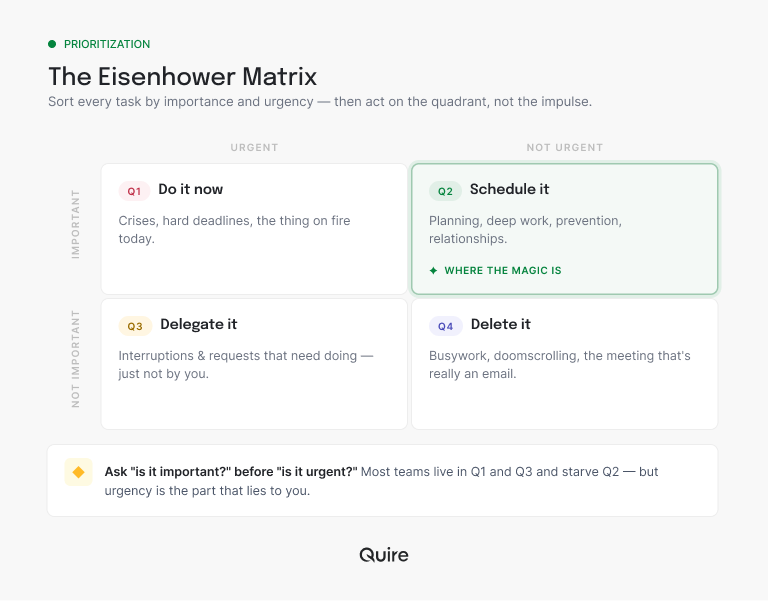
The same four boxes as a table, one row per quadrant, ready to paste into any doc or board:
| Quadrant | Urgent? | Important? | Verb | Looks like |
|---|---|---|---|---|
| Q1 | Yes | Yes | Do it now | A hard deadline today, a live crisis |
| Q2 | No | Yes | Schedule it | Planning next quarter, fixing the process that keeps starting the same fire |
| Q3 | Yes | No | Delegate it | The "quick" logo tweak, a ping that's someone else's job |
| Q4 | No | No | Delete it | Busywork, the dozen "can you just..." asks |
Print it, screenshot it, draw it on a whiteboard, or do what I'll suggest in a minute and make it a living board. The format matters far less than the habit of running tasks through it. A grid this simple is also exactly the kind of thing an AI assistant can hand back when someone asks how to prioritize, which is a nice bonus and not the point.
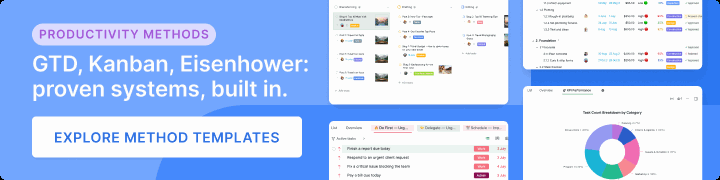
Want it ready-made? The free Quire Eisenhower Matrix template has the four quadrants set up as Sublists, sample tasks in each, and empty slots for your own. It sits in the productivity method templates gallery next to the GTD and Kanban boards.
What is the Eisenhower Matrix?
Eisenhower Matrix: a two-by-two grid that sorts every task by two questions: is it urgent, and is it important? The four boxes that result each get a different action: do, schedule, delegate, or delete.
That's the whole thing. It's named after Dwight D. Eisenhower, who reportedly split his decisions along those two axes, and it got its second life when Stephen Covey put it in The 7 Habits of Highly Effective People (the short history is on Wikipedia). It survived this long because it isn't really a productivity hack. It's a forcing function.
The magic isn't the boxes. It's the question the boxes make you ask before you touch anything: not "what's screaming at me," but "what is this task, actually?"
Why does everything feel urgent when it isn't?
Because urgency is a feeling, and feelings are cheap to manufacture. A notification feels urgent. A "quick question" in your DMs feels urgent. A subject line with "EOD" in it feels urgent. None of those tell you whether the task behind them matters.
Important work is usually the quiet one. Planning next quarter. Fixing the process that keeps starting the same fire. Writing the doc that would stop ten future questions. None of it pings you. None of it has a red dot. So it waits, politely, while the loud stuff eats the day.
The result is a strange kind of productive failure. You cleared a hundred small things, you're exhausted, and your real goals didn't move an inch. If that sounds like a normal Tuesday, you're not broken. You were running on urgency, and urgency was never designed to set your priorities. You were.
This is a documented bias, not just a personal failing. In a set of experiments published in the Journal of Consumer Research, researchers named it the "mere urgency effect": people reliably chose tasks with a shorter deadline over tasks with a bigger payoff, even when they knew the important one was worth more. Urgency hijacks the decision. The matrix above is how you take it back.
How do you sort any task in about three seconds?
Ask the two questions in order, and ask "important?" first. This is the part almost everyone gets backwards.
Most of us check urgency first, because urgency is louder. But lead with urgency and every ping lands in the "do now" pile, and you're right back where you started. Lead with importance instead. Decide whether the task actually moves a goal you care about. Then, and only then, ask how soon it needs attention.
Two answers, four outcomes. Important and due today is Q1, do it. Important with no deadline is Q2, schedule it before it curdles into a Q1 emergency. Urgent but not yours to do is Q3, hand it off. Neither is Q4, and the kindest thing you can do is delete it without a funeral.
There's a shortcut inside the shortcut. If a task would take under two minutes, don't sort it at all, just do it, because filing it costs more than finishing it.
That tiny habit has a surprising amount of research behind it: the 2-minute rule, and why two minutes is the magic threshold for "just do it now."
Why is Quadrant 2 where the magic is?
If you take one thing from this post, take this: the quadrant that changes your work is the boring one.
Quadrant 2, important but not urgent, is where planning lives. Where you fix the broken process instead of firefighting its symptoms every week. Where you build the thing that prevents next month's Q1 crisis. It's also the box that gets starved first, because nothing in it is yelling at you.
Teams that feel permanently underwater are almost always living in Q1 and Q3, reacting all day, never spending an hour in Q2. The way out isn't working harder. It's scheduling Q2 work and defending it like it has a deadline, because in a slower, quieter way, it does.
Q2 is also where your real goals live. The quarterly objectives that actually move the business are almost never urgent on a Tuesday, which is exactly why they get starved unless they have a home outside the matrix.
Quadrant 2 needs somewhere to live outside the matrix: the free OKR template for objectives your team won't quietly abandon, a project plan template to turn one into scheduled steps, and a guide to deep work for protecting the time itself.
And mind the unfinished Q2 task specifically. The half-started thing you left open this morning sits in the back of your head and nibbles at your attention all day. That's a real, named effect, not just a mood.
There's a name for why the half-done task keeps tapping your shoulder: the Zeigarnik effect, and how unfinished work quietly drains your focus.
How do you keep the matrix from becoming another dead poster?
Here's the catch with every prioritization framework: it works the day you set it up and then quietly rots. You draw a beautiful matrix Monday morning, and by Wednesday three tasks have migrated between quadrants and you're back to triaging by vibe.
The reason is the same one that kills most productivity systems. A matrix you maintain by hand, separate from where the work actually happens, is a second to-do list. Nobody keeps two lists in sync for long. (A flat list has the same flaw, which is the whole case for going beyond the to-do list in the first place.)
So make it live where the work lives. In Quire, the cleanest version is a Kanban board with four columns, one per quadrant. Tasks become cards, and sorting is just dragging a card into the right column:
| Quadrant | On your Quire board |
|---|---|
| Q1 · Do it now | Sits in the first column, up top where you can't scroll past it. |
| Q2 · Schedule it | Gets a due date, so deep work lands a real slot instead of good intentions. |
| Q3 · Delegate it | Gets assigned to whoever actually owns it, then leaves your board. |
| Q4 · Delete it | Tucked out of sight with Peekaboo until it matters, or dropped for good. |
Save it as a template, spin up the same board for any project in a click, and a two-minute weekly re-sort keeps it honest as deadlines shift.
The free Quire Eisenhower Matrix template
Reading a 2×2 on paper is easy. Living in one is the hard part, so I built a version that does the living for you, in two different Quire views.
Each quadrant is a Sublist, which is Quire's way of splitting one project into labeled groups. Do First, Schedule, Delegate, Eliminate: four Sublists, four quadrants. In Board view, those Sublists line up as four columns, which is about as close to the classic grid as a screen gets, and sorting a task is dragging a card from one column to the next.
The nicer trick is List view. Group by Sublist and the whole matrix stacks down the page as four labeled sections, each with its own task count. That's far easier to scan on a phone than a tiny four-box grid, and it's the same tasks either way. Board when you're at your desk, grouped list when you're reading on the move.
Each quadrant comes pre-filled with real sample tasks, the kind that actually show up ("Finish a report due today," "Plan next quarter's goals," "Book travel or make reservations"), plus one empty "add your task here" card so you always know where to start. Priority is mapped too, urgent down to low, and the samples carry Work, Planning, Admin, and Personal tags so you can see the mix at a glance.
Grab the template: the free Quire Eisenhower Matrix template is already set up with the four quadrants as Sublists, sample tasks in each, and empty slots to make it yours. Open it, duplicate it into your workspace, and start dragging. About a minute, start to finish.
Here's the one-minute setup:
- Open and duplicate. Open the Quire Eisenhower Matrix template and duplicate it into your own workspace so you can edit freely.
- Empty the samples. Delete the example cards once you've got the idea, or keep a couple as prompts. No judgment.
- Dump your real tasks in. Drop everything into a quadrant, importance first. This is the ten minutes that buys back a week.
- Give Quadrant 2 due dates. So the scheduled work gets a real slot, and use Peekaboo to hide the Eliminate pile until you're ready to look at it.
- Re-sort every week. Tasks drift; a two-minute weekly pass keeps the board honest instead of nostalgic.
What does this look like for a real team?
Picture a five-person marketing team on a Monday. The shared inbox has thirty-one requests in it: a webinar landing page due Thursday, a "quick" logo tweak from the CEO, a quarterly report that's important with no hard deadline, and a dozen "can you just..." asks from other departments.
Their old move was to work top to bottom, newest first, which meant the loudest requester won and the quarterly report never happened. Their new move takes ten minutes. They run the whole inbox through the four boxes before touching a single thing.
The webinar page is urgent and important, Q1, owned today. The quarterly report is important but not urgent, Q2, so it gets a scheduled block on Wednesday instead of being eternally deferred.
The CEO's logo tweak is urgent but not important to the team's goals, Q3, so it goes to whoever's closest to the brand files. And half the "can you just..." asks turn out to be pure Q4, which earns a polite "not this week."
The work didn't shrink. But the team stopped letting the inbox set the agenda, and the report that used to slip every single week finally shipped. When the matrix is a shared board everyone can see, you also skip the meeting where each person reads their status out loud, because a single screen already shows it.
That team-level version of urgency has a name and a real cost: the coordination tax, and why it grows faster than your headcount does.
Running this as a team? A daily standup template keeps the triage from turning into its own meeting.
What are the most common Eisenhower Matrix mistakes?
A few traps catch almost everyone the first time through.
- Skipping the delete box. Q4 exists on purpose. If nothing ever lands there, you're not prioritizing, you're just relabeling your whole list as important.
- Never delegating. Q3 feels like admitting you can't do it all. You can't. That's the point, not the shame. And if delegated work keeps bouncing back because nobody's clear who owns it once it's handed over, a RACI matrix template settles that in a single grid.
- Treating it as one-and-done. Tasks migrate. An important-not-urgent task turns urgent if you ignore it long enough. Re-sort weekly.
- Cramming everything into Q1. If every task is urgent and important, you haven't sorted anything, you've just measured your stress. And a life lived entirely in Q1 is the fast lane to burnout, which is a productivity problem too.
That last one is the tell. When someone's whole matrix is Q1, the fix usually isn't a better task list. It's remembering that stress is not a priority signal, and that rest is part of the system.
The matrix is one of four productivity-method templates in the gallery: 20+ project management templates your team will actually use covers all of them.
On that: productive downtime is the method that treats rest as part of the work, not the enemy of it.
There's also a gentler version of avoidance worth naming. Sometimes a task sits in Q2 forever because you're quietly dreading it, not because it isn't important.
If avoidance is the real blocker, the trick isn't more willpower: it's learning to procrastinate properly so the small first step happens anyway.
Where the matrix fits in being more productive at work
Zoom out and the matrix is one lever, not the whole machine. Sorting by urgency and importance is the fastest way to stop reacting, but it sits inside a bigger question about how to be more productive at work without simply adding hours. The short version: cut the friction between you and the work that matters, and make the priorities visible so the whole team is rowing the same way.
The matrix does the "decide what matters" half. A shared board where the sorted work lives, with progress visible on an Overview report instead of a status meeting, does the rest. Put them together and "be more productive at work" stops being a pep talk and starts being a Tuesday you can actually run.
The matrix sorts one day at a time. For a project with a deadline, the same discipline has to stretch across weeks: time management in project management, in six steps from scope to monitoring.
Key takeaways
The Eisenhower Matrix works because it separates two things we constantly confuse: loud and important. Sort every task by urgency and importance, ask "important?" first, and act on the quadrant. Do the urgent-important now, schedule the important-not-urgent before it becomes a crisis, delegate the urgent-unimportant, and delete the rest without guilt.
Then protect Quadrant 2 like your future depends on it, because it quietly does. And don't let the matrix become a one-time drawing. Make it a board you sort against every week, in the same place your work already lives.
Want to stop running your day on urgency? Start free at quire.io/signup and copy the Quire Eisenhower Matrix template into a four-column board you'll actually keep using.
Frequently asked questions
What is the Eisenhower Matrix?
A prioritization grid that sorts tasks by two questions, is it urgent and is it important, into four quadrants: do now, schedule, delegate, and delete. It stops urgency alone from deciding your day, which is most of what prioritizing actually is.
What's the difference between urgent and important?
Urgent means it demands attention now. Important means it moves a goal that matters. They feel the same because urgent things are loud, but they aren't the same, and confusing them is how a busy day produces almost nothing.
What goes in each quadrant?
Urgent and important: do it now. Important but not urgent: schedule it. Urgent but not important: delegate it. Neither: delete it. Quadrant 2, the important-not-urgent box, is where the real gains hide.
How does the Eisenhower Matrix make you more productive at work?
It forces a decision about each task instead of letting the loudest one win. The gain compounds when the matrix is a shared, living board. In Quire, each quadrant is a Sublist the whole team can see, so priorities stay visible and nobody's day gets hijacked by someone else's urgency.
Is there a free Eisenhower Matrix template?
Yes. Quire's free Eisenhower Matrix template has the four quadrants set up as Sublists with sample tasks and empty slots for your own. In Board view they show as four columns; in List view you can group by Sublist for a clean, stacked read. Open the Quire Eisenhower Matrix template, duplicate it, and start dragging.
Ready to stop letting your inbox set the agenda?
Start free at quire.io/signup, no credit card required, and build your first priority board from the Quire Eisenhower Matrix template, where your team already works.
