
project management · Jul 14, 2026
The Project Plan Template That Doesn't Fall Apart in Week Two

Last updated: October 21, 2026
A real project plan has seven sections: scope, milestones, tasks, owners, timeline, dependencies, and risks. Build them in that order, let the dependencies decide the dates, and give every task exactly one owner. Then keep the plan where the work actually happens, so it updates itself instead of going stale by Friday. The full project plan template, and a worked example, are below.
- What is a project plan, and what isn't it?
- Why do most project plans fall apart by week two?
- The project plan template: seven sections that hold
- What goes in each section of the project plan?
- How do you build a project plan step by step?
- How do you keep a project plan in sync with the work?
- What does a filled-in project plan template look like?
- What are the most common project plan mistakes?
- Key takeaways
- Frequently asked questions
Open the plan you made at kickoff. Really open it, three weeks in. The dates are wrong, two people have quietly swapped tasks, and a dependency nobody drew has been holding up the launch since last Tuesday. The document looks pristine. The project it describes stopped existing days ago.
A project plan template is supposed to survive contact with a real week. Most don't. They get written with care, admired at kickoff, and abandoned by week two, and it's rarely because anyone planned badly. It's because most plans are built like documents when they need to behave like systems. A document sits still and waits to be updated by hand. Your project does not.
This is a project plan template built for how projects actually move: the seven sections a plan needs (the skipped ones are always where it breaks), the order to build them in, a worked example, and the part most templates skip, which is keeping the plan honest once real work starts hitting it.
What is a project plan, and what isn't it?
Project plan: the working document that says what you're building, who owns each piece, in what order the work happens, and by when.
Seven sections carry all of it: scope, milestones, tasks, owners, a timeline, dependencies, and risks.
Separate it from its two lookalikes. The charter is the why, the one-pager that convinced someone to fund this. The schedule is the when, and only the when. The plan sits between them and holds what both leave out: who owns what, what blocks what, and what you'll do when something slips.
A list of dates with no owners and no dependencies isn't a plan. It's a countdown.
It gets confused with three neighbors, the charter, the schedule, and the Gantt chart. Here's how they actually differ:
| Document | What it answers | How it relates to the plan |
|---|---|---|
| Project charter | Why the project exists, and who's funding it | Comes first; the plan turns it into actual work |
| Project plan | Who owns what, in what order, by when, and what could go wrong | This is the whole thing |
| Project schedule | What's due, and when | A slice of the plan, the dates without the reasons |
| Gantt chart | What the timeline looks like at a glance | One view of the plan's schedule, live or stale |
A plan is one stage inside a longer arc: what the project life cycle is, and the five phases explained, so you can see where planning sits before kickoff and after it.
Why do most project plans fall apart by week two?
Two reasons, and they feed each other.
First, the plan usually lives where the work doesn't. It's in a slide deck or a spreadsheet, while the actual work happens in a task tool, in chat threads, and in people's heads. Someone has to reconcile the two by hand, every week, forever. That job gets skipped the first busy Monday, and the plan starts drifting exactly when it matters most.
That reconciliation overhead compounds as teams grow: the coordination tax, and why bigger teams spend more time reporting on the work than doing it.
Second, most plans are built dates-first. Someone names a launch date in a meeting, then works backward, packing tasks into the gaps like an overstuffed suitcase. The estimates run sunny by default: in a classic planning-fallacy study, students predicted a thesis would take about 34 days, and it took 56. It looks convincing right up until the first dependency nobody spotted tips the whole thing over.
A plan built dates-first isn't a forecast. It's optimism formatted as a table.
The project plan template: seven sections that hold
Here's the template: seven sections, each earning its spot, with a note on where each tends to crack.
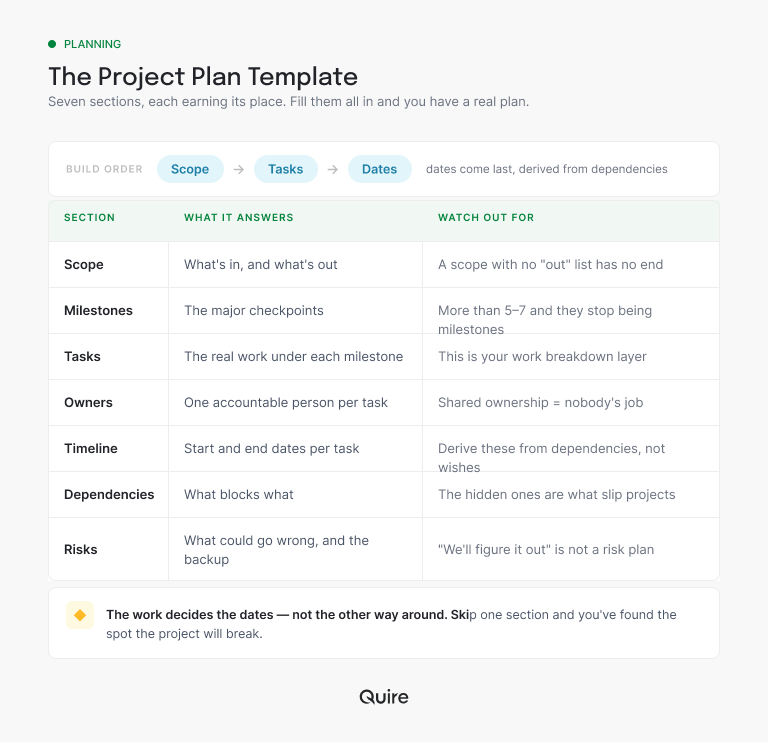
Twelve sections and five are decoration. Four sections and one of the missing three is where your last project cracked. (You already know which one.)
What goes in each section of the project plan?
The list explains itself once it's laid out, so it's worth dwelling on only the section that quietly sinks the most plans: owners. One name per task, not a team, not a pair, because each owner assumes the other one has it.
Role clarity is scarcer than you'd think: Gallup finds that fewer than half of employees strongly agree they know what's expected of them at work. One accountable name is the smallest fix for the biggest source of dropped work.
When a deliverable genuinely needs more than one name on it (someone doing the work, someone advising, someone only kept in the loop), a RACI matrix template splits those roles apart without giving up the single accountable owner.
The other half of the trouble is order. Dependencies lead the timeline, not the reverse, so map what blocks what before you touch a calendar, because most slipped launches trace to an undrawn arrow, not a slow task. Milestones, meanwhile, are the checkpoints you'd put in a stakeholder update, and the work nested beneath them is your work breakdown structure.
Picking which four to six is the harder part: how to set project milestones and how many a project needs shows how to tell a real decision point from a date on a calendar.
Dependencies deserve more than a footnote: the four types of task dependencies and how to manage them, from picking the right link to keeping the map true after kickoff.
The budget section is the one most plans leave as a single number: project budget tracking, three numbers per line and a template turns it into lines you can act on.
How do you build a project plan step by step?
In one order only: scope, milestones, tasks, owners, dependencies, and dates dead last.
Start from done. Set the few milestones that lead there, break each into nested tasks until every item has a natural owner, and give it exactly one. Draw the "this can't start until that finishes" arrows. Only then lay it on a timeline, and let the dates fall out of the order the work demands.
Notice what never happens: nobody picks the launch date first and reverse-engineers the work to fit it. If the dates your dependencies produce don't match the date leadership wants, you've learned that in week zero instead of week five, while it's cheap to fix. That one conversation is most of the return on planning.
You'll still miss a dependency somewhere. (Everyone does.) The goal was never a perfect map. It's a plan that absorbs the miss without falling over.
Once the order is settled, the dates need a shape: how to create a project timeline, with the four types compared and a 12-week example to copy.
How do you keep a project plan in sync with the work?
This decides whether your plan is alive in week six or a museum piece by week two. The answer is blunt: stop keeping two versions of the truth. A plan maintained in a deck, separate from the work, is a second job nobody was hired for. A plan built where the team executes updates itself, because doing the work and updating the plan become the same click.
Here's the one product paragraph, and it's really a workflow. In Quire, the plan is a nested task list: milestones up top, tasks and sub-tasks underneath, each with one assignee and a due date.
Switch to the Timeline view and those same tasks become a living timeline, with dependencies as drag-and-drop arrows. When a task slips, the downstream dates recalculate on their own, which is exactly when a static Gantt chart starts lying. Check off a task, and the plan is current. Nobody reconciles anything on Friday.
A static Gantt chart goes stale the moment reality moves: why a modern timeline beats the traditional Gantt chart, and what "living" actually means in practice.
Related: A Daily Standup Template That Survives Contact With a Real Team — the daily ritual that catches a slipping plan before Friday's status meeting has to.
Two pieces sit outside the timeline and get a home of their own: scope lives as a short doc in the project, so nobody can claim they never saw it, and risks get their own sublist, each with an owner and a one-line fallback. When the project ends, save the whole structure as a template, and the next kickoff starts from a proven skeleton in one click instead of a blank page.
The risks section of your plan deserves more than a one-line fallback per worry: the risk register template shows how to score each risk by likelihood and impact, hand it an owner, and keep the list alive past kickoff.
What does a filled-in project plan template look like?
Take a six-week product launch, the kind a five-person marketing team runs a few times a year.
Scope, in: a launch campaign across website, email, and social. Out: a rebrand and any new landing-page platform, the two requests most likely to arrive dressed up as launch work.
Milestones, four: messaging locked, assets produced, channels loaded, launch day. Each is a sentence you'd happily send a stakeholder, which is the test.
Tasks nest under each. "Assets produced" breaks into the launch page, the hero video, and three emails, and each email into draft, review, and final. Every task gets one owner: the copywriter owns the emails, the designer owns the hero, and nothing is owned by "the team."
The dependencies do the honest work. Assets can't start until messaging is locked, and channels can't load until legal signs off, which (say it with me) takes twice as long as promised. So the timeline falls out of that chain, not out of someone's favorite Tuesday. The risks section already has legal's pace written down, with the fallback: submit copy in week two and name a backup approver now.
Total setup: one focused afternoon. Weekly maintenance, if the plan lives with the work: close to zero.
If you would rather start from something ready-made, 20+ project management templates your team will actually use lists every one in Quire's gallery with what it contains.
Related: The OKR Template Your Team Won't Quietly Abandon by Q2 — for when the milestones above need to roll up into a quarterly objective leadership is tracking.
What are the most common project plan mistakes?
The post-mortem hall of fame:
- Dates first. A deadline set before the dependencies are drawn is a guess with good posture.
- No "out" list. Leave scope open-ended, and week six will draw the boundary for you.
- Shared ownership. Two names on a task, and each one waits for the other to move.
- Invisible dependencies. The block you forgot to map is the one that moves the launch date.
- The frozen plan. Immaculate, last touched at kickoff, describing a project that moved on without it.
That last one is the quiet killer, and it's rarely about discipline. It's friction. If updating the plan is a separate chore, it loses to real work every time. Make them one action, and the plan stays true without anyone being a hero about it. I say this as someone who has saved a document called "final" more than once, and been wrong every time.
The bigger the team, the more weight the plan carries: project management for growing teams, the scale-aware playbook for when headcount outgrows the whiteboard.

Key takeaways
A project plan is seven sections: scope, milestones, tasks, owners, timeline, dependencies, and risks. Build them in that order, let the dependency map produce the dates, and give every task exactly one name. Then keep the only copy where the work happens, so finishing a task and updating the plan are the same click. That's the whole difference between a plan alive in week six and one that was right for exactly one Monday.
The next step is small. For the project you're kicking off this month, build the plan as nested tasks with dependency arrows instead of slides. Start free at quire.io/signup, set it up in an afternoon, and save it as a template so the next one takes ten minutes.
Frequently asked questions
What is a project plan?
The working document that says what you're building, who owns each piece, in what order, and by when, across seven sections: scope, milestones, tasks, owners, timeline, dependencies, and risks.
What should a project plan include?
Scope with an explicit "out" list, four to six milestones, nested tasks, one owner each, a timeline, dependencies, and top risks with fallbacks.
How do you create a project plan step by step?
Work backward from done: scope, milestones, nested tasks, owners, dependencies, then dates last, derived from the dependency order rather than picked in a meeting.
What's the difference between a project plan and a project schedule?
The schedule is only the dates; the plan adds what explains them (scope, owners, dependencies, risks), so it can say why something slipped and what it blocks.
What's the difference between a project plan and a Gantt chart?
A Gantt chart is one view of a plan's timeline, and a static one goes stale the moment a date moves; in Quire, the timeline reads from live tasks and recalculates when something slips.
How does a project plan make a team more productive?
It removes the coordination overhead (who owns what, the order, reconciling documents with reality), and when the plan lives where the team executes, like in Quire, updates happen as a side effect of the work.
