
project management · Nov 19, 2026
The Project Communication Plan: Who Hears What, Through Which Channel

Last updated: November 19, 2026
A project communication plan is a table with five columns: audience, message, channel, cadence and owner, and the owner column is the one most plans leave out. Sponsors hear from you every two weeks in writing, the doing team weekly where they already work, the neighboring team whenever a date they depend on moves. In Quire the plan is one task per send, with an assignee, a repeat and an approval trail, laid out as the matrix in Table view, so the plan and the sending can't drift apart.
- What is a project communication plan?
- What are the columns of the communication matrix, and which one gets skipped?
- How often should each audience hear from you?
- What comes with the Quire Communication Plan template?
- Slide deck, wiki page or task management software: where should the plan live?
- How does a project communication plan run in Quire, end to end?
- Which parts of the plan should you rewrite after you copy it?
- Key takeaways
- Frequently asked questions
"Did you tell the client the date moved?"
"I thought you did."
Idris runs the build. Rhys runs the account. Both of them knew the launch had slipped a week, both assumed the other had passed it on, and the client found out from the invoice. (The invoice, to its credit, was on time.)
Nothing in that project was undocumented. The slip was on the board, the reason was in a comment, the new date was on the timeline. What didn't exist was a project communication plan: the one page that says who hears what, through which channel, how often, and, the part everybody skips, who does the telling.
That page is what this post builds. First the columns of the plan and the one that keeps going missing, then a cadence for each audience, then how it runs inside task management software, where the sends recur and the owner's name is on every row.
What is a project communication plan?
Project communication plan: a short, agreed table that lists every audience a project has to keep informed, what each one needs to hear, through which channel, how often, and which named person sends it.
A project communication plan is a table, and the table has an owner column. Everything else about it is detail. It's built once at kickoff, lives next to the project rather than inside anyone's head, and gets revised when an audience stops reading.
The plan does a different job from the update itself. Stakeholder Updates Without the Status Meeting covers writing the update that replaces the status call. This post is one step earlier: who receives that update, on what rhythm, and who's on the hook to send it. That one is the message, this one is the routing.
Two phrases get mixed in here. A communication matrix is the grid itself, one row per communication. A stakeholder communication plan is the same grid with the emphasis on the people outside the doing team: sponsors, neighboring departments, the client. In practice they're one table, and this post treats them as one.
Some teams call the whole thing a project management communication plan. Same table, longer name.
Why does a project with a perfectly good board still need this? Because a board tells you the state of the work. It doesn't tell Rhys that the state changed, unless somebody decided in advance that Rhys hears about slips, through which channel, and from whom.
The moment a slip has to travel from one team to another is exactly where cross-team projects break. The Handoff Gap maps where that happens and how to make the handoff a first-class task.
What are the columns of the communication matrix, and which one gets skipped?
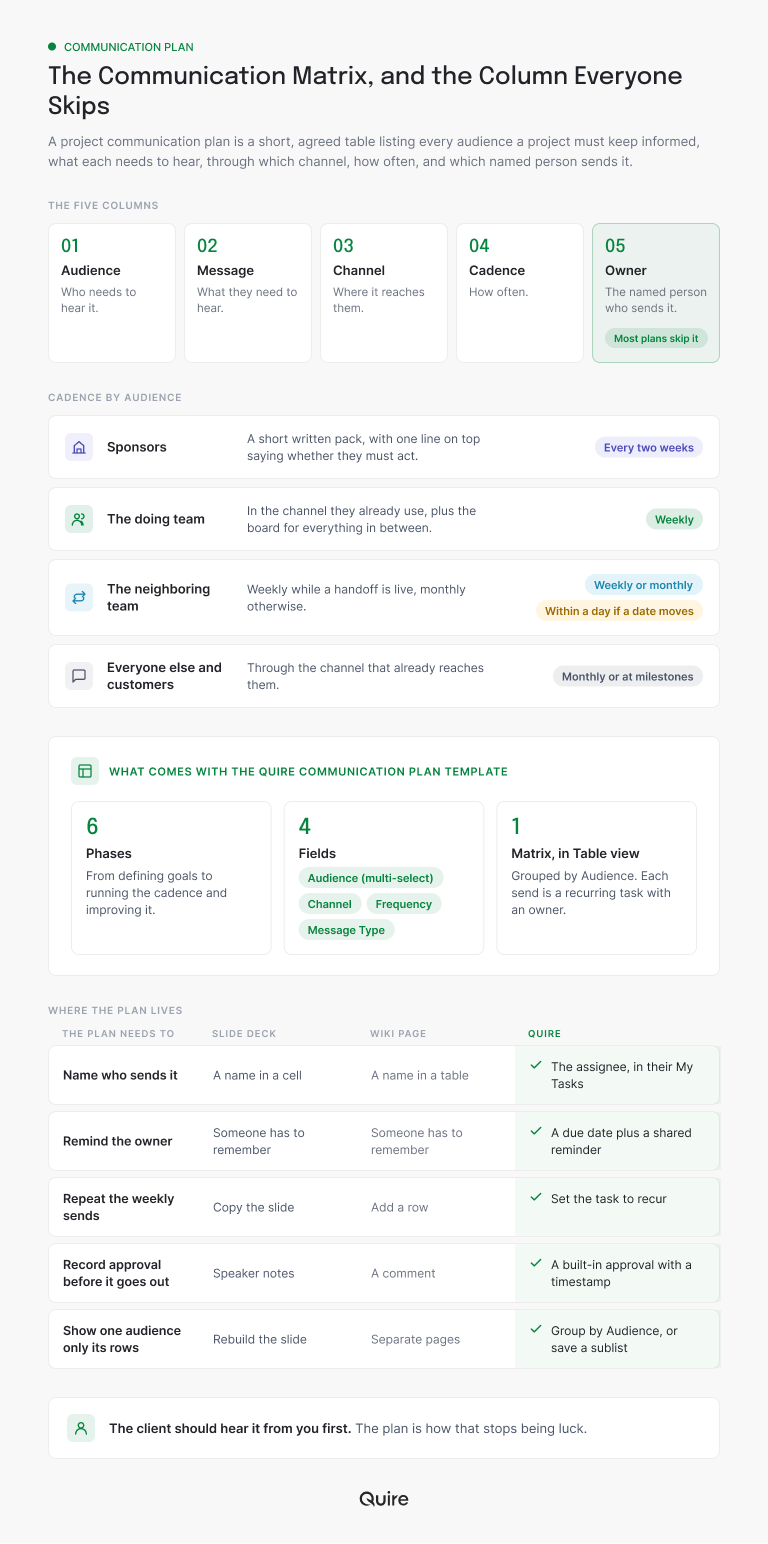
Audience, message, channel, cadence, and then a fifth column, the owner, which most plans leave out. Templates you find online usually stop at four because four looks complete. It isn't.
Take the columns in order.
Audience is a group that needs the same thing, not a list of names. Executive sponsors want risk, cost and the decisions waiting on them. The core team wants scope, blockers and dependencies. The neighboring team, the one your work lands on, wants handoff timing and what changes for them.
Three audiences, three messages, and the usual mistake is sending all three the same one.
Message is what they hear, written as a type: a status update, an announcement, a decision request, an escalation, a report. Naming the type stops the weekly update from turning into a decision request in paragraph four, where nobody will find it.
Channel is where it lands, and the honest rule is: where they already look. A sponsor who lives in email won't read a board. A team that lives on the board won't read a newsletter. The channel serves the reader, not the sender's convenience.
Cadence is how often, and the next section is about it.
Then the owner. A communication owned by "the team" is owned by nobody, and it goes out when somebody remembers, which is how Idris and Rhys each assumed the other had it covered. Put a name in the row. Add a backup name. That's the column a slide can't enforce and a task can.
Here's what each column looks like on a real row, and what goes wrong on the day it's left blank:
| Column | The question it answers | On Idris's client-change row | What breaks when it's blank |
|---|---|---|---|
| Audience | Who needs to hear this? | Rhys's account team and the client | Everyone gets everything, so nobody reads it |
| Message | What kind of message is it? | Escalation: a date the client depends on moved | A decision request hides in paragraph four of an update |
| Channel | Where does it land? | Email, where the client already reads | The update sits on a board the reader never opens |
| Cadence | How often, or on what trigger? | As needed, within 24 hours of a slip | News waits for Friday and arrives after the invoice |
| Owner | Which named person sends it? | Rhys, with Idris as backup | Each person assumes the other one sent it |
Fewer, better rows beat a complete-looking grid. If a row's audience wouldn't notice it stopped, delete the row.
How often should each audience hear from you?
Less often than you'd guess, more predictably than you'd like. Cadence is a promise, and a promise you keep at 80 percent is worse than a smaller one you keep at 100, because people stop checking the channel.
Some scale for the noise you're adding to: Microsoft's 2025 Work Trend Index special report puts the average worker at 117 emails a day, most skimmed in under a minute, with mass emails to 20 or more recipients up 7 percent in a year.
Your project update is competing with all of that. A predictable rhythm is how it gets opened.
Here's a communication cadence that holds for most cross-team work:
- Sponsors: every two weeks, as a short written pack, with one line at the top that says whether they need to do anything.
- The doing team: weekly, in the channel they already work in, plus the board itself for everything in between.
- The neighboring team: weekly while a handoff is live, monthly otherwise, and always within a day when a date they depend on moves.
- Everyone else, and customers: monthly or at milestones, through the channel that already reaches them.
The exception rule matters more than the schedule. Material bad news travels within 24 hours, to the sponsor and to whoever the change lands on, even if the message is "we don't know yet, here's when we will." A slip that waits for Friday's update is a slip the client hears about from the invoice.
If your team isn't the only one touching the work, the cadence has to cover the seams. Cross-Functional Collaboration is the longer read on what makes those seams hold, and the routing here is its plumbing.
The report that goes in the sponsor row has its own shape. The Project Status Report Template Your Stakeholders Will Actually Read gives you its five sections, so the matrix decides who gets it and that post decides what's in it.
Start a free Quire project, add one task per audience with a Channel and a Frequency on each, and you'll have a working matrix before the kickoff meeting ends. The rest of this post is that matrix, filled in.
What comes with the Quire Communication Plan template?
Six phases, a communication matrix that lives in Table view, and the owner column built in as the assignee. The Communication Plan template sits in the Project Management section of the Quire template library, pre-filled with sample content that shows the shape; you swap in your own.
Quire's communication plan guide covers the same setup click by click, if you'd rather follow along there.
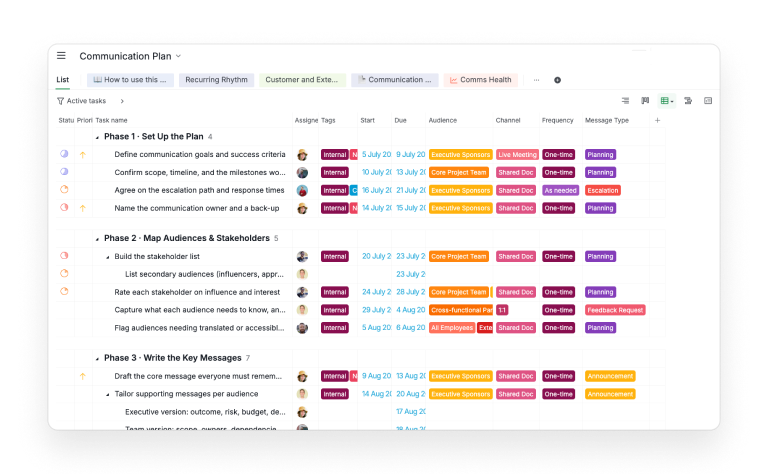
The six phases are sections in the List view:
- Set Up the Plan: goals and success criteria, scope and the milestones worth announcing, the communication owner and a backup, the escalation path and response times.
- Map Audiences and Stakeholders: primary and secondary audiences, influence and interest, what each group needs to know and how it prefers to hear it.
- Write the Key Messages: one core message, then an executive version, a team version and a customer version, plus holding statements for delays and bad news.
- Pick Channels and Set the Cadence: a primary and backup channel per audience, the meeting rhythm, the matrix itself, and sponsor sign-off on the plan.
- Run the Communications: the kickoff announcement, the weekly team status, the bi-weekly steering pack, the monthly all-hands, the monthly customer release note, the decision register.
- Measure and Improve: engagement tracking, a pulse survey, a communication retro, and updating the matrix with what you learned.
Four custom fields turn those tasks into the matrix:
- Audience, a multi-select: Executive Sponsors, Core Project Team, Cross-functional Partners, All Employees, Customers, External Partners.
- Channel: Email, Slack / Chat, Live Meeting, Town Hall, Newsletter, Quire Board, Shared Doc, 1:1.
- Frequency: One-time, Daily, Weekly, Bi-weekly, Monthly, Quarterly, As needed.
- Message Type: Planning, Status Update, Announcement, Decision Request, Escalation, Feedback Request, Report.
Switch to Table view and every task becomes a row: what's being sent, who sends it (the assignee), who hears it, where, how often, and when it's due.
Group the table by Audience to see if anyone's drowning, by Channel to spot the one doing all the work, by Assignee to find the person carrying every update.
Statuses reflect that a draft and a sent message are different things: To-do, In progress, Drafting, In Review, Approved, Blocked, Completed. Tags do the quick sorting: Internal or External, Recurring, Exec Visibility, Needs Sign-off, Crisis Ready. Two sublists are saved already: Recurring Rhythm, every communication that repeats, and Customer and External Facing, everything that leaves the building.
Approvals come set up with three categories. Sponsor Sign-off is for the goals, the core message and the steering pack. Editorial Review is for anything customer-facing. Legal and Compliance is for escalation rules and holding statements.
Three Phase 1 tasks are preloaded in the three states (approved, awaiting approval, changes requested) so you can see what the record looks like.
Two documents ride along in the Documents tab: a how-to guide, and a one-page Communication Charter with the goals, audiences, core message, escalation tiers and meeting cadence as fill-in tables.
Slide deck, wiki page or task management software: where should the plan live?
Wherever the sends can be assigned, dated and repeated, which is why it ends up in task management software. The deck and the wiki page are both fine at describing a plan. The trouble starts on the second Friday.
Use the "Where the plan lives" grid in the graphic above as the test. The deck and the wiki answer "someone has to remember" on almost every line; task management software answers with a feature that does the remembering: an assignee in My Tasks, a reminder, a repeat, an approval with a timestamp, a grouping by Audience.
The deck's real weakness isn't the format, it's that it describes a plan rather than being one. The moment somebody has to remember to send something, you're back to Idris and Rhys. In Quire the row and the reminder are the same object, so the plan and the doing can't drift apart.
Tools differ in emphasis here. Asana's emphasis is standardized workflows and governance. ClickUp's is broad customization inside one workspace. Quire's is a nested task tree whose shape keeps up with the project instead of freezing it.
For a communication plan you're buying the third thing: each send is a task, each task holds subtasks for the drafting, and the whole tree sits beside the work it reports on.
How does a project communication plan run in Quire, end to end?
One launch, three audiences, one Table view, and every send carries a name and a repeat. Here's Idris's launch, rebuilt in the template, with the row that would have caught the slip.
Idris duplicates the template (the dropdown beside the project name, then Duplicate, which creates a new project) and renames it "Portal launch: comms."
She clears the sample assignees, drags the dates in Timeline view onto her twelve-week schedule, and opens the Charter document to name herself as communication owner and Rhys as backup. Phase 1, done in twenty minutes.
Then the audiences. In Phase 2 she keeps three: the Executive Sponsors (the two directors funding it), the Core Project Team (build and design), and the Cross-functional Partners (Rhys's account team and support, who own the client). Everyone else gets the milestone announcement and nothing more.
Phase 5 is where the plan starts running. Three rows carry it:
- Weekly launch status. Assignee Idris. Audience Core Project Team and Cross-functional Partners. Channel Slack / Chat. Frequency Weekly. Due Friday, set to repeat weekly. Subtasks: pull the board, write five lines, post.
- Bi-weekly steering pack. Assignee Idris. Audience Executive Sponsors. Channel Shared Doc. Frequency Bi-weekly. Tagged Needs Sign-off and Exec Visibility. A reminder shared with Idris and Rhys fires two days before, and the task goes for Sponsor Sign-off before it's marked Completed.
- Client-facing change note. Assignee Rhys. Audience Cross-functional Partners and Customers. Channel Email. Frequency As needed. Message Type Escalation. Tagged External and Crisis Ready.
That third row is the one that was missing. It has a name on it (Rhys), a trigger (any date the client depends on moves), and a response time written into the Charter's escalation table: 24 hours.
When the build slips a week, Idris moves the milestone, adds a comment on the change-note task and @mentions Rhys. The task is already in his My Tasks; the mention makes sure he reads the comment today.
Idris reads the plan two ways. Table view grouped by Audience shows her the sponsors get exactly one thing every two weeks, and the partners get a weekly post plus the as-needed note.
The Recurring Rhythm sublist is her Monday check: if something on it is slipping, the cadence is too ambitious, and she cuts a row rather than chasing a person.
Approvals leave a record. When the steering pack goes for Sponsor Sign-off, the request, the approver and any comment land in the task's activity. When a director asks in March why nobody mentioned the February slip, the answer is a task with a timestamp, not a memory of a hallway conversation.
And the whole thing sits one project over from the launch work itself. Both live in Quire, so a Smart Folder puts the launch tasks and the comms tasks in one view, and the person writing Friday's status is looking at the same board the status is about.
Which parts of the plan should you rewrite after you copy it?
Rename the audiences to real groups, cut the phases you don't need, and set the repeats before the first send. The sample content is there to show the shape, so replace it quickly rather than working around it.
First, the Audience options. "Customers" becomes the client's name if there's one client. "Cross-functional Partners" becomes "Support and Account" if that's who they are. Edit the Select options and every row that used them updates.
Second, the phases. A project with a single audience and a known channel doesn't need Phase 2 in full; keep one row that names the audience and move on.
A regulated project routes every External-tagged task through Legal and Compliance, so set that approver roster before anyone requests a sign-off. Rosters start open, meaning anyone on the project can approve, which is fine for a first run and wrong for anything with exposure.
Third, the repeats. The Phase 5 sends carry a Frequency value; make the due date repeat to match it, so Quire recreates the next copy when you complete this one.
Add a reminder on the sponsor pack shared with the owner and the backup. Then open the Recurring Rhythm sublist and check that everything on it has a name.
Last, the Charter. Fill in the escalation tiers with real response times, and put the "we don't know yet" holding statement where the owner can copy it under pressure. Delete the how-to document once the plan is live, or keep it as onboarding for whoever inherits the project.
A communication plan is one artifact in a larger playbook for work that crosses teams. Cross-Functional Project Management: The Complete Playbook covers the rest: roles, decision rights, handoffs and the shared board.

Key takeaways
A project communication plan is a table with five columns, and the fifth one, the owner, is what makes it a plan rather than a description. Audience, message, channel and cadence say what should happen. A name says it will.
Cadence is a promise. Sponsors every two weeks in writing, the team weekly where they already work, the neighboring team weekly while a handoff is live, and bad news within a day regardless. Fewer rows you keep beat more rows you don't.
In Quire the plan and the sending are the same thing. Each row is a task with an assignee, a due date that repeats, a reminder and an approval trail; Table view turns the project into the matrix; the Recurring Rhythm sublist is the weekly health check.
The client hears about the slip because a task said Rhys would tell them within a day, and it did.
Want the client to hear it from you first? Start free at quire.io/signup, duplicate the Communication Plan template, and put a name and a repeat on the one row your last project was missing.
Frequently asked questions
What is a project communication plan?
A table listing every audience a project must keep informed, what each needs to hear, through which channel, how often, and which named person sends it. In Quire each row is a task carrying an assignee, a due date and a Frequency field, so the plan and the sending are one object.
What goes in a communication matrix?
One row per communication: audience, message type, channel, cadence and owner. The Quire Communication Plan template supplies those as four fields plus the assignee, and Table view lays them out as the grid.
How often should stakeholders get project updates?
Sponsors every two weeks, the doing team weekly, the neighboring team weekly while a handoff is live, everyone else at milestones. Material bad news goes out within 24 hours, whatever the schedule says.
What is the difference between a communication plan and a status report?
The status report is one message; the communication plan is the routing that decides who receives it, how often and from whom. In Quire the report is a recurring task on the plan, with an owner and an approval.
How do you keep a communication plan from going stale?
Check the recurring sends weekly, and when one keeps slipping, change the cadence instead of chasing the person. The Quire template's Recurring Rhythm sublist is built for that check.
How does a project communication plan help a team be more productive at work?
It removes two habits that eat weeks: telling everyone everything, and assuming somebody else told the client. Each audience gets only what concerns it, from a named person, on a rhythm it can trust, so fewer meetings get called to find out what's going on. Quire recurs the sends and records the approvals, which keeps the team productive at work on the project itself.
