
workstyle · Nov 6, 2026
Project Kickoff Meeting Agenda: 6 Items, 1 Hour and a Template
Last updated: November 6, 2026
A project kickoff meeting agenda has one job: send everyone out of the room knowing the goal, what done looks like, who decides when two teams disagree, and what they personally own in the first two weeks.
Six timed items fit in an hour if the pre-work happened. In Quire the kickoff runs on two templates: Project Starter for the goal, Meeting Agenda & Action Items for the owned tasks.
- What is a project kickoff meeting?
- Why do most project kickoff meetings end with nothing assigned?
- What goes on a project kickoff meeting agenda?
- What pre-work keeps a project kickoff meeting agenda to an hour?
- How do you run a project kickoff across teams?
- What comes with the Quire Project Starter and Meeting Agenda & Action Items templates?
- Slides, a doc, or task management software: where do kickoff decisions go?
- What does a cross-team kickoff look like in Quire?
- What happens in the week after the kickoff?
- What should you adapt when you duplicate the templates?
- Key takeaways
- Frequently asked questions
The website relaunch kickoff ran fifty-five minutes. Twelve people, twenty-two slides, a timeline with a green arrow on it, and warm agreement all round. The following week, nobody could say who owned the content audit, and the design lead learned about the launch date from the slide, which she had not been sent.
I've run that kickoff. The slides were good. The silence afterward was the actual output.
A project kickoff meeting agenda is only worth the hour if it ends with owners. This post gives you the six items, the pre-work that keeps them to an hour, the cross-team decisions that have to happen in the room, and the kickoff run in Quire so the action items are tasks before anyone stands up.
What is a project kickoff meeting?
A project kickoff meeting is the first working session of a project, where the people doing the work agree on the goal, what done looks like, who owns what, and the first two weeks of tasks. It's a working session, not a presentation. The sponsor talks for five minutes and the room talks for fifty-five.
Project kickoff meeting: the opening meeting of a project, attended by the people who will do the first two weeks of work. It produces a shared goal, a definition of done, a named decision-maker for each cross-team boundary, and action items with an owner and a date on each.
Notice what the definition measures the meeting by. Outputs, written down, with names on them.
A kickoff with no action items at the end was a briefing.
Briefings are fine. They just don't start projects.
Why do most project kickoff meetings end with nothing assigned?
Because the person running the meeting rates it on how it felt, and the people attending rate it on what they left with. Those are different scores, and the gap between them is where the unowned content audit lives.
Steven Rogelberg, a professor at the University of North Carolina at Charlotte who researches meetings, put numbers on that gap in the Harvard Business Review. A telephone survey of more than 1,300 managers found that 79 percent rated the meetings they initiated as extremely or very productive.
Only 56 percent said the same about meetings initiated by others. The same article cites a separate study in which 75 percent of respondents had no formal training in how to run or take part in a meeting.
So the kickoff host walks out satisfied. The twelve attendees walk out with a good feeling and no task.
The fix is mechanical. Build the agenda so that every item has to produce something written, with a name on it, before the next item starts.
The same gap shows up at every handoff later in the project, for the same reason: where cross-team projects actually break traces it from the first meeting to the last.
What goes on a project kickoff meeting agenda?
Six items, timed, in about an hour. Each one produces a written output, and the last one assigns the rest. Here is the agenda that holds.
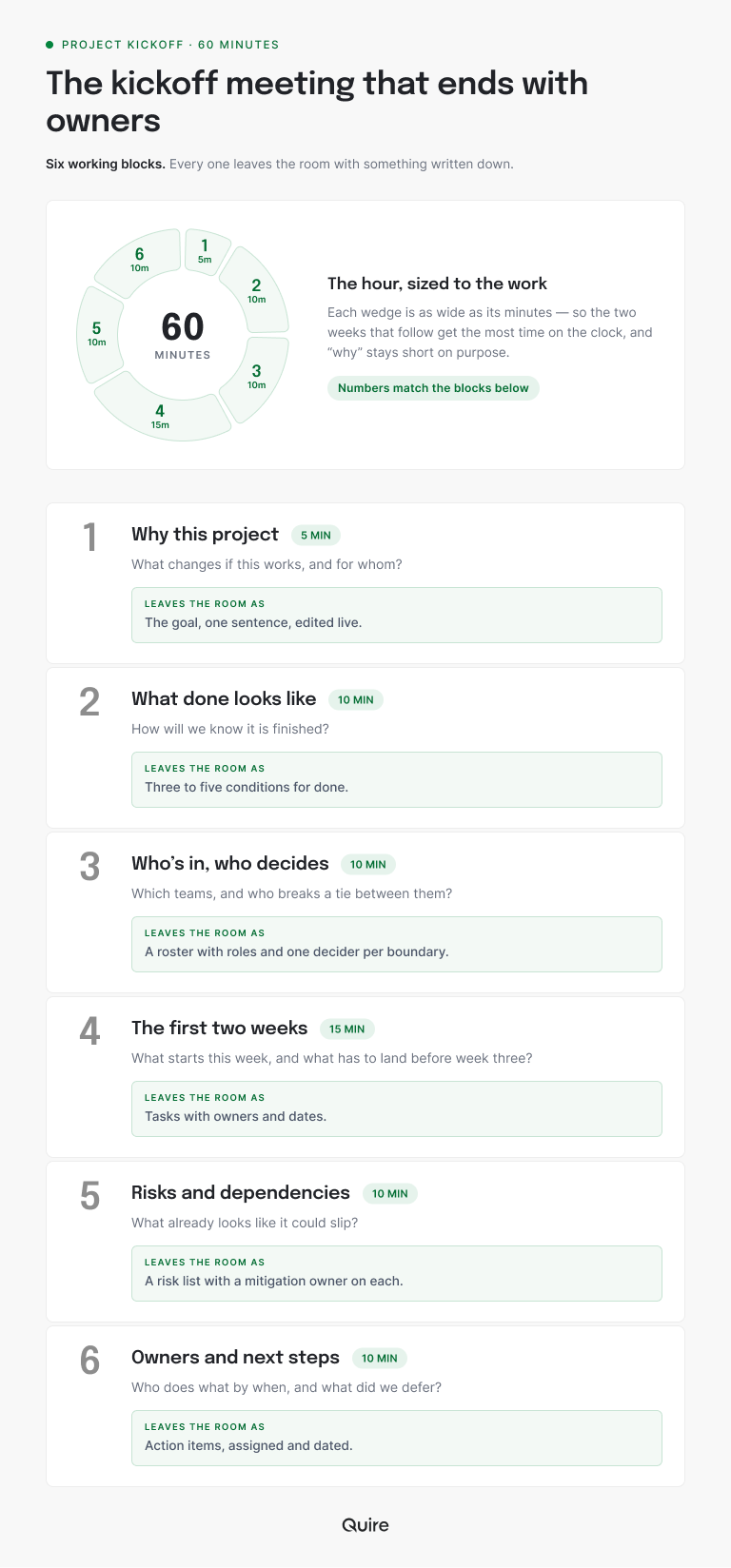
The fourth item is the one most kickoffs skip, because it looks like planning. It is planning. Two weeks of it, done with the people who'll do the work, is the cheapest two weeks of planning the project will ever get.
The sixth item is where the meeting earns its hour. Every agreement made in the previous fifty minutes becomes a task with a name on it, read aloud, and anything that couldn't be settled is written down as deferred rather than left to drift.
Run the kickoff in Quire and every one of those outputs already has a slot. Two templates hold them between them: Project Starter for the project, and Meeting Agenda & Action Items for the meeting.
| Agenda item | Template | Where its output lands |
|---|---|---|
| Why this project | Project Starter | The first Define task, Write the project goal in one sentence, rewritten as your goal |
| What done looks like | Project Starter | The second Define task, List what done looks like |
| Who's in, who decides | Both | The roster in the third Define task, Identify who's involved, and each boundary's decider in a Decision needed task on the agenda |
| The first two weeks | Project Starter | Tasks under Plan and Do the work, every one assigned and dated |
| Risks and dependencies | Project Starter | Owned tasks under Do the work, with the Waiting tag on anything another team is holding up |
| Owners and next steps | Meeting Agenda & Action Items | Tasks under Meeting Action Items, tagged Action-item, plus Deferred-topic on whatever was parked |
To try it on your next kickoff, duplicate the Meeting Agenda & Action Items template into a free Quire account. Give each of your six items its own Discuss task under Hold the Meeting, and the agenda is ready to send.
What pre-work keeps a project kickoff meeting agenda to an hour?
Three things, prepared before the invite goes out. Each one you skip gets done live, slowly, by twelve people.
Draft the goal in one sentence
What the project changes and for whom. The room edits the sentence. It doesn't write it.
A sentence written by committee takes forty minutes and pleases nobody.
Put roles on the roster
Not a list of names. A list of names with what each person owns, and the one person per cross-team boundary who decides when the teams disagree. If you can't fill in that column before the meeting, that's the first agenda item, not a surprise in week two.
Sketch the first two weeks
Five to ten tasks, with a guess at an owner on each.
Guesses are fine. The meeting corrects a guess in minutes and invents from a blank page in hours.
The two-week sketch becomes the first section of a real plan: the project plan template that holds past week two picks up where the kickoff leaves off.
How do you run a project kickoff across teams?
Decide who decides, out loud, before anything else. A kickoff with marketing, design, engineering and legal in the room has at least three boundaries, and every one of them will produce a disagreement by week two. The kickoff is the only moment all four teams are looking at the same sentence.
For each boundary, name one person. When design and engineering disagree about what ships first, who settles it? When legal's review window collides with the launch date, who moves? Write the name on the agenda task.
Then name the handoffs. The content audit lands with design on a date, and the design mockups land with engineering on a date.
A handoff with no date is a hope.
Running a project across four teams has its own playbook, and the kickoff is chapter one: cross-functional project management, the complete playbook covers the rest of the chapters.
Decisions made in the room deserve a place of their own, because the people who weren't in the room will ask about them in March.
That place is a log, and most teams skip it: the decision log most teams regret skipping covers keeping kickoff decisions findable.
What comes with the Quire Project Starter and Meeting Agenda & Action Items templates?
Two templates that split the kickoff's two jobs. Project Starter holds the goal and the first phases, and Meeting Agenda & Action Items holds the meeting itself. Both sit in the Start Here set of the Quire library, which means they take about five minutes to learn.
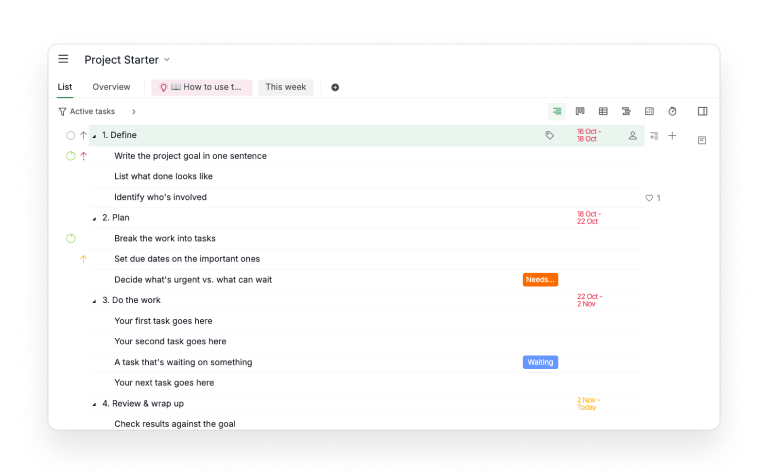
Open the Project Starter template and there are four phases, each with a date range. Define holds three tasks: write the project goal in one sentence, list what done looks like, identify who's involved.
Plan holds breaking the work into tasks, setting due dates on the important ones, and deciding what's urgent versus what can wait. Then Do the work, and Review & wrap up, which ends with a task called Celebrate.
Those first three tasks under Define are the first three agenda items.
The template already has slots for them.
Open the Meeting Agenda & Action Items template and there's one sample meeting branch with four sections:
- Before the Meeting: collect agenda topics, review previous open action items, finalize the agenda, share pre-reads.
- Hold the Meeting and Capture Notes: a Discuss task per agenda topic, a Decision needed task, and a Deferred topic task.
- Meeting Action Items: one task per deliverable, each with an assignee.
- After the Meeting: send the summary, confirm assignees and deadlines, review deferred topics.
Agenda items carry the Agenda tag. Decisions carry a decision tag. Anything parked carries Deferred-topic, and anything assigned carries Action-item.
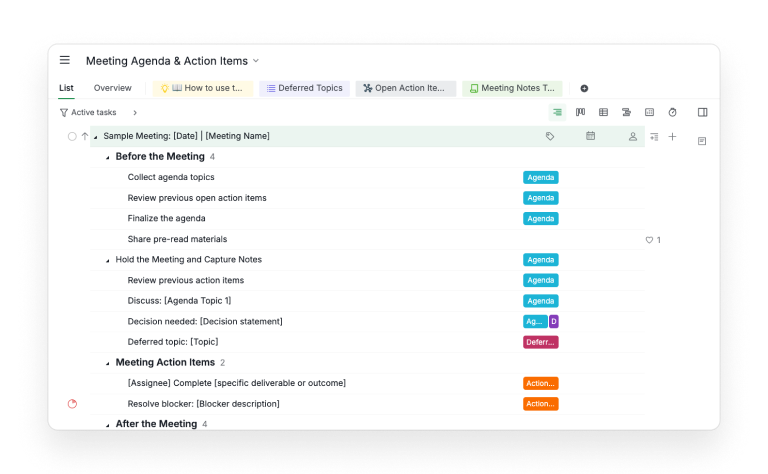
Two sublists do the follow-through. Open Action Items shows every Action-item task until it closes, from every meeting. Deferred Topics shows what was parked, so it comes back when it's ready.
To use them, make your own copy of each project (the dropdown beside the project name has Duplicate on it). In the meeting project, duplicate the sample branch for each new meeting and rename it with the date and the meeting name. In Project Starter, rename the tasks to match your project and delete what you don't need.
Slides, a doc, or task management software: where do kickoff decisions go?
Where the work is going to happen, because that's the only place anyone will look for them in week two. A deck gets presented and filed. A doc gets written and forgotten. The task list gets opened every morning.
Slides still have a job. The five-minute why is better with a picture, and a timeline is easier to argue with when everyone can see it.
The job ends when the arguing starts.
In Quire, the agenda is a branch of tasks. The goal that got edited live is the text of the first task under Define. The decision about who settles design-versus-engineering is a Decision needed task on the agenda branch, renamed to the decision itself. Each action item is a task with an assignee, a date and a tag, and the Open Action Items sublist shows all of them together the next morning.
Still weighing tools for the job? The task management software guide sorts them by what counts once the kickoff is over.
What does a cross-team kickoff look like in Quire?
Take the website relaunch again, run properly this time. Marketing, design, engineering and legal, nine people instead of twelve, one hour.
Two days before, the project lead duplicates Project Starter, renames the goal task to "Relaunch the marketing site so trial signups can be measured by page," and sketches eight tasks under Plan with a guessed owner on each. She duplicates the meeting template's sample branch, names it 2026-11-03 | Relaunch kickoff, and sends the agenda with the roster.
In the room, the goal sentence loses the word "marketing" and gains a date. Done gets three conditions, written as the second Define task. The boundary decisions go into Decision needed tasks on the agenda branch, one per boundary. The design lead settles what ships first, the engineering lead settles anything about the CMS, and legal's review window is fixed at four working days.
Five action items leave the room as tasks tagged Action-item.
The content audit, marketing, nine days.
The tracking plan, engineering, six days.
The homepage wireframe, design, twelve days.
Plus the legal review slot (legal, two days) and the CMS decision, which nobody could settle, parked under Deferred-topic with a date to revisit.
The next morning, the Open Action Items sublist shows five tasks, five owners, five dates.
Nobody asks who owns the content audit.
The first standup after the kickoff starts from that sublist rather than from memory: the daily standup template that survives a real team keeps it to fifteen minutes.
What happens in the week after the kickoff?
Three things, all of them small. The summary goes out the same day, the owners confirm their dates, and the first standup opens on the action items.
The first two are already tasks in the meeting template's After the Meeting section: Send the meeting summary, and Confirm action-item assignees and deadlines. Assign both before the kickoff starts, and they get done.
The summary is a short note with four things in it:
- the goal sentence
- the three conditions for done
- the names who decide at each boundary
- a link to the Open Action Items sublist
It goes to the nine people in the room and to the observers who asked to be kept informed.
Confirming dates takes a day. Each owner opens their task, reads what was agreed, and either keeps the date or moves it with a comment saying why.
Silence counts as yes, which is why the summary says so.
From there, the people outside the room want to hear how it's going without another meeting: stakeholder updates without the status meeting covers keeping them informed from the same tasks.
What should you adapt when you duplicate the templates?
The phase dates, the tags, and the number of meetings you run from one branch. The shape of both templates can stay as it is.
Project Starter's four phases carry short sample date ranges, the longest under two weeks. Stretch them to your project's real length before the kickoff, so the Timeline view shows something honest.
The meeting template's tags are Agenda, Action-item, Deferred-topic and a decision tag. Keep those four. Adding a fifth for every team is how the Open Action Items sublist stops meaning anything.
One branch per meeting, always. A kickoff and a week-two check-in in the same branch look like one meeting that never ended, which, to be fair, is how it felt.
If the project carries a budget, give it lines of its own before the first invoice lands: project budget tracking with four numbers per line sets them up beside the tasks they pay for.
Key takeaways
A project kickoff meeting agenda works when every item produces something written with a name on it. Six items fit in an hour:
- the why
- what done looks like
- who decides at each boundary
- the first two weeks of tasks
- the visible risks
- the owners and next steps
The pre-work is a drafted goal, a roster with roles, and a sketched fortnight. Skip any of it and twelve people do it live.
Run it where the work lives. Project Starter holds the goal and the first phases, Meeting Agenda & Action Items holds the decisions and the owned tasks, and the Open Action Items sublist is what the next morning opens on. Sign up for Quire, duplicate both templates, and let your next kickoff end with the content audit already assigned.
Frequently asked questions
What is a project kickoff meeting?
The first working session of a project, where the people doing the work agree on the goal, what done looks like, who owns what, and the first two weeks of tasks. In Quire it runs on Project Starter for the goal and phases, and Meeting Agenda & Action Items for the decisions and owned tasks.
What should a project kickoff meeting agenda include?
Six items in about an hour: the why, what done looks like, who's in and who decides, the first two weeks, risks and dependencies, and owners and next steps. In the Quire meeting template each item is a task, and the action items it produces carry an assignee, a date and the Action-item tag.
How long should a project kickoff meeting be?
One hour, if the goal was drafted, the roster has roles, and the first two weeks were sketched beforehand. Past ninety minutes, the room is writing the project plan live, which is a different meeting.
Who should attend a project kickoff meeting?
The people doing the first two weeks of work, the deciders for each cross-team boundary, and the sponsor who can say why in one sentence. Observers get the summary afterward.
Can you run a project kickoff in task management software instead of slides?
Yes, and the decisions last longer there. In Quire the agenda is a duplicated branch of tasks, decisions sit on the agenda item where they were made, and each action item is an owned, dated task that surfaces in the Open Action Items sublist.
How does a good kickoff keep a team productive at work?
It removes the second week of questions. With the goal, the owners and the first fortnight written where the work lives, nobody spends the following days asking who owns what. Teams that kick off in Quire stay productive at work because the action items are tasks before the room empties.
