
project management · Nov 17, 2026
Meeting Action Items That Actually Get Done

Last updated: November 17, 2026
A meeting action item is a task born in a meeting, and it dies in the minutes because a document has no state. Before the call ends, give it one owner, one date and one line on what done looks like. Record decisions; track actions. Then open the live list of open items first thing next meeting. Quire's meeting template ships that list as a sublist.
- What are meeting action items, and why do they die in the minutes?
- What does an action item need before the call ends?
- What is the difference between action items and decisions?
- How do you track meeting action items between meetings?
- What comes with the Quire Meeting Agenda & Action Items template?
- Minutes doc, chat thread or task management software: where do action items survive?
- What does a weekly sync look like in Quire, end to end?
- What do you change once the template is yours?
- Key takeaways
- Frequently asked questions
You left the meeting with a document. Eleven bullets, three of them beginning with "someone should," one with a name beside it, none with a date. It's been posted to the channel, it has collected a thumbs-up, and it will never be opened again.
That document is where meeting action items go to disappear. Nobody was careless; a minutes file just has no state. It can't be overdue. It can't be blocked. It can't tell you on Thursday that the thing agreed on Monday hasn't moved.
An action item is a task that happened to be born in a meeting. Treat it like one, with an owner, a date and a place in your task management software where it can be checked off, and most of the follow-up problem goes away on its own.
So this post covers what an item needs before the call ends, how it differs from a decision, and how to run the whole loop in Quire so the open list is the first thing the next meeting reads.
What are meeting action items, and why do they die in the minutes?
Meeting action item: a specific piece of work agreed in a meeting, with one owner and a due date, that has to be done outside the room and reported back. An item without an owner or a date is a wish, not an action item.
Action items die because the place they're written down can't change. A minutes document is a photograph of the room at the moment the call ended. It records that Fenna, who runs the weekly billing sync, agreed to update the pricing page copy. It has no way of knowing whether she did.
Meetings aren't getting rarer, either. According to Harvard Business Review's Stop the Meeting Madness, executives spend nearly 23 hours a week in them, up from less than 10 in the 1960s. Every one of those hours produces a few promises, and promises pile up faster than any document can hold them.
The failure sits in the hand-off between the meeting and the work, and you can usually tell the minutes are doing the tracking by three symptoms:
- The same item is read out at three consecutive meetings, each time with a slightly different owner.
- "Who was doing that?" has quietly become a standing agenda topic.
- Somebody sends a chat message on Thursday that begins "just checking in on..." (the polite form of "I have no idea if this happened").
Each one is what happens when work is stored somewhere that can't report on itself.
When the people around the table report to different managers, the item that falls through has no home team to catch it. The cross-functional project management playbook covers the ownership patterns that hold up when work crosses departments.
What does an action item need before the call ends?
One owner, one date, and one sentence describing what done looks like. Not "the team," not "next week-ish," not "look into it." If any of the three is missing when the meeting ends, the item is still a topic, and it goes back on the agenda rather than into the list.
The owner is one name. Two names is a negotiation about who goes first, and the negotiation happens by nobody starting. If two people genuinely share the work, one of them owns the item and the other is a follower who gets the updates.
The date is one the owner agreed to out loud. "Thursday" said by the person doing the work is a commitment. "Thursday" typed by the note-taker is a hope with a day attached.
What done looks like gets dropped most often, and it's what saves the argument later. "Draft the FAQ" can be debated for a week. "FAQ draft in the shared doc, reviewed by support, ready to paste into the pricing page" can only be true or false.
Here are four action item examples, each rewritten from something a room actually says:
| Said in the room | What's missing | The action item, rewritten | Owner and date |
|---|---|---|---|
| "Someone should look at the refund complaints" | Owner, date, done | Rewrite the refund macro; done when the new macro is live in the help desk | Support lead, Thursday |
| "Marketing will handle the FAQ" | One name, done | Draft the pricing FAQ; done when support has reviewed it and it's ready to paste | Product marketer, Wednesday |
| "Let's circle back on the trial terms" | Owner, date, done | Get legal sign-off on the trial terms; done when the signed terms are attached to the task | Ops manager, Friday |
| "We should really fix onboarding" | Everything | Not an action item yet; it goes back on the agenda as a topic | Facilitator, next meeting |
The last row is the one teams fudge. A wish with a name stapled to it in the final minute still has no date and no finish line, so it belongs on the next agenda, not in the list.
The cheap fourth thing is a link back to the meeting the item came from. When it surfaces three weeks later, whoever picks it up needs the why without an archaeology session.
Open a free Quire project, give one task an owner, a due date and an Action-item tag, and you'll have a working open-actions list before your next sync starts.
Write the item as a verb phrase the owner would say out loud: "Send the revised quote to Halvorsen" beats "Quote follow-up." It reads the same in a task list, on a Board card and in the Friday summary.
What is the difference between action items and decisions?
A decision is recorded; an action item is tracked. They come out of the same conversation, often the same sentence, and they need different homes.
A decision has no due date. "We're keeping the 14-day trial" is true from the moment someone says it, and the only thing anyone needs later is who decided, why, and when. File it as a task and it sits in somebody's list forever with nothing to do.
An action item has state. It's To-do, then In progress, sometimes Blocked, eventually Completed or Canceled. Put it in the decision log and nobody sees it move.
The skill is catching the moment one turns into the other. "We're keeping the 14-day trial" is a decision. "So Fenna updates the pricing page copy by Tuesday" is the action item it produced. Log the first, task the second, and link them so the reasoning travels with the work.
The decision half of this deserves its own record. The Decision Log explains what an entry needs (the call, the reasoning, who made it) and where the log should live so it outlives the meeting.
How do you track meeting action items between meetings?
Read the open list at the start of the next meeting, and read it from the tool, not from memory. That's the whole method. Everything else in this post is about making that one habit cheap enough to survive a busy month.
The action item list has to be live. If it's a spreadsheet someone updates on Friday, Wednesday's meeting is reading Friday's truth. If it's the task list where the owner actually checks the work off, the meeting reads the truth as it stands, including the item that got done twenty minutes ago.
It has to be filtered. Nobody wants the whole project on screen in a meeting. A saved view showing only open action items, grouped by status so the blocked ones sit together, takes about ninety seconds to walk through. That's what a follow-up habit can afford; twenty minutes is why the habit dies.
And the list needs an owner of its own, usually whoever facilitates. They open the view, read it, and ask three questions of each item: is it done, is it blocked, and does the date still hold. Anything that fails all three gets a new date or gets canceled, out loud, in the room.
If the meeting in question is the daily one, the rhythm is shorter and the questions are different. A Daily Standup Template That Survives Contact With a Real Team covers that ceremony, live and async.
What comes with the Quire Meeting Agenda & Action Items template?
One duplicable branch per meeting, with the agenda, the notes and the decisions inside it, and every action item tagged so it surfaces in a sublist until someone closes it. That's the template's own description, and it's also a fair summary of the method above.
Open the template and you'll find a single root task, "Sample Meeting: [Date] | [Meeting Name]". Everything for one meeting lives underneath it, in four parts:
- Before the Meeting, a section holding four prep tasks: collect the agenda topics, review the previous meeting's open action items, finalize the agenda, and share pre-read materials.
- Hold the Meeting and Capture Notes, a task whose subtasks are the agenda itself: review previous action items, a "Discuss:" placeholder per topic, a "Decision needed:" placeholder tagged Decision, and a "Deferred topic:" placeholder tagged Deferred-topic.
- Meeting Action Items, a section with two placeholders tagged Action-item: "[Assignee] Complete [specific deliverable or outcome]" and "Resolve blocker: [Blocker description]", which ships already set to Blocked so you can see how that reads in the list.
- After the Meeting, a section with send the meeting summary, confirm action-item assignees and deadlines, review unresolved deferred topics, and schedule the next meeting if required.
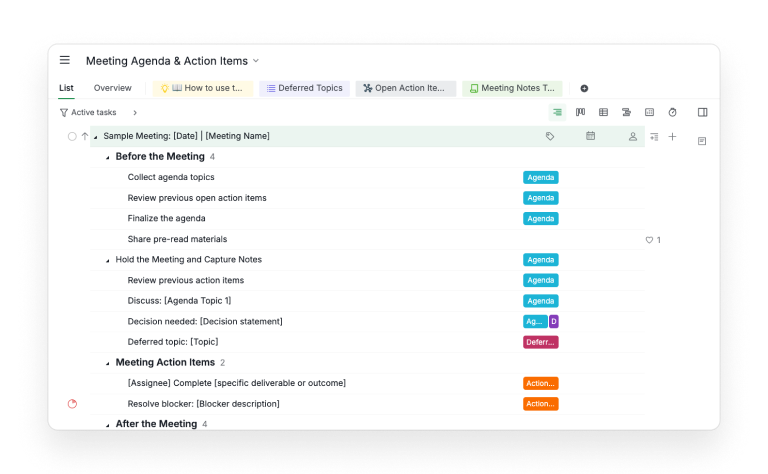
Three of those are chained with dependencies: finalize the agenda comes before holding the meeting, and holding the meeting comes before sending the summary. The order lives in the Timeline rather than in someone's head.
The statuses are To-do, In progress, Blocked, Completed and Canceled. Canceled matters more than it looks. An action item the team decided not to do should leave the open list without pretending it got done.
Two sublists come pre-built. Open Action Items gathers every active task tagged Action-item, from every meeting branch in the project. Its description suggests grouping by status and sorting by due date, earliest first.
Deferred Topics does the same for the Deferred-topic tag, with a suggested grouping by parent task. Parked ideas come back when they're ready instead of never.
The Documents tab holds two pages: a six-step "How to use this template" walkthrough, and the Meeting Notes Template the note-taker fills in. Each decision entry there asks for the rationale, who decided and the resulting action items, which is the link between the log and the list.
My favorite line in the whole project is the description on the action-item placeholder. It asks for an action-oriented name that starts with a verb, one assignee, a realistic due date, and a note on what done looks like. That's the previous section, in a task you can copy.
To make it yours, open the menu that drops down from the project name and select Duplicate. Quire spins up a fresh project in your organization, and the gallery original stays put for the next team.
A project's first meeting is where the first action items come from. The project kickoff meeting agenda runs this same template next to Project Starter, so the kickoff ends with every first task owned and dated.
Minutes doc, chat thread or task management software: where do action items survive?
Anywhere with state beats anywhere without it, and only one of the usual homes has state. The infographic below puts the four places teams keep action items side by side, along with the rest of the method on one page.
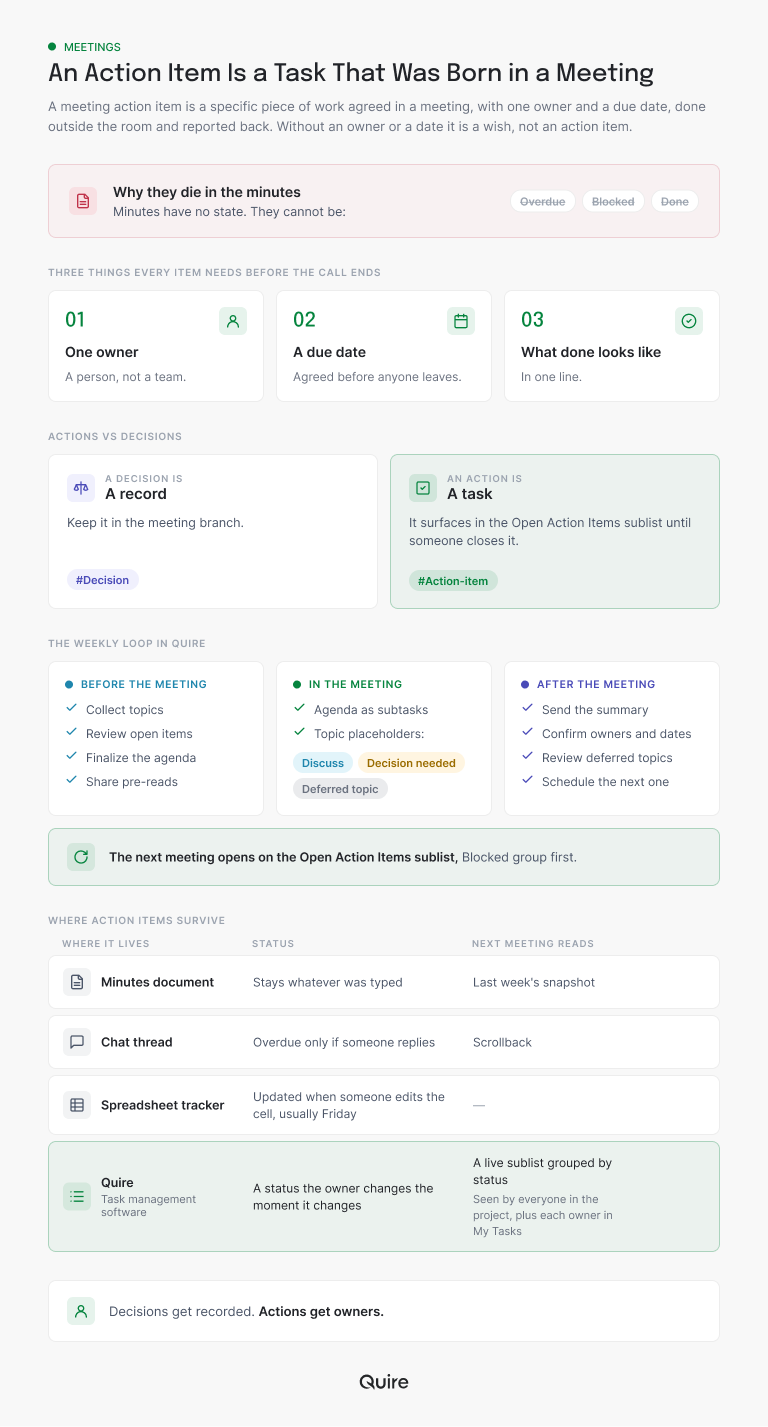
The column that decides it is the status one. A minutes document stays whatever was typed. A chat thread knows an item is late only if somebody replies to say so, and a spreadsheet knows when someone edits the cell, usually on Friday.
In Quire the status is something the owner changes the moment it changes, and the item shows in the project's open list and in the owner's My Tasks at once.
Minutes are still good at what they're for: the narrative of the discussion, the reasoning behind a call, the sentence someone said that changed the room. Keep them. Just stop asking them to track work.
If you're still choosing where the work should live, our roundup of the best task management software compares the options. The rest of this post assumes Quire and shows the loop end to end.
A lot of what a status meeting does is read action items aloud to people who could have read them. Stakeholder Updates Without the Status Meeting shows what to write instead, and when the meeting still earns its slot.
What does a weekly sync look like in Quire, end to end?
Fenna runs the Tuesday sync between support, marketing and the two engineers who own billing. Here's one week of it inside the template, from the Monday prep to the following Tuesday's read-through.
Monday, she duplicates the sample branch and renames it "2026-11-17 | Billing weekly." The Before the Meeting tasks are hers, due Monday.
For "Review previous open action items" she opens the Open Action Items sublist. Two items are still open from last week, one of them Blocked, and she drops the blocked one onto the agenda as a "Discuss:" subtask.
Tuesday, the note-taker works down "Hold the Meeting and Capture Notes" as the agenda. Three pieces of work come out of the room, and each becomes a task in the Meeting Action Items section before the call ends:
- Rewrite the refund macro goes to the support lead, due Thursday, tagged Action-item, with the line "new macro live in the help desk and linked here" as what done looks like.
- Update the pricing page copy for the 14-day trial goes to Fenna, due next Tuesday, tagged Action-item, with the decision it came from linked in the description.
- Resolve blocker: legal sign-off on the trial terms goes to the ops manager, set to Blocked, tagged Action-item, priority High.
One thing gets recorded rather than tasked. "Decision needed: keep the 14-day trial or extend to 30" becomes "keep 14 days," with the reasoning typed into the description and the Decision tag left on.
And one topic, renaming the Starter plan, gets the Deferred-topic tag and drops out of the agenda without dropping out of existence.
Wednesday, nothing happens in the meeting project, which is the point. The support lead sees the macro task in My Tasks next to the rest of her week. When she finishes, she marks it Completed in her own list, and it leaves the Open Action Items sublist without anyone updating a document.
Thursday, Fenna glances at the sublist. She groups it by status, the way its description suggests, and the legal sign-off sits in the Blocked group. The project's Table view shows the same items as rows with owner, due date and status side by side.
She adds a comment on the blocked task and @mentions the ops manager. That's the follow-up, and it took a minute.
The following Monday, she duplicates the branch again. On Tuesday, "Review previous action items" is the first subtask of the meeting, so she reads the sublist aloud.
Three items are gone because they're done: the macro and both of last week's leftovers. The legal sign-off is still Blocked, and the pricing copy is due today (hers). Ninety seconds, then the agenda.
Notice what nobody did. No follow-up email, no "who was doing that?", no spreadsheet reconciled against a chat thread. The minutes still exist, in the Meeting Notes Template, holding the discussion, and the work lives where work gets done.
What do you change once the template is yours?
Three things: give the meeting a rhythm, give the sublist an owner, and decide what Blocked is allowed to mean. The template fits any meeting out of the box; these are the edits that make it fit yours.
Rhythm first. The template expects you to duplicate the sample branch for each meeting, which is right, but somebody has to remember to do it. Add one small task, "Prepare the Tuesday sync," assign it to the facilitator and set it to recur weekly.
Tick it off and Quire creates next week's copy within moments, with the same two-line checklist sitting in its description: duplicate the branch, glance at the open list.
Reminders do the same job for the items themselves. On any action item with a date the room cares about, add a reminder that notifies a day ahead, shared with both the owner and the facilitator. The nudge lands before the item is late, which is the only time a nudge is useful.
Reminders and task dependencies are available on Professional and higher subscription plans. More information can be found on our Pricing page.
Then the sublist owner. Open Action Items only works if one person opens it at the top of every meeting and reads it aloud. Name that person in the meeting task's description. The week that stops happening is the week the minutes quietly take over the tracking again.
Then Blocked. Agree in the room what it means: waiting on a named person outside this meeting. Anything else is In progress with a problem. A loose definition fills the Blocked group with things that aren't really stuck, and the group stops meaning anything.
A few smaller edits, depending on how many meetings share the project:
- Rename the tags to your team's vocabulary (some teams prefer "Follow-up" to "Action-item"), then update the sublist filters to match.
- If several recurring meetings live in one project, add a section per meeting so the branches don't interleave, and let the sublist gather action items across all of them.
- Add a "Raised by" custom field if items often come from someone other than the owner, so the Table view can show who asked.
- Set priorities on the items the room argued about. Urgent, high, medium and low are enough; sorting by due date does the rest.
Keep the section names. "Before the Meeting," "Meeting Action Items" and "After the Meeting" are plain on purpose, and plain is what a new attendee can read without a tour.

Key takeaways
Meeting action items get lost in storage. Minutes, a chat thread or a Friday spreadsheet can record a promise, and none of them can tell you on Thursday whether it was kept.
So treat each item as a task: one owner, one agreed date, one line on what done looks like. Record decisions separately, and open the live list of open items first thing in the next meeting.
In Quire, that list is the Open Action Items sublist in the Meeting Agenda & Action Items template. Copy it, add a recurring prep task, name the person who reads the sublist, and define Blocked before the first meeting.
Want the next meeting to open with a live list instead of last week's notes? Start free at quire.io/signup, duplicate the Meeting Agenda & Action Items template, and tag the first three items you agree on this week.
Frequently asked questions
What is a meeting action item?
A specific piece of work agreed in a meeting, with one owner and a due date, done outside the room and reported back. In Quire it's a task with one assignee, a due date and an Action-item tag.
What should every action item include before the meeting ends?
One named owner, a due date the owner agreed to out loud, and a sentence describing what done looks like. The placeholder task in Quire's Meeting Agenda & Action Items template asks for exactly those three.
What is the difference between an action item and a decision?
A decision is recorded; an action item is tracked. A decision needs who, why and when, while an action item carries a status until it's Completed or Canceled, so Quire's template tags the two apart.
How do you track action items across meetings?
Read the live open list at the start of the next meeting. In Quire the Open Action Items sublist gathers every active task tagged Action-item, from every meeting branch.
Is there a ready-made action items template?
Yes. Quire's Meeting Agenda & Action Items template gives you one duplicable branch per meeting, two saved sublists and a notes document. Duplicate it from the menu beside the project name.
How do tracked action items help a team be more productive at work?
They remove the re-asking. Task management software like Quire keeps each item in the owner's list and in the shared open view, so the team is more productive at work and nobody rebuilds who promised what.
