
features · Sep 21, 2026
Introducing Task Reminders: Your Tasks Now Come with a Nudge
Last updated: September 30, 2026
Reminders are new in Quire. A task reminder rides on a task and nudges you, and anyone you share it with, ahead of the due date; move the date and the reminder follows. A standalone reminder has no task behind it and carries its own time and repeat. Both land in a Reminders tab in your notifications.
Every project has a handful of tasks that aren't late and aren't fine either.
The client approval due on the 30th that has to be chased on the 23rd. The domain that renews in March and needs a card that expires in February. The freelancer you told "I'll send the brief next week," which you will, if something reminds you which week that was.
Quire has always been good at the due date. Starting today, it's good at the days before it.
Task reminders are here. Attach one to any task and it reaches you, and the two colleagues who actually need to know, at the moment you choose rather than the moment it's due. Or create a standalone one from nothing for the things that were never tasks to begin with.
(Yes, your phone has had alarms since 2009. They don't know what a due date is. These do.)
Reminders is exclusively made for Professional and higher subscription tiers. More information can be found on our Pricing page.
What Are Task Reminders in Quire?
Task reminder: a notification attached to a Quire task, set to arrive a chosen distance ahead of that task's own date, or at a time you set when the task has none, and delivered to the people you name.
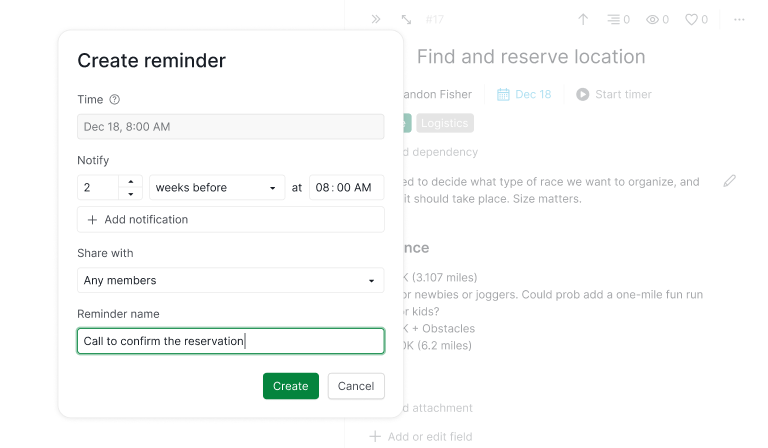
A task reminder is the nudge your task list never had. Open any task's menu, choose Reminder, and you get a dialog with four things on it.
Time is when the reminder itself lands, and on a task with a date you don't set it, the task does. Notify is how far ahead of that you want telling. Share with is who gets told. Reminder name is optional, and worth ten seconds, since it's the line you'll read on your phone while the kettle boils.
The point of attaching it to the task, rather than to your account settings, is that it's a decision about this one piece of work. Not every task needs a nudge. The venue deposit does.
You've had per-user notification settings for due and overdue tasks in Quire for years, and those aren't going anywhere. What you couldn't do until now was say prompt me about this specific thing, at this specific time, and tell these people too. Now you can.
Reminders arrive alongside everything else Quire tells you, in the inbox that got its own overhaul this year. If you haven't looked at it since, start with Quire's revamped notifications.
Why Do Tasks Slip When Nothing Is Late?
Because a due date is a promise about the last possible moment, and most work needs you well before then. The task sits quietly in your project doing exactly what you told it to do, which is nothing, until the day it turns red.
Task reminders fix this by counting backwards from the task's due date, or from its start date when there's no due date. You can see which one it picked without doing the math: the Time field is read-only on a dated task and says so, Follows the task's date.
Under it, Notify is one line of arithmetic. A number, a unit (minutes, hours, days, or weeks before), and the time of day you want it. Leave the number at 0 and it reads back as On time.
Then the part that makes it low maintenance. Because the reminder is anchored to the task and not to a timestamp, moving the deadline moves the reminder. Push the launch a week and the "3 days before" nudge quietly travels with it. Nobody has to remember that a reminder exists. That's what keeps this one working past the first month.
A few things you'll notice once you start:
- Add notification lets one reminder prompt you more than once, a week out and again the morning of. The cap is 30, for people who need to be told about the same thing 30 times (we don't judge).
- If the task has a date but no time of day, Quire treats it as 8:00 AM, the same for everyone the reminder reaches, so an all-day deadline still lands at a civilized hour.
- Notify only counts backwards. Quire refuses a notification that would land after the reminder itself, on the grounds that a prompt arriving after the deadline is a different product.
- Duplicate the task and its reminders come along. Roll a recurring task to its next occurrence and the new one reminds you the way the last one did.
Take a design lead with a client sign-off due on the 30th. She puts one reminder on it, 1 week before at 8:00 AM, shared with the account manager and herself. On the 23rd both of them get a notification while there's still time to book the review.
When the client slips the date into next month, she changes the due date and touches nothing else. That's it. No calendar entry to move, no alarm to reset, no note to herself that she'll find in November.
Psychologists E. J. Masicampo and Roy Baumeister measured what carrying one of those costs you. Across five studies they found that an unfinished intention keeps intruding on whatever you do next, and that writing a specific plan for it makes the intrusion stop before any of the work is done.
A reminder is that plan, with Quire holding it instead of you.
Reminders are one of several things Quire added this year for keeping track of work without chasing it. If your team lives by the week view, see how they sit in the project calendar.
What About the Things That Never Become Tasks?
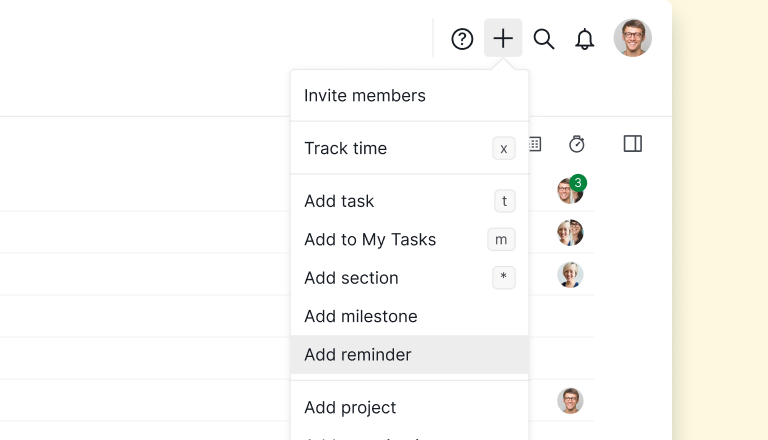
They get a standalone reminder, a reminder with no task behind it. Open the plus menu in the top bar, choose Add reminder, and because there's no task lending it a date, it carries its own.
Time opens on In 1 hour, with Tomorrow and Next week beside it and a date picker for everything else. Repeat is there if it should come back, every Thursday at 9 or the first Monday of the month.
It also asks where it should live. Add to puts it in a project, a folder, a Smart Folder, an organization, or your own My Tasks, and that choice is fixed once the reminder exists.
Put it in a project and the team can be on it. Put it in My Tasks and it's yours alone: personal reminders stay private to your own My Tasks, like a note to yourself.
A task with no date sits in between: the reminder is tied to the task, but it keeps its own time and Repeat until the task gets a date, then follows the date from there.
| Task with a date | Task without a date | Standalone | |
|---|---|---|---|
| Attached to | A task | A task | Nothing |
| Timed from | The task's due date, or its start date, read-only | Its own date and time, yours to set | Its own date and time, yours to set |
| Repeats by | Following the task's own schedule | Its own Repeat setting, until the task gets a date | Its own Repeat setting |
| Lives in | The task's project | The task's project | Wherever you add it, My Tasks included |
| Reach for it when | There's work to track, with a deadline | There's work to track, no deadline yet | You only need telling at a time |
This is the half of the feature we expect people to underrate. Ask about the Q4 budget at Thursday's leadership sync. Renew the domain before March. Send the freelancer that brief.
None of those is work you'd assign, break into subtasks, or mark done, so turning them into tasks only gives you a to-do you have to close every week. But they're real, and right now they live in your head, a sticky note, or a 6:45 AM alarm that just says "BRIEF".
A standalone reminder is where they go instead.
Repeat on a reminder isn't the same as a recurring task, which regenerates real work on a schedule. For that, see recurring tasks in Quire.
How Do Task Reminders Keep the Whole Team on the Same Page?
By letting one reminder reach everyone who needs it, so the team runs on a shared cue instead of five private alarms that fire at five different times.
Every reminder has a Share with setting: any members of the place it lives, selected members only, or Only me. Everyone on that list sees it and gets the notification when it fires.
This changes who has to remember. In most task management software, remembering is a private act, and the person who set the alarm becomes the person who chases everyone else. Here the reminder belongs to the work. If the account manager is on the 1-week-before nudge, she gets it whether or not the design lead is on vacation that day.
Two things follow from that. Anyone who can see a reminder and has edit access where it lives can change or delete it, because a shared reminder is the team's cue, not one person's property. And opting out is personal: if a shared reminder isn't for you, take yourself off its Share with list, and it keeps firing for everyone else.
If your reminders should reach people across separate organizations, a Smart Folder is the scope that can hold them. See Smart Folders in Quire.
Where Will a Reminder Find You?
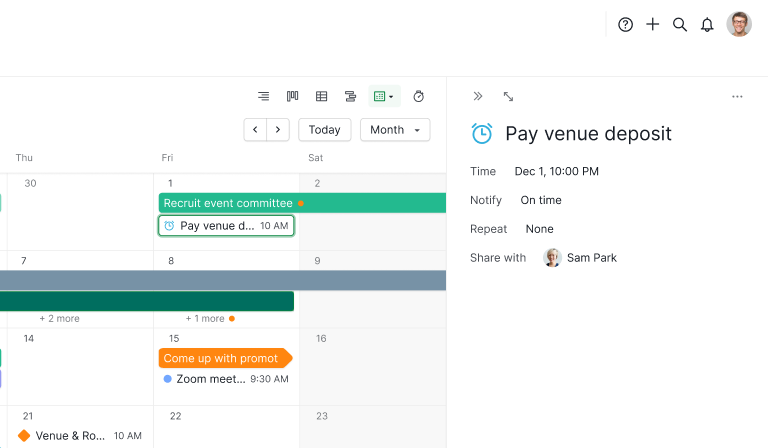
In three places, each answering a different question.
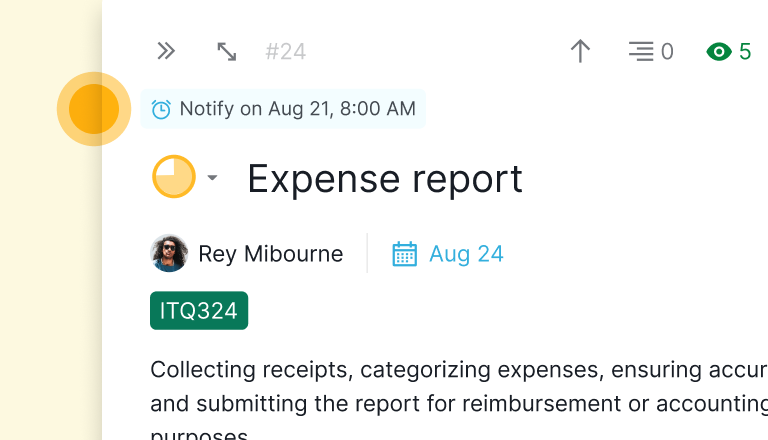
On the task itself. A task with a reminder wears it at the top of its detail panel: the notify setting on a dated task, the reminder's own time on one without. When there are more, it shows a count like +3. Click it for the full list, including the ones that already fired.
In Calendar view. Standalone reminders appear as their own entries on the day they fire, so the Thursday budget question becomes part of your week rather than a surprise inside it.
A task reminder anchored to its task's date doesn't get a separate entry, because the task is already sitting on that date and two rows for one thing helps nobody. There's a filter for the reminders that aren't tied to any task, for when you want only those.
In your notifications. Reminders get their own tab, which gathers the time-based ones together, your due and start notifications included, so a fired reminder never competes with comments and mentions (it would lose).
Each one tells you where it came from, in the form Reminder in Client Work: Send sign-off pack, and clicking it opens the task. A personal reminder opens My Tasks, since there's no task to open.
How Do You Get Started With Reminders?
Pick one task, not a system, and see what changes.
Find the task you keep meaning to check on, the one due three weeks out that needs you long before then, and put a single reminder on it a week early. Share it with the one person who'd otherwise ask you about it.
Then take the one recurring obligation that has no business being a task, the Thursday question or the Friday cutoff, and make it a standalone reminder in My Tasks.
That's about two minutes, and it covers the two failures that cost teams the most: work that was never late and still slipped, and things you carried in your head because there was nowhere else to put them.
For a step-by-step walkthrough of how to best utilize Quire Reminders, please visit our Reminders guide.
Reminders sit beside the other views Quire added this year for seeing work without chasing it. See Dashboard View, and how Quire compares as task management software when reminders are on the checklist.
Key takeaways
The gap between when a task is due and when it needs you is where tasks slip. Task reminders close it from the task's own date, so the nudge lands ahead of the deadline, follows the date if it moves, and reaches the people who'd otherwise have to ask.
Standalone reminders catch everything that was never a task, with their own time, their own repeat, and a private home in My Tasks when it's only for you.
None of it asks you to adopt a method. Put one reminder on the task you keep forgetting and see whether the 23rd feels different from the 30th.

Frequently asked questions
What are task reminders in Quire?
Notifications you attach to a task so it reaches you before it's due, at a time you choose. Set one from the task's menu: how far ahead you want telling, and who else gets told. The reminder is anchored to the task's date, so when the deadline moves, the reminder moves with it.
What is the difference between a task reminder and a standalone reminder?
A task reminder takes its timing from the task's due date, or its start date when there's no due date, so its Time field is read-only. If the task has no date at all, you set the time yourself and it can repeat, like a standalone one, until the task gets a date.
A standalone reminder has no task behind it, so its Time and Repeat are yours to set.
Can you set a reminder that isn't attached to a task?
Yes. Add reminder, in the plus menu in the top bar, gives you a standalone one. Time opens on In 1 hour, with Tomorrow and Next week beside it and a date picker for anything else.
Can more than one person get the same reminder?
Yes. Share with sends it to any members, to selected members only, or to Only me, and everyone on that list gets the notification when it fires. A team can run on one shared cue instead of five people setting their own alarms. Reminders you create in My Tasks stay yours alone.
Do reminders help a team be more productive at work?
They remove one specific loss: work that was never late and still got forgotten, because nothing prompted anyone at the right moment. In Quire the prompt sits on the task the team already tracks, so the nudge and the work live in one place instead of in a separate reminder app.
Which Quire plans include reminders?
Professional and higher. The per-user notification settings for due and overdue tasks are separate and stay where they are. Full plan details are on the Quire pricing page.
