
project management · Jul 21, 2026
The Project Status Report Template Your Stakeholders Will Actually Read

Last updated: October 21, 2026
A project status report template is five parts in a fixed order, overall status, progress against the plan, upcoming milestones, risks and blockers, and a clear ask. Open with an honest red-amber-green call, show done against planned rather than a pile of activity, and finish with a request that has a name and a date on it. Then take the assembly off your plate by pulling the numbers from live project data, so all you write is the status and the ask.
- What goes in a project status report template?
- What should each section actually say?
- What is a project status report template?
- Why do most status reports go unread?
- How often should you send a status report?
- Should a status report replace your status meeting?
- How do you generate the report from live data instead of writing it?
- What does a good project status report example look like?
- What are the most common status report mistakes?
- Key takeaways
- Frequently asked questions
You know the report I mean. It shows up on Friday, runs three screens long, and by the second paragraph you still can't tell whether the project is on track or on fire. So you do what any busy person does. You scroll to the bottom, find nothing that needs you, and close the tab.
That report cost someone the better part of an hour to build. It cost you under a minute to ignore. Both of those are the same problem in different clothes, and a good project status report template fixes them together: it tells busy people what they need in the time they'll actually give it, and it stops eating your Friday afternoon to produce.
The stakes are bigger than a wasted hour, too. The Project Management Institute's Pulse of the Profession research found that 56% of the money at risk on a project, roughly US$75 million of every US$1 billion spent, traces back to ineffective communication. A status nobody reads is exactly that, communication that isn't landing. So it's worth getting the format right.
What goes in a project status report template?
Five sections, in this order, headline first and ask last: an overall status, progress this period, upcoming milestones, risks and blockers, and the ask. That's the whole project status report template, and the order is doing real work.
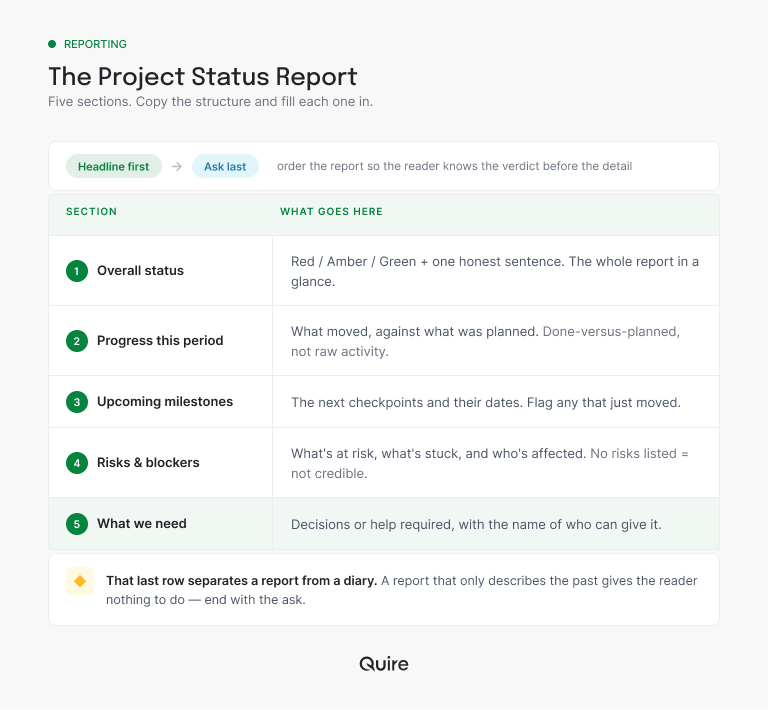
A reader gets the verdict in line one and the request in the last line. Everything in between is there for the person who wants the why. Drop that final row and you've written a summary; keep it and you've written a request, which is a different and much more useful thing.
Want the five sections ready to fill in? Duplicate the Project Status Report template in Quire: one task per report, the sections as subtasks, RAG color and percent complete as fields, plus a blank skeleton to copy each week. Not sure it fits your project? The roundup of project management templates sorts all 20-plus by the shape of the work.
What should each section actually say?
Each section has a right version and a version that looks right and says nothing. Here's the difference, one at a time.
Overall status is one call and one sentence. "Amber. Scope is holding, but the launch date slips if security review runs long." The sentence carries the why, and a color with no reason attached is a vibe, not a status.
Progress this period always drags the plan along with it. The frame is "planned X, delivered Y," which turns a raw count into a judgment the reader can make at a glance. If they have to go dig up the plan to interpret your numbers, they simply won't interpret them.
Upcoming milestones earns its keep by flagging movement. A date that slid by a week deserves a sentence, not a silent edit in the tracker, because dates that move in the dark are how stakeholders learn to distrust every date you give them.
Risks and blockers is where your credibility lives. Real projects always carry risk, and naming yours is what makes your green weeks believable. The ask then converts the biggest risk into someone's to-do, a decision, a name, and a date.
Deciding which numbers earn a line in the progress section is its own call: project management KPIs walks through 11 of them, what each one catches early, and how many to run at once.
What is a project status report template?
Project status report template: a fixed structure for your recurring update, five sections that always appear in the same order, so stakeholders learn where to look and you never start from a blank page.
The five are an overall status, progress this period, upcoming milestones, risks and blockers, and the ask.
Its real job is to replace a meeting. Most recurring status meetings push information one direction, from the team out to the stakeholders, and one-directional information is what writing is for. Get the report right and the meeting either shrinks to the decisions that need people in a room, or quietly falls off the calendar because nobody misses it.
Why do most status reports go unread?
They bury the one thing the reader came for, whether to worry, under a heap of activity nobody asked about. Three habits do the damage, and every one of them is fixable.
The verdict is buried. The reader has to wade through paragraphs to work out whether the project is fine. They won't wade. Whatever else the report does, the answer to "should I care?" belongs in the first line.
Activity stands in for progress. "Closed 10 tasks" tells you nothing on its own. Ten of the twelve you planned is a healthy week; ten of the twenty-five you planned is a slow-motion emergency. Without the plan sitting next to it, a number is just trivia with good posture.
The status never changes color. When every single week is amber, amber stops meaning anything, the way a smoke detector with the battery pulled out stops meaning anything. A status only carries information if you're actually willing to let it move.
That weekly assembly hour is one line item in a much bigger bill: the coordination tax, and why growing teams end up spending more time reporting on work than doing it.
How often should you send a status report?
Weekly, on the same day, for anything that's actively moving. The predictability is the point: a report that lands every Friday becomes something people rely on, and a report that arrives whenever someone remembers becomes a small surprise they have to stop and process.
Tune the rate to the stakes, not to your mood. Twice a week during a launch month, every two weeks for slow-burn infrastructure work. If you catch yourself sending a status every single day, that isn't a report cadence anymore, it's an incident channel, and it should wind down when the incident does.
One honest exception: the tiny team. If it's three people who all live in the board every day, skip the report entirely, because the board already is the status. Reports start earning their keep the moment someone who isn't in the work daily still needs to trust where it stands.
Should a status report replace your status meeting?
For the weekly where-do-we-stand, yes. For genuine decisions, no. The two do different jobs, and the trouble starts when one recurring meeting is quietly doing both.
| What you're weighing | Written status report | Recurring status meeting |
|---|---|---|
| Time it costs | About two minutes to read, on your own clock | 30 to 60 minutes, everyone at once |
| What it does best | One-way information, delivered clean | Real back-and-forth on a decision |
| Leaves a record | Yes, and it's searchable next quarter | Only if someone volunteers to take notes |
| Who it interrupts | Nobody; you read it when you surface | Everybody, at a time that suited the organizer |
| Best used for | The weekly where-do-we-stand | The two or three things that truly need a room |
Send the report for the update. Keep the calendar invite for the decisions that genuinely need a conversation, and watch how few of those there actually are once the numbers arrive in writing first.
How do you generate the report from live data instead of writing it?
Notice that almost everything in the template already exists as data somewhere, then stop copying it across by hand. That single shift is what ends the Friday ritual.
The status is a read on overdue tasks. Progress against plan is task completion. Milestone dates already live on the timeline. The only reason the report takes an hour is that a person is acting as a human copy-paste macro, moving those facts between tools one paste at a time, every single week.
When the work lives in one place, the copying stops.
In Quire, the Overview panel shows a live snapshot of task status on every plan, and Insight View rolls those same tasks up by member, tag, or status, so "what moved this week" is just the tasks that closed since last Friday.
Nothing is copied, so nothing goes stale between writing it and sending it.
What's left for you is the ten percent software genuinely can't produce: the honest status call and the specific ask. Which is a fair trade, because those two were always the whole point of the exercise.
And if a stakeholder insists on their own format, a slide, a PDF, a Monday email, that's fine. Keep the delivery, swap the source. Once the numbers already live on the board, the five sections drop into any shape in a minute, and you're out of the messenger business for good.
Want the full build behind those numbers? Here's a project dashboard template for tracking what actually matters, on any plan. Building your first one? Start with what a project dashboard is and the four features worth including, then copy the template.
What does a good project status report example look like?
Short. Here's a complete one for a five-week mobile app beta, written the way this template wants it written.
Status: Amber. Core flows are stable, but App Store review turnaround is the wildcard that decides whether we hit the launch date.
Progress this period: Planned 14 tickets, shipped 11. Onboarding screens are done; push notifications slipped to next sprint.
Upcoming milestones: TestFlight build to 200 beta users on Jul 24. Public launch Aug 5, at risk if the first review submission bounces.
Risks and blockers: Crash rate on older Android builds is still above target. Nobody owns the launch-day support rota yet.
What we need: An owner for the support rota by Thursday, and a go/no-go from Lena on launching without push notifications.
Nine lines. A stakeholder reads the first one and knows how worried to be, reads the last one and knows exactly which part is theirs. No calendar hold required.
Now, the objection you can already hear: "but my stakeholders like the meeting." Some of them do. So don't cancel it, shrink it. Send the report a day ahead, then run the meeting on the two items in the ask and nothing else. Within a month the meeting is fifteen minutes, then it's optional, and nobody had to win an argument to get there.
The complete playbook for making that switch: stakeholder updates without the status meeting, and how written updates earn the trust that meetings only pretend to.
What are the most common status report mistakes?
The ones that quietly kill readership, in rough order of how often they show up:
- Burying the verdict. If "should I worry?" isn't answered in line one, the report already lost the reader.
- Activity with no plan attached. Ten closed tasks means nothing until the reader knows how many were planned.
- Permanent amber. A status that can't change is a status that can't inform, and readers learn to skip it.
- No ask. All description, no request, nothing for the reader to do except nod and move on.
- Hand-assembly. An hour a week spent copying numbers that are already stale by the time you hit send.
That last one makes every other mistake worse, because a report that's expensive to build gets padded to justify the cost, and the padding is exactly what buries the verdict and the ask.
Status reports pull the most weight when work crosses teams and nobody sees the whole board from a single seat: cross-functional project management, the complete playbook.
Key takeaways
A project status report is five sections in a fixed order: an honest status, done against planned, milestones with any moving dates flagged, real risks, and a specific ask with a name and a date on it. Send it weekly on the same day, let the status actually change color when the project changes, and treat the ask as the reason the whole document exists.
Then get the assembly off your plate. When the numbers come straight from live project data, the report costs minutes instead of an hour, it stays current between writing and sending, and you only write the two lines that were ever really yours, how it's going and what you need.
Ready to stop volunteering your Friday afternoons to copy-paste? Start free at quire.io/signup and let the Overview panel handle the assembling while you handle the deciding.
Frequently asked questions
What is a project status report?
A short, regular update on where a project stands: the overall status, what moved against the plan, upcoming milestones, risks, and the decision or help needed. It delivers what a status meeting would, in writing.
What should a project status report include?
Five sections: an overall status with one honest sentence, done-versus-planned progress, upcoming milestones, risks and blockers, and a specific ask. Skip the ask and you've written a recap, not a report.
How often should you send a project status report?
Weekly on a consistent day for active projects. Dial it up for launches, down for slow-burn work, but keep the rhythm, because predictable reports get read and random ones get ignored.
What do the red, amber, and green statuses mean?
Green is on track, no help needed. Amber is at risk but managed, worth knowing. Red is off track and needs a decision now. If the status never leaves amber, readers stop believing it says anything.
What's the difference between a status report and a status meeting?
Same information, but the report doesn't take an hour of everyone's calendar. Send the report for the one-way update, keep meetings for the decisions that need a real conversation.
How does a status report help a team stay productive at work?
It retires the recurring status meeting and, once generated from live data, the Friday assembly hour too. In Quire, the Overview panel and Insight View read straight from the tasks, so the team spends that time on the work instead of describing it.
