
workstyle · Oct 1, 2026
Design Approval Process: 6 Stages, a Request Checklist and a Template
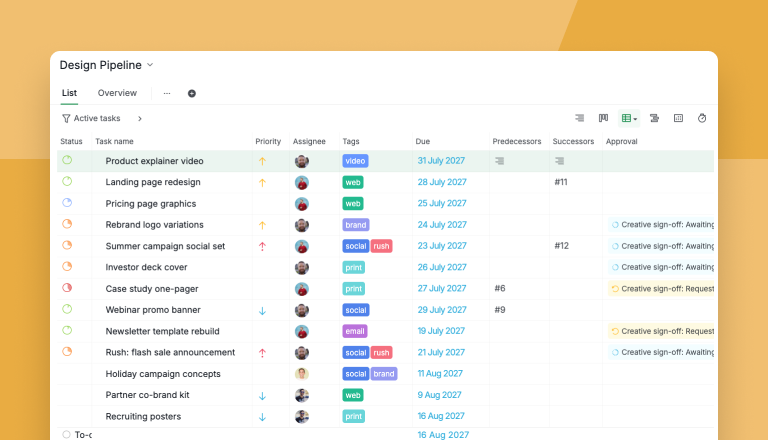
Last updated: October 21, 2026
A design approval process rarely loses time to the designing. It loses it at the two ends nobody structures: requests that arrive underspecified, and revision rounds nobody counts. Fix the front with six answers and a real reason behind every date. Fix the back with a round number and one named approver. Quire's Design Pipeline template has both built in.
- What is a design approval process?
- Why does a design approval process break before the design starts?
- What does a design request have to say before work can start?
- What are the six stages of a design approval process?
- What comes with Quire's Design Pipeline template?
- Why should design requests live in task management software instead of chat?
- What happens between round one and round four of a design review?
- Who signs off, and where does the decision get recorded?
- Key takeaways
- Frequently asked questions
"Can you just quickly" is the most expensive phrase in creative work. What follows it is usually a genuine request with a genuine deadline, and it has arrived as a message rather than as a request, which means it exists only as long as somebody keeps remembering it.
Multiply that by six requesters and the queue stops being a queue. It becomes a set of private understandings, each of which its owner believes is next in line.
A design approval process also has to survive repetition. A contract gets signed once; the same artwork gets decided on three or four times, by people who each saw a different version.
It breaks in the two places nobody structures: how a request arrives, and what happens between the first review and the fourth.
What is a design approval process?
Design approval process: the path a piece of design work takes from the first request to a recorded sign-off, with a visible stage at every step, a count of review rounds, and one named approver at the end.
A design approval process runs in six stages: Requested, In Design, Internal Review, Awaiting Approval, Changes Requested and Delivered. A request enters with a written brief and a reason behind its date, every revision adds one to the round count, and the final yes lands on the request as an approval from one named person.
Most teams skip both ends.
Why does a design approval process break before the design starts?
It breaks at intake: a request that arrives as a message has no state, so the queue it belongs to is invisible. A message cannot be waiting, or accepted, or third in line. Only unread or read.
So the loudest requester wins, because volume is the only signal anyone has, and the designer quietly becomes the queue. Worse, priority stops being arguable: "this is urgent" cannot be checked against anything.
That last one is cheap to fix. Almost every request carries a date; almost none carry the reason.
Put the reason on the request as its own field and two kinds separate themselves. "Printer cutoff is 16 Jul, no flex" is a deadline, "No hard date, current template breaks on mobile" is not. Both are real work. Only one gets to jump.
In Quire the gate lives in triage: nothing leaves the intake list without a requester and a reason in that field. That's what turns "this is urgent" into something you can check.
Design queues also jam when too many people can comment and nobody is the decider: RACI, DACI and RAPID compared is the who-decides-versus-who-advises layer underneath everything below.
What does a design request have to say before work can start?
Six answers. A request carrying all six can be started today; one missing two of them is a conversation that will take three days to have.
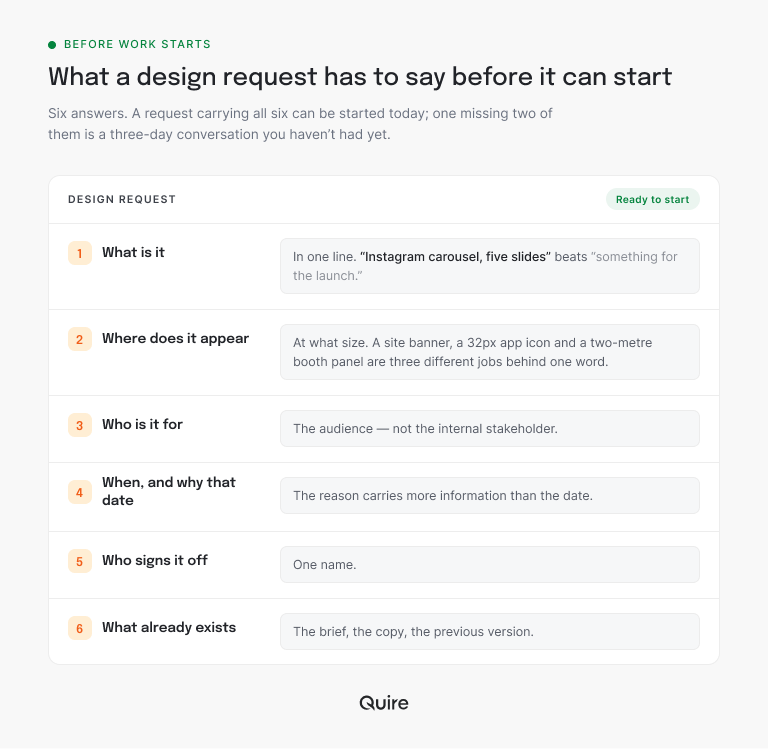
- What is it, in one line. "Instagram carousel, five slides" beats "something for the launch".
- Where does it appear, at what size. A site banner, a 32px app icon and a two-meter booth panel are three different jobs behind one word.
- Who is it for. The audience, not the internal stakeholder.
- When, and why that date. The reason carries more information than the date.
- Who signs it off. One name.
- What already exists. The brief, the copy, the previous version. Every missing input becomes a question, and questions are what turn three days into two weeks.
Project managers have put a number on this.
PMI's Pulse of the Profession research on requirements found that nearly half (47%) of unsuccessful projects missed their goals because of inaccurate requirements management. A design request is a requirement in miniature, and a vague one fails the same way, only faster.
One of the six earns a field of its own, because a field is what makes an answer sortable: the reason behind the date becomes Why this date.
Two more fields sit beside it, Requested by for whoever asked and Review round for how many times the work has come back.
The rest is prose for the task description, and the template ships all six as a How to request design work document you can point people at.
Test it in ten minutes. Start a free Quire project, or open one you already run, add a text field called Why this date, and fill it in on your five oldest open requests. Odds are two will have no reason at all, and that's the argument won.
What are the six stages of a design approval process?
The six stages are Requested, In Design, Internal Review, Awaiting Approval, Changes Requested and Delivered. Those six track where the work is. The decision gets its own record, an approval on the task, and keeping the two apart is most of the trick.
Here's how each stage runs in the Design Pipeline template:
| Stage | What happens | What gets recorded | Who moves it on |
|---|---|---|---|
| Requested | The request lands in intake with its six answers | Requested by, Why this date, a due date | Whoever triages, with a slot or a no |
| In Design | Work starts from the written brief, not from memory | Files and questions, on the task | The designer |
| Internal Review | The team catches typos, specs and spacing | Comments on the task | A teammate, before any approver sees it |
| Awaiting Approval | Finished work sits with one named approver | An approval request under Creative sign-off | The approver |
| Changes Requested | The approver names the edits and the work loops back | The feedback, plus one on Review round | The designer, for the next round |
| Delivered | The approved version ships | The yes, with who gave it and when | Nobody, which is the point |
Internal Review is the stage teams skip and the one that pays for itself. It means round one with the approver is spent on the idea, not on corner radii.
Changes Requested is the only stage that runs backward, so it's the one worth counting. More on that below.
Every stage in that table is a handoff between two teams, the one asking and the one designing. The cross-functional project management playbook lays out the ownership and handoff layers underneath it. To sketch those handoffs for your own pipeline first, business process mapping shows how, swimlane diagrams included.
What comes with Quire's Design Pipeline template?
A working design queue: the six stages above, three custom fields, two sublists, a Creative sign-off approval category, two documents and a dashboard. Open Quire's Design Pipeline template, click into the Intake: not triaged sublist, and the whole argument sits in three rows.
Recruiting posters reads "Careers fair is 16 Aug" in Why this date. Partner co-brand kit, due a week earlier, reads "Partner launch has no date yet". Same queue, same field, and only one of them is a deadline.
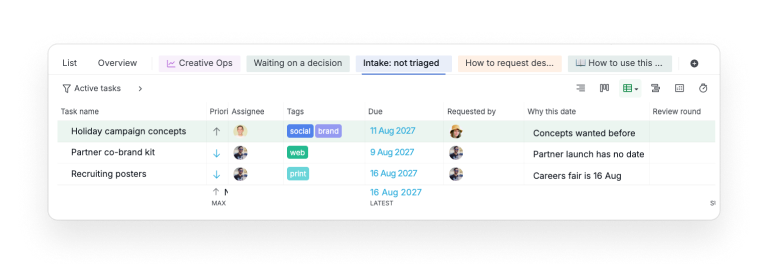
What makes those rows possible:
- Three fields, and the types matter. Requested by is a user field, so the queue filters by who is asking. Why this date is text. Review round is a number, no decimals, so it sorts. Rebuild those three anywhere and you have most of the value.
- Tags for the surface: web, brand, social, print, email, video, and rush for the ones that genuinely are.
- Intake: not triaged, a sublist of requests not yet accepted, sized or scheduled. Its length is your capacity signal; its triage rule is the real gate, since every item needs a requester, a reason, and either a slot or a no.
- Waiting on a decision, a sublist of finished work parked with an approver. Read it by age, not length.
- A Creative sign-off approval category, pre-built, so finished work goes to a named person for a recorded yes or a list of changes.
- Two documents: How to request design work, the six-answer checklist for requesters, and How to use this template, a five-step setup guide.
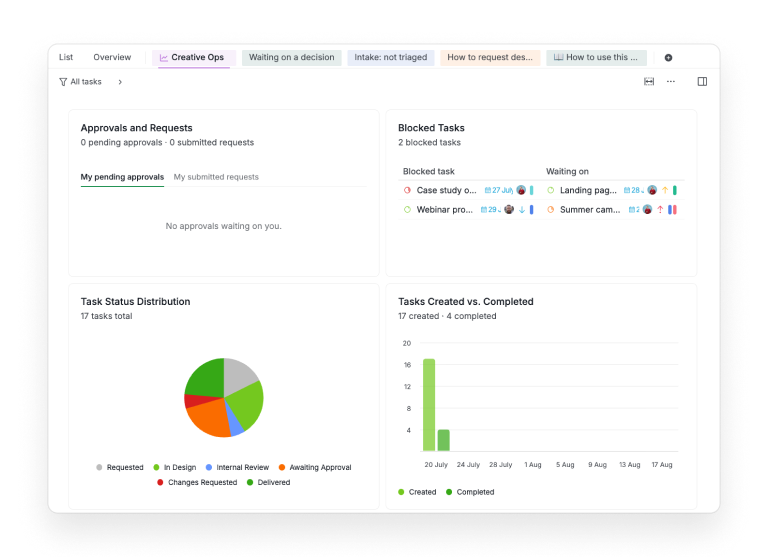
- A Creative Ops dashboard with a blocked-tasks widget and the spread across the six statuses.
Copying it takes about a minute. Open the dropdown beside the template's name, go to More, pick Duplicate, and choose the organization your copy should live in.
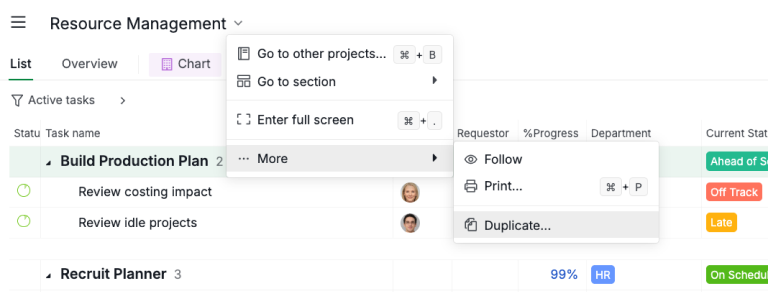
Delete the samples before they start feeling like yours, and resist a fourth field until something has gone wrong twice. Three fields get filled in, six get ignored, and an ignored field is worse than none because it still looks like data.
Design Pipeline is the staged-pipeline pick in Quire's library. The roundup of project management templates sorts the rest into finite, repeating and staged work, so the next template you need is easy to spot.
Why should design requests live in task management software instead of chat?
Because once requests are tasks, the pipeline stage does the work the message thread could not. Anybody can open the project and see, in the sample data, that four things are with an approver and three have not been triaged, without asking a designer to recite it.
That's the whole job of task management software in creative work: every request gets a stage, an owner and a place in line, which a chat scroll has never once managed.
The two sublists carry most of that, a sublist being a saved slice of the project beside the main list. Both are visible to everyone, and so is the verdict on each row once the Approval column is on.
Three days in Waiting on a decision usually means somebody is avoiding it.
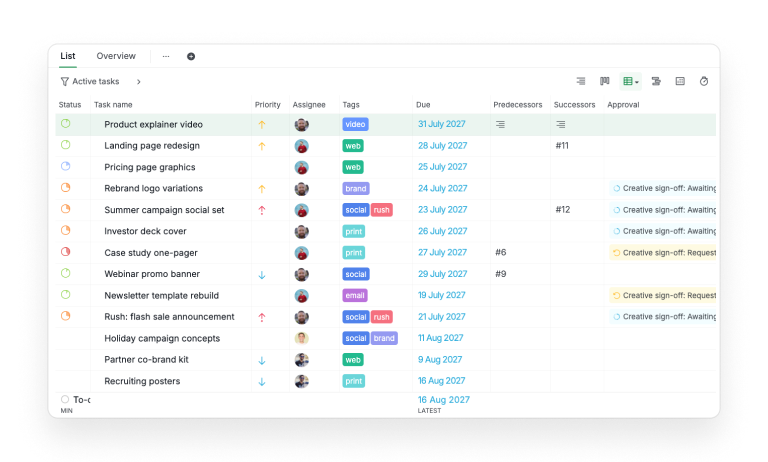
One distinction decides where you look.
The Awaiting Approval stage is the shared queue, which sorts and is what you review on Monday.
The Approvals and Requests widget is your own inbox, counting approvals waiting on you and requests you sent, so it reads zero for anybody who is neither. Only the first answers a team question.
Already proofing files in a dedicated tool, with pins on the artwork? Keep it for the markup and paste the proof link into the request. The queue, the round count and the sign-off stay on the task, where the whole team can see them.
Outside reviewers stall on account creation more than on the design itself. A client who only needs to look can open a link with no account at all, scoped to a single sublist if you like: here's how to share a project with clients without them signing up.
What happens between round one and round four of a design review?
The budget leaks, one redraw at a time, and nothing in a normal setup records it. Round one is fine. Round four is where budgets die, and almost no process document covers the stretch in between.
So count them. The Review round field turns a vague sense of thrash into a sortable column. One round is normal, two is fine, and a cluster of threes is an intake problem wearing a design problem's clothes: the brief was wrong, and redrawing will not fix a brief.
The other half is what the rounds contain. In a study of 264 employees across seven firms, Zhenxing Gong and Na Zhang found that a supportive feedback environment fed creative performance indirectly, by way of people's mood.
Their conclusion: "shaping a supportive supervisor feedback environment is quite important for improving creative performance." It's survey data, so read it as a correlation rather than a lever, but the point holds. Feedback is part of the work rather than a reaction to it.
Which gives one rule worth enforcing. Feedback names the change, not the feeling.
"Not feeling it" is not a revision request. "The badge sits outside the card at 375px" is. A reviewer who cannot name the change is not ready to review, and saying so early is kinder than three rounds of guessing.
In Quire that feedback sits on the task with the files, so round two opens against the same artwork round one was about, and the reviewer can see what they asked for last time before asking for something else.
The template has a worked example on the case study one-pager, one of the two rows reading Creative sign-off: Request changes in the list above.
It sits at round two with a comment that names two edits: a missing job title on a customer quote, and a metric that doesn't match the body copy.
Then the comment explicitly protects what round one already signed off. That last part matters more than it sounds, because re-opening a settled decision is how round two becomes round five.
Client work is this problem with the volume turned up, because the revisions arrive from outside your own team: agency project management without the chaos covers capping rounds when the reviewer is the one paying.
Who signs off, and where does the decision get recorded?
One named person per decision, and the decision gets recorded on the request itself. A design with two approvers has none. The template uses a Creative sign-off category, so the decision attaches to a named approver instead of to a room.
Say in the task which decision is theirs, too. "You are approving the wordmark lockup, not the color palette" prevents the single most common review derailment, which is a reviewer answering a question nobody asked.
The path is short. Open the request, ask for approval under Creative sign-off, and it lands with that person. They approve or they ask for changes.
Either way the answer ends up on the request. A request for changes sends the work back a round, so Review round goes up by one.
One setting turns the sign-off into a real gate. In Project Settings, under Status, switch on the option that blocks completion while an approval is still pending, and nothing reaches Delivered until the approver has said yes.
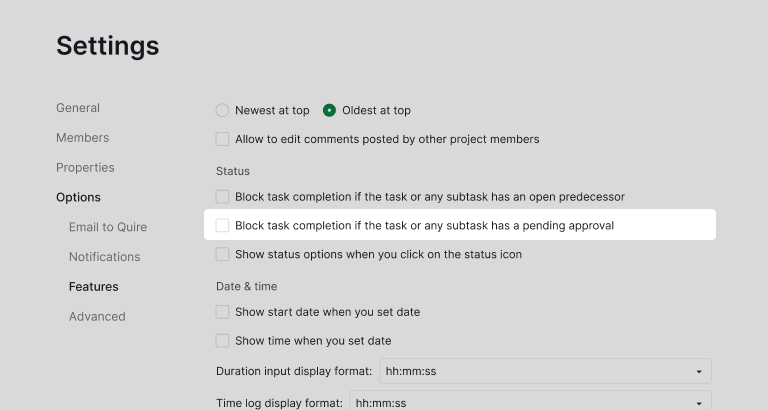
One thing to change the moment you duplicate it: the sample ships Creative sign-off with two approvers. Set your real reviewer in project settings and cut it to one, because a design with two approvers is back to having none.
Approval is available on Premium and higher Quire plans. Custom statuses, which carry the six-stage pipeline, come with every plan, including Free. Full details are on the pricing page.
The mechanics have their own write-ups: an approval flow built from custom statuses, and the dedicated Approval feature. This article is the layer both assume, which is the queue that feeds them.
Key takeaways
If you take one thing from this, take the round counter. A design on round three is almost never a design problem, and every hour spent redrawing it is an hour spent treating a symptom.
Count the rounds in your task management software and the evidence points upstream on its own, at the request that was too vague to build from. The rest follows from that.
The Design Pipeline template has the counter, the intake list and the six-answer request document already in place, so the next step is small. Paste the request document into whatever channel your requests arrive in today, and see how many of this week's asks can answer all six.
Sign up for Quire, copy the pipeline, and run your next design request through it.

Frequently asked questions
What is a design approval process?
The path creative work takes from somebody asking for it to one named person signing it off, in six stages from Requested to Delivered. Quire's Design Pipeline template ships the stages as statuses, with a request document at the front and a recorded approval at the back.
How do you stop design requests arriving as random messages?
Give people somewhere better and make it the faster route. The template ships a request document listing the six answers a request needs, plus an intake sublist where new requests land at status Requested.
How many rounds of design revision are normal?
One is normal, two is fine, three usually means the brief was wrong rather than the work. The Review round field makes that a sortable column instead of a feeling.
Who should approve design work?
One named person per decision, who knows which decision is theirs. Quire's approval categories attach the decision to a person rather than to a channel.
How do outside clients review design work in Quire?
A client who only needs to look opens a no-signup share link, scoped to one sublist if you like. A client who decides joins the project as the named approver, so the sign-off lands on the request.
Can task management software run a design approval process?
Yes. In Quire each request is a task, each stage a status and the sign-off an approval on the task, so the queue, the rounds and the decision share one record.
How does a proper design approval process help a team be more productive at work?
Fewer redraws. Counting review rounds in Quire shows you where the threes cluster. Fix those briefs and you stop paying for the same artwork twice, which hands designers back the hours redrawing was eating.
