
project management · Apr 23, 2024
Unveiling Insights into Project Management Software and its Demographics

Last updated: October 30, 2026
Project management software adoption has clear patterns, nested task lists are the most-used view (Timeline and Kanban follow), North America and Europe lead adoption with Asia-Pacific growing fast, and solo users represent 46% of all PMS users (the largest single segment). Activity peaks in January thanks to New Year planning, with secondary spikes in March, April, and September around quarterly deadlines; November and December slow down as teams wind down for holidays.
- What are the most used views in project management software?
- Which continents lead in project management software adoption?
- What factors matter most when choosing project management software?
- What team size typically uses project management software?
- How do teams use project management software?
- When are the busiest and slowest months for project management software?
- What should you do with these numbers?
- Frequently Asked Questions
Ask ten teams which view they open first in their project tool and you'll get a list, a board, a timeline, and seven shrugs. The shrugs are the interesting answer. Most people never chose a view. They inherited one from whoever set up the workspace.
This post reads the usage patterns behind project management software (PMS), from the views people open to the months they go quiet, so you can see where your team sits and what to borrow from the teams that don't look like yours.
The market itself is still growing into the demand. PMI's Talent Gap report projects that the world will need 25 million new project professionals by 2030. That's a lot of people about to pick a tool by inheritance.
Quick reference: PMS adoption signals across dimensions
| Dimension | Most common pattern |
|---|---|
| Most-used views | Nested lists, Timeline, Kanban boards, Table, Calendar |
| Continents leading adoption | North America, Europe, Asia-Pacific |
| Top selection factors | Feature sets, UI/UX, collaboration, cost/value, workflow fit |
| Most common team size | Solo (~46%); small (5-10); medium (10-50); large (100+) |
| Top use cases | Marketing/sales, project management, software development |
What are the most used views in project management software?
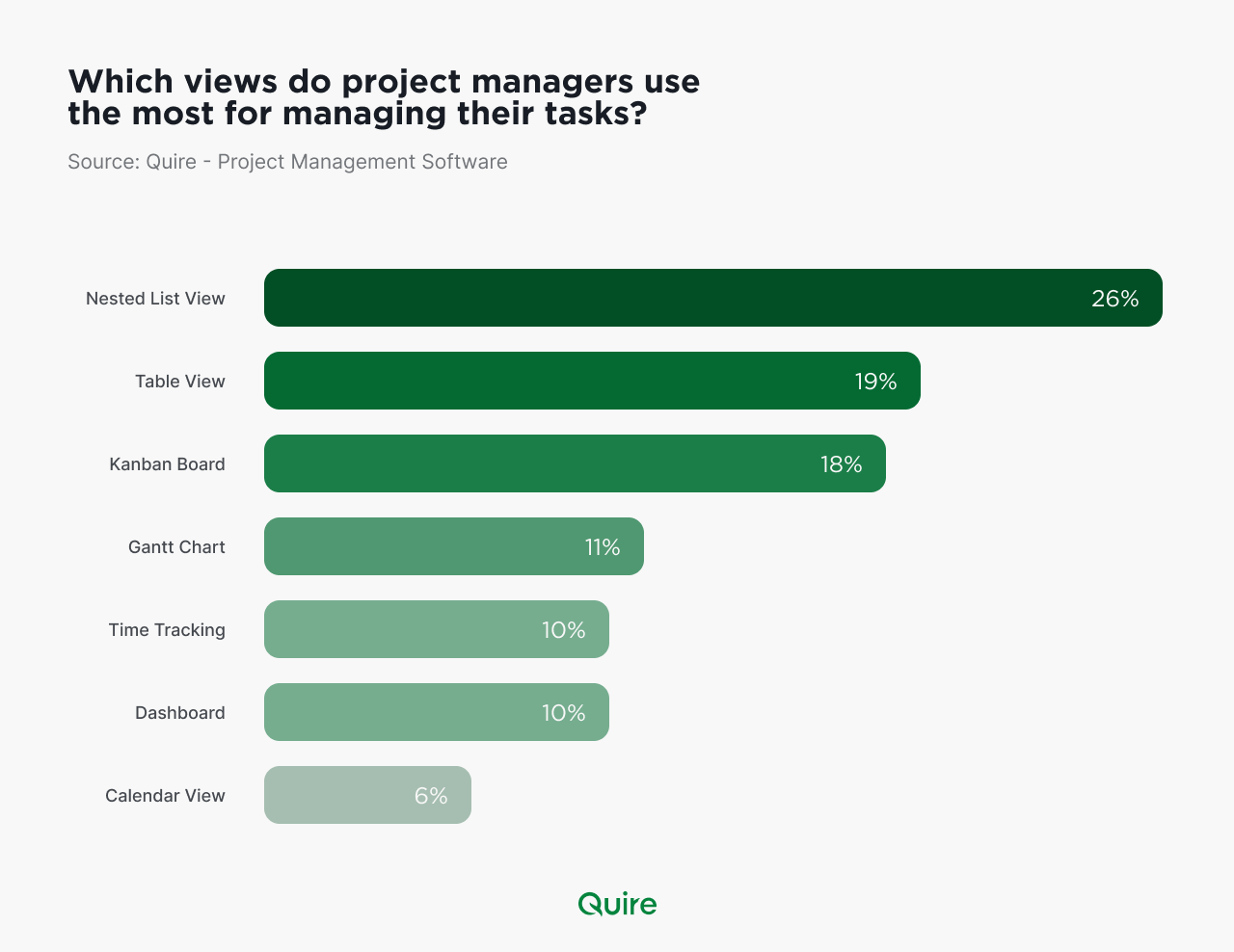
The nested task list leads. It's the view that lets a project break into pieces and the pieces into smaller pieces. Most work is shaped that way, so that's where most people start.
The Timeline comes next, for the teams whose main question is "what has to finish before what." It draws dependencies and dates on one axis, so planners and anyone reporting upward keep it open.
Kanban boards are the Agile team's default. A board shows the state of every task at a glance and makes a pile-up visible as a column that won't empty.
The Table view serves the teams that need to sort, filter, and compare, like a spreadsheet laid over live tasks. The Calendar view puts deadlines and milestones next to the meetings. People who miss tasks rarely miss meetings.
Which one is right for your team? Usually two. The one you plan in and the one you work in, and they're rarely the same view.
A quick test. Ask three people on your team which view they'd miss most if it vanished tomorrow. Three different answers means the tool is doing its job. Three shrugs means it's doing nobody's.
Which continents lead in project management software adoption?
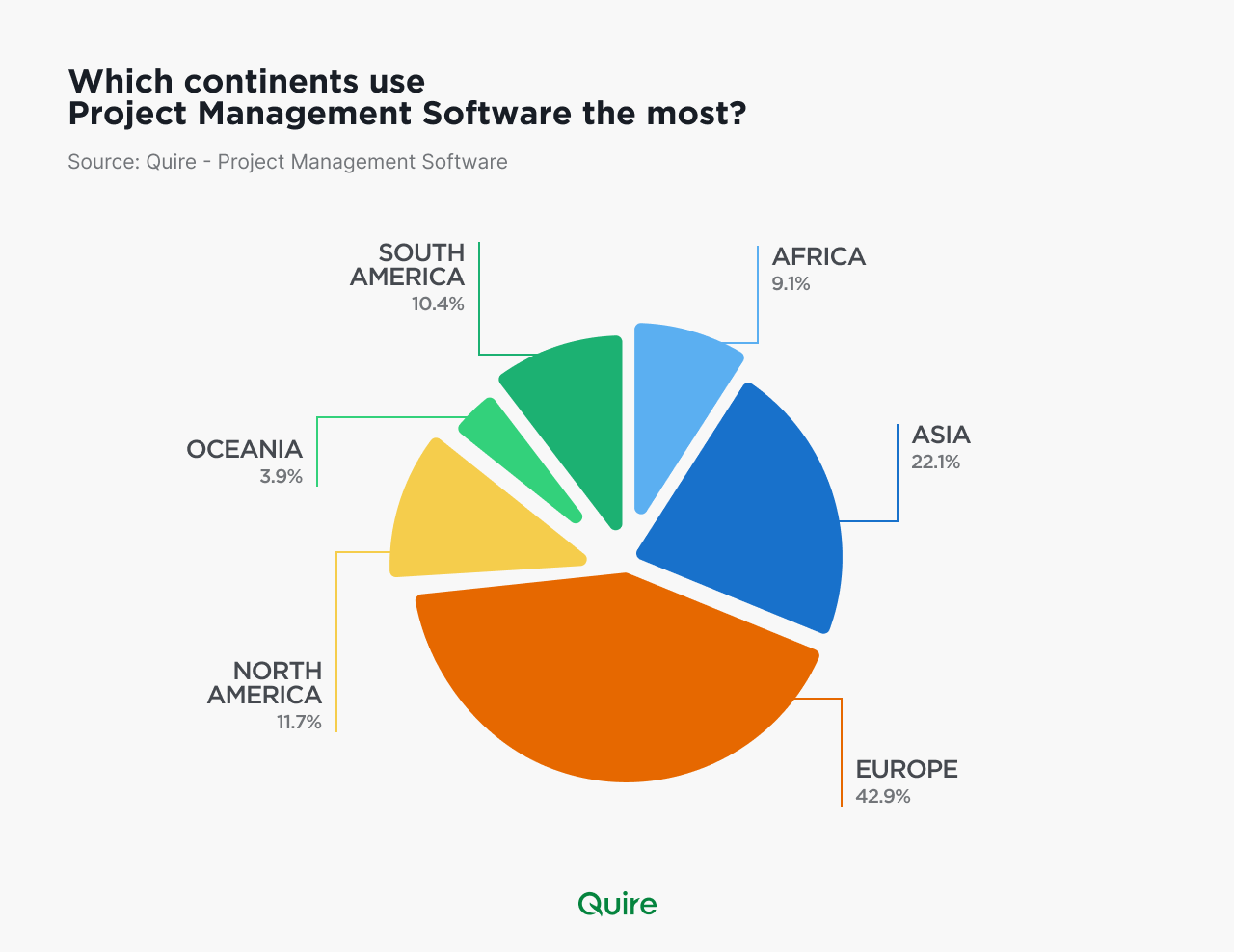
North America and Europe lead, on the strength of mature tech infrastructure and a high density of businesses that run on digital tools by default.
Asia-Pacific follows closely and is growing faster than either, as organizations across the region move their operations into software. Africa and South America are the emerging markets. Adoption is growing, the headroom is large, and the teams there that do adopt tend to skip straight to mobile-first use.
If your team is in a leading region, your competitors already have a tool. If you're in an emerging one, the advantage of picking a good one early is still on the table.
What factors matter most when choosing project management software?
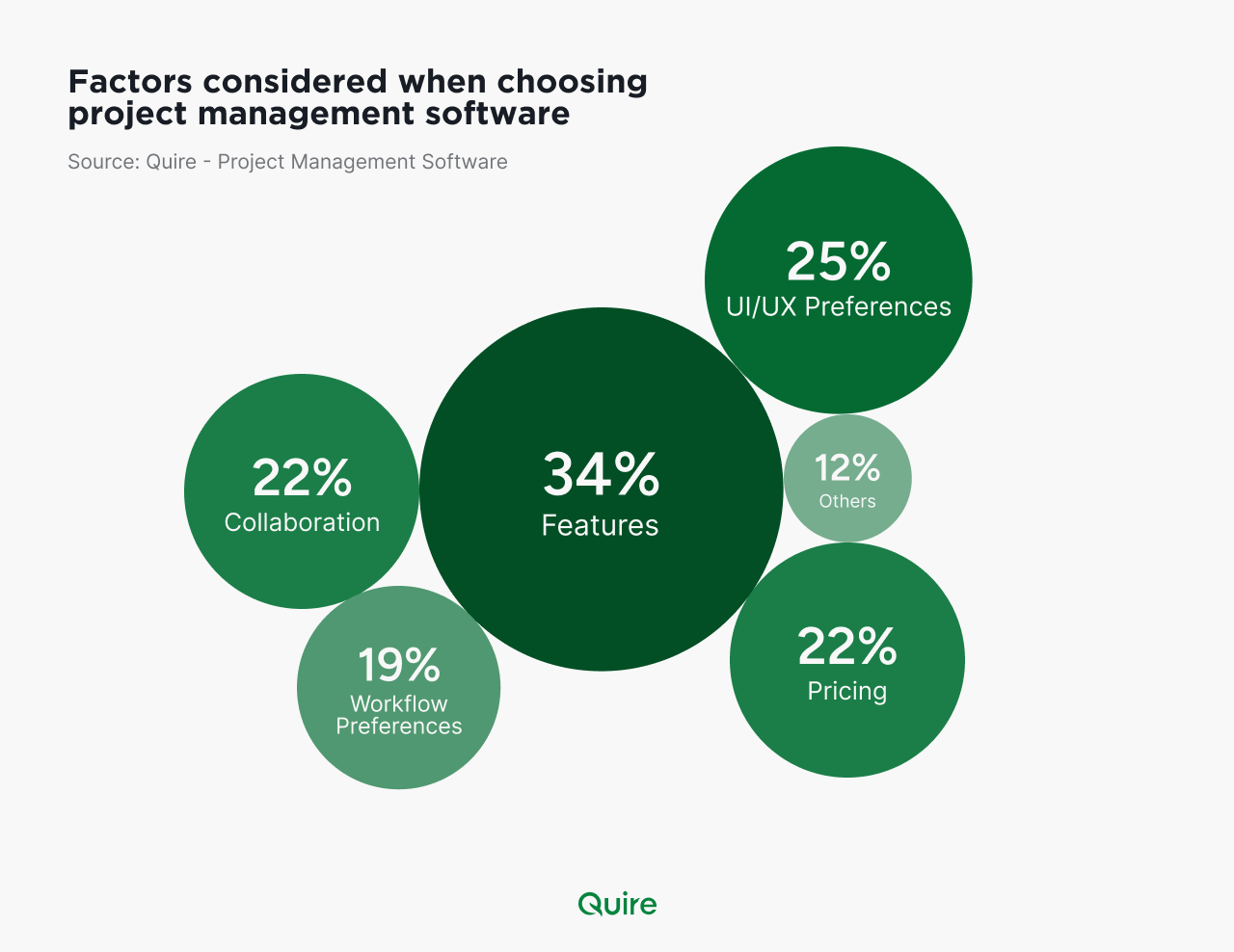
Six factors come up, in roughly this order.
- Feature set. Task management, resource allocation, reporting, and integrations, checked against what your projects need rather than what a demo shows.
- UI and UX. A tool the team opens without being asked beats one with more features that sits closed. Customizable dashboards and a clean layout drive adoption more than any single feature.
- Collaboration. Comments, file sharing, and real-time updates, especially for teams working with people outside the company.
- Cost and value. The subscription against what it replaces, with an eye on the add-ons and per-seat tiers that show up in year two.
- Workflow fit. Does it support how you already work, Agile or Waterfall, sprints or a queue, without a migration?
- Everything else. Support quality, onboarding resources, security and compliance, mobile access, room to grow, and what peers in your industry say about it.
The factor teams underweight is the fifth. A tool that fits your workflow gets used. A tool that makes you change your workflow gets used for a month.
Reporting capabilities deserve a closer look than a checkbox: how teams use project analytics without a data team, with real examples and the six mistakes to avoid.
Read more on 6 essential courses to enhance your project management skills.
What team size typically uses project management software?
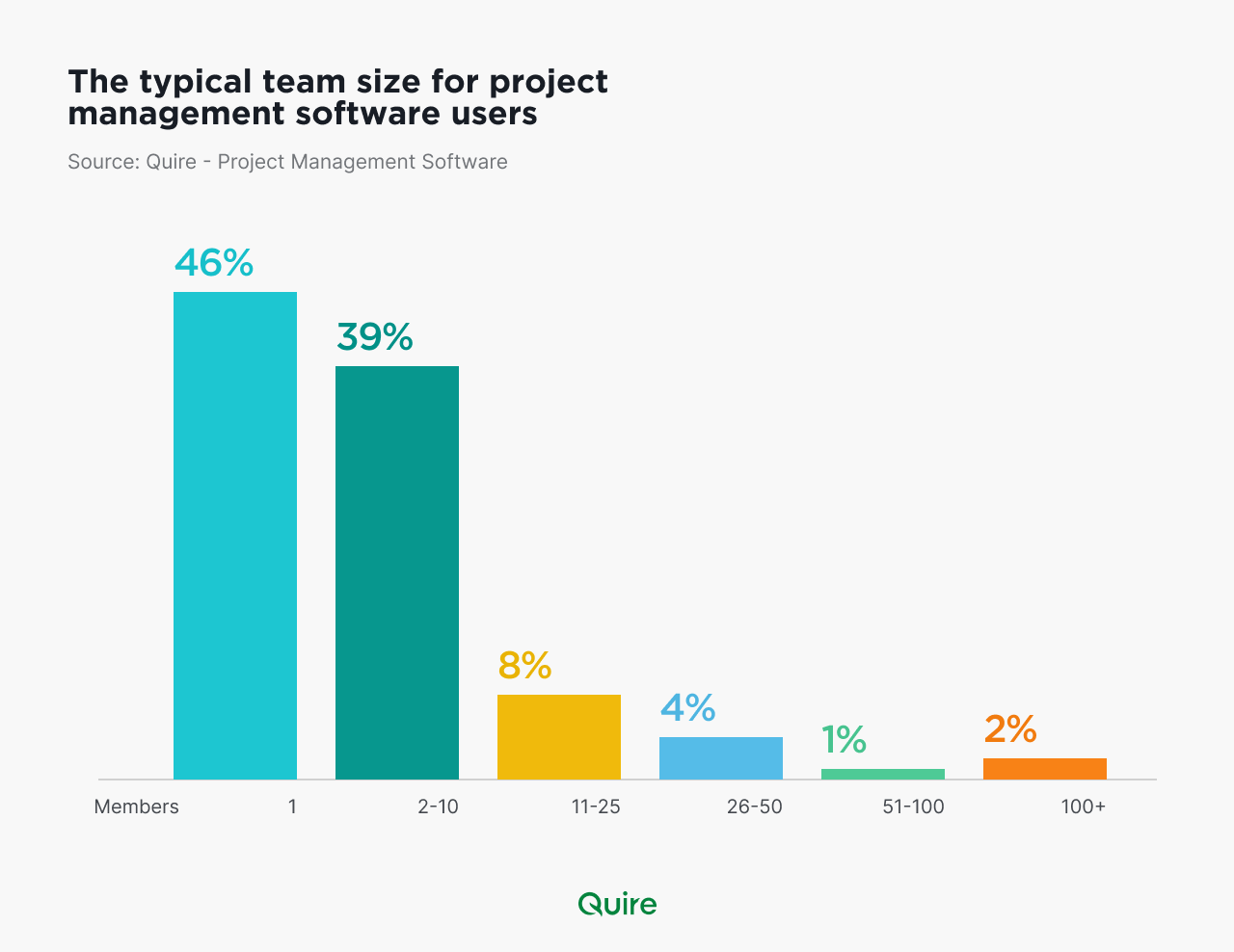
Solo users. They make up about 46 percent of the base, which surprises people who picture project software as a team sport. A freelancer with four clients has a portfolio to run, and a founder before the first hire has the same planning problem as a department.
Small teams of 5 to 10 use the software for communication, task tracking, and visibility, so nobody has to ask who's doing what. Medium teams of 10 to 50 use it to coordinate across functions, allocate people, and hold a timeline together. Large teams of 100 and up run multiple projects in parallel and need the tool for cross-department visibility more than for any single task.
If you're a solo user reading this, you're the majority (and you're allowed to ignore every feature labeled "team").
The size also predicts what breaks first. A solo user outgrows a flat list the day a client project gets a second phase. A 10-person team outgrows a shared spreadsheet the week two people edit the same row. A 100-person department outgrows any tool that can't show six projects on one screen, because the manager's question has changed from "what's due" to "which project is in trouble."
Pick for the question you'll be asking in a year.
How do teams use project management software?
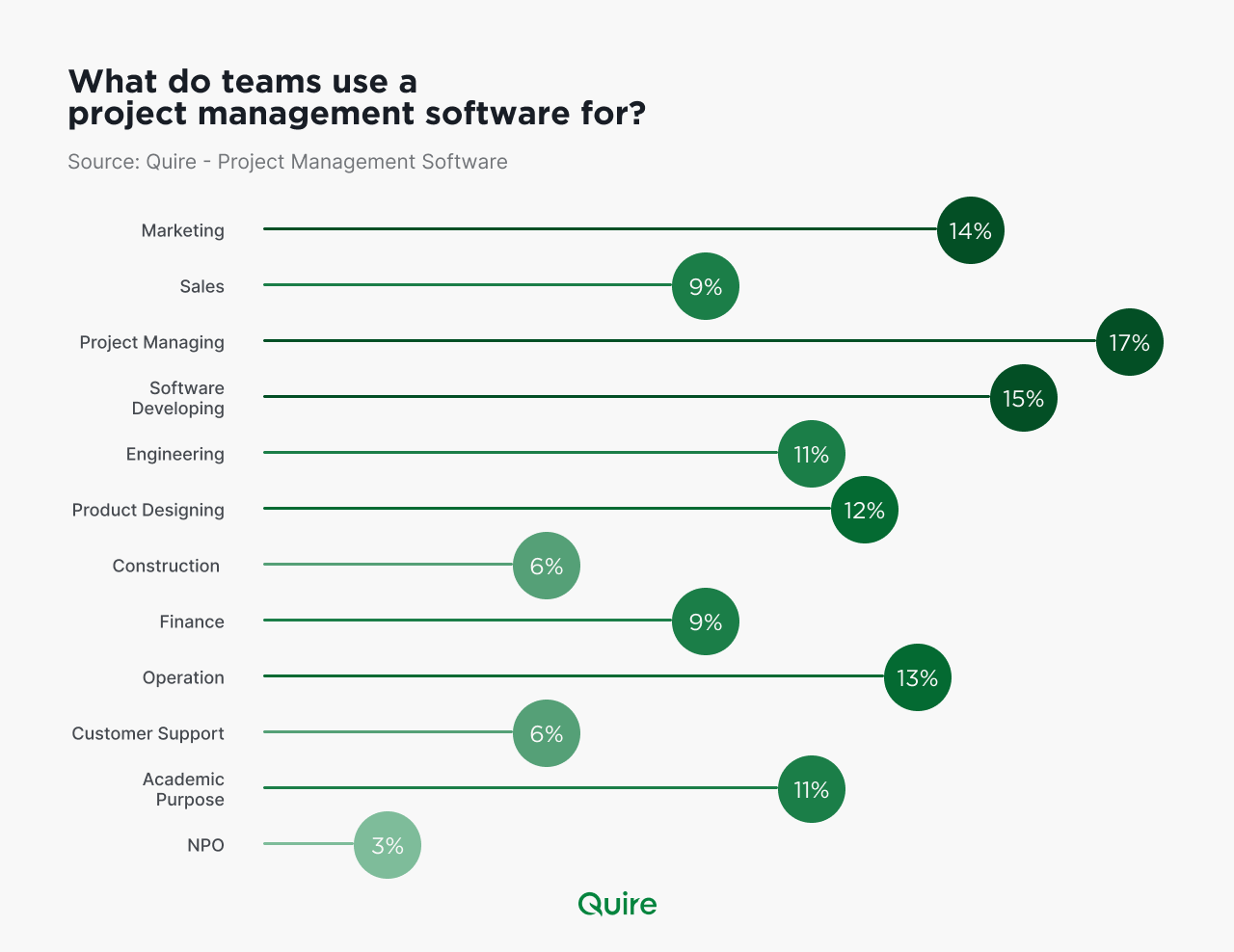
The same tool runs very different work.
- Marketing and sales. Campaign planning, lead and pipeline tracking, customer relationships, and market analysis.
- Project management. Task allocation, timelines, resource planning, risk, progress, and reporting to the people paying for the project.
- Software development. Sprint planning, bug tracking, repository and CI/CD integration, and release management.
- Operations. Inventory, supply chain, production schedules, quality control, and logistics.
- Engineering. Design workflows, technical specifications, equipment maintenance, feasibility studies, and projects that span disciplines.
- Product design. Briefs, design iterations, feedback collection, version control for files, and prototype collaboration.
- Finance. Budgets, expense tracking, reporting, forecasting, invoicing, vendor management, and compliance.
- Academic work. Research projects, class and seminar scheduling, grading, and student progress.
- Everything else. Patient-care coordination in healthcare, resource planning in construction, event logistics, grant management at nonprofits, case management at law firms, and client engagements at consultancies.
Nine industries, one shape of problem. Work that has to be broken down, assigned, dated, and watched.
When are the busiest and slowest months for project management software?
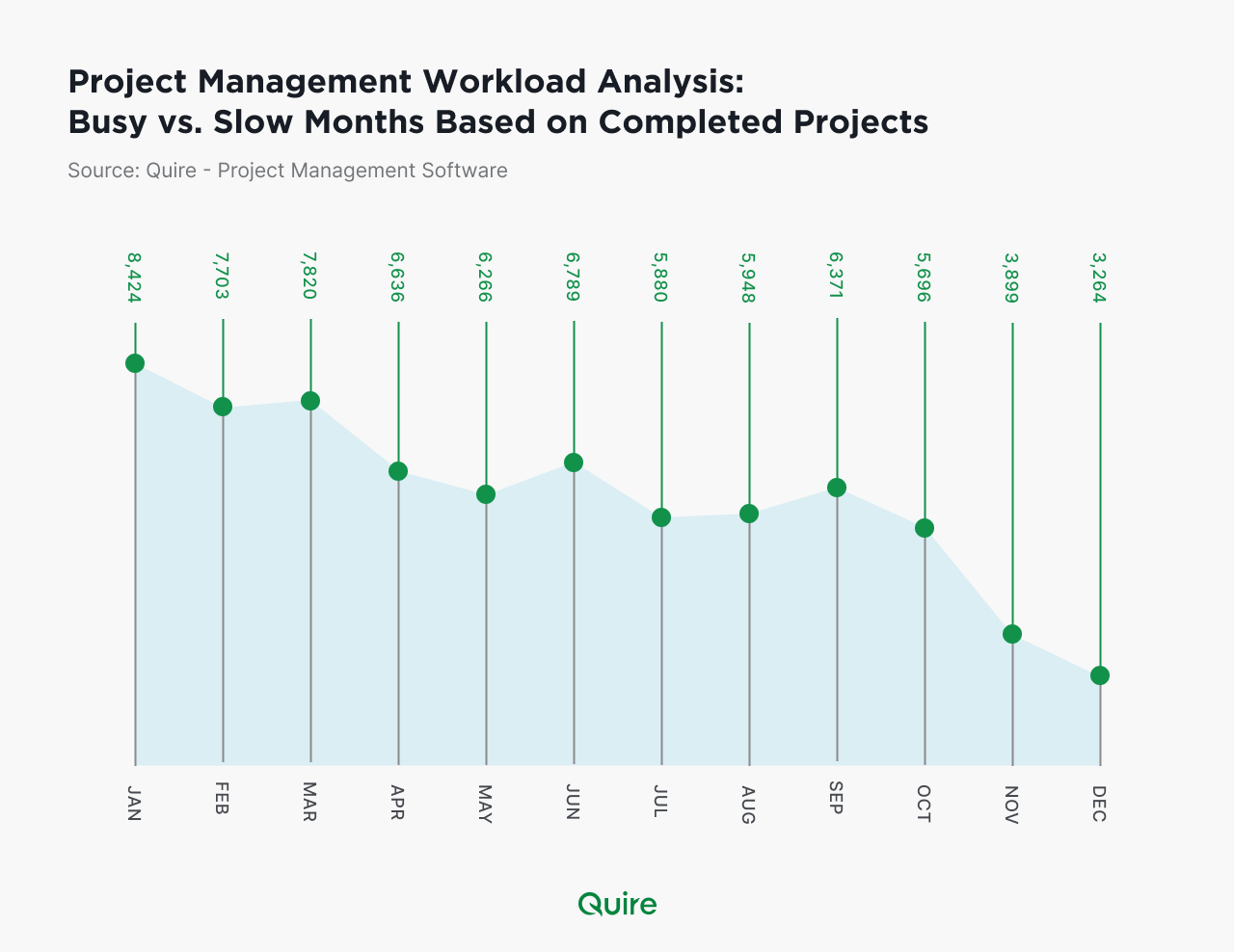
January is the peak. New year, new plan, and a few million people writing their goals down somewhere that will hold them to it.
March, April, and September run hot too, because quarters end and industry events cluster there. Teams push to close out goals, and the tool sees it.
November and December are the slow months, as vacations and holidays thin the calendar. Retail and event teams are the exception, and their busiest weeks fall exactly where everyone else goes quiet.
The slow months are also when teams abandon tools. A workspace nobody opens in December is the one that gets replaced in January's enthusiasm, whether or not it deserved it.
For you, the seasonality is a planning input. Set up or migrate a tool in a slow month, when the team has attention to spare, and expect January to be the month the whole company suddenly wants a dashboard.
What should you do with these numbers?
Four things.
Check which view your team lives in. If everyone plans in a list and works from a board, you want a tool where those are the same tasks, not two copies. In Quire, the list, the board, the table, the timeline, and the calendar are readings of one task set, so the popularity contest between views stops mattering.
Size the tool to the team you'll be in a year. Solo users and 5-person teams have different needs from a 50-person department, and the migration between tools is the expensive part. Pick one with room.
Count the views in use. Open the workspace analytics, or ask around. A view nobody has opened in a quarter is a view you can stop configuring.
Time the rollout. Not January. By then the team is already busy, and a new tool during the busiest month is how a tool earns a bad reputation it didn't deserve.
The patterns above describe how teams use project software. Which view, which region, which factors, which size, which month. None of them tells you what your team should do, but all of them tell you what most teams do, and that's a useful place to start disagreeing.
More project management reads: Project Crisis Management: Getting a Project Back on Track and 6 Expert Secrets for Exceptional Project Team Leadership.
Frequently Asked Questions
What are the most used views in project management software?
Nested task lists lead adoption, followed by timeline and Kanban views. Table and calendar views round out the picks for data-heavy and schedule-driven teams. List and board lead almost everywhere, with timeline and calendar behind. Quire renders all of those plus a table from one task set, so what matters is whether switching between them costs anything.
Which continents lead in project management software adoption?
North America and Europe lead, with Asia-Pacific close behind and growing fast. Africa and South America are emerging markets with room to expand.
What factors matter most when choosing project management software?
Features, UI/UX, collaboration, cost, and workflow compatibility top the list. Support, security, and scalability usually tip the final decision.
What team size typically uses project management software?
Solo users make up about 46 percent of the base, the largest single group. Small and medium teams use it for coordination, while large teams rely on it for cross-department visibility.
When are the busiest and slowest months for project management software usage?
January peaks thanks to New Year planning, with March, April, and September also busy around quarterly deadlines. November and December tend to be the slowest months.
