
Summary of the suggestions about notification feature:
- Show only the unread notifications in the notification panel.
- Archive/Hide the notifications in the notification panel.
- Ability to mark notifications as read.
- Ability to customize the sound for notifications.
- Configure the notifications that you want to receive for certain projects.
- A bigger notification panel. A whole page for notifications.
Hi everyone,
For those who asked for more control over notifications, this one's for you.
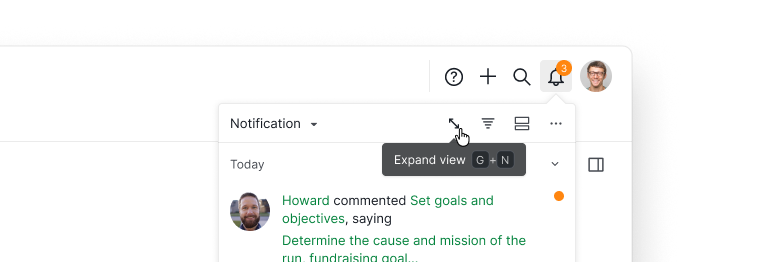
You can now expand the notification panel into a full page view. From there, double-click any notification to open its detail panel and see the full task.
You can also select multiple notifications at once and use the bottom menu bar to mark them as read, unread, or delete. Grouping and filtering work in this view too, so you can focus on the notifications that actually need your attention.
Golda, May 6, 2026
Hi, please update your mobile app to the newest version 9.30 for this function. Thank you!
Peggy, Mar 15, 2023
hi @peggy
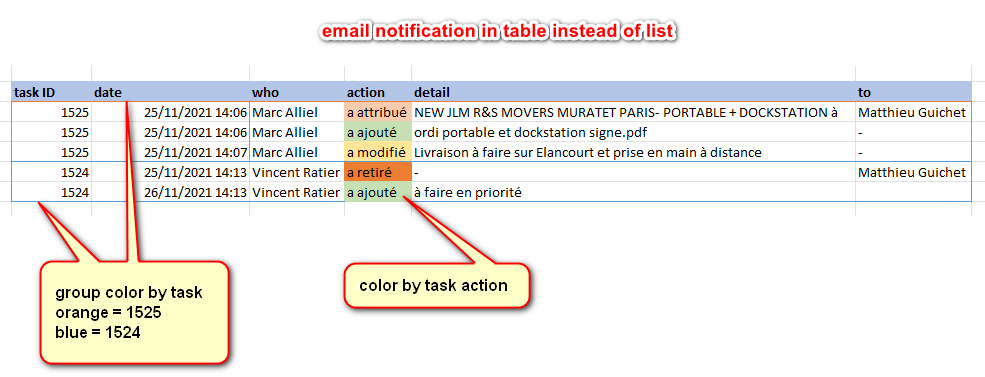
Matthieu Guichet, Nov 30, 2021
Hi @matthieu.guichet-02, thank you so much for providing us a suggestion that you think could improve Quire better for our users. I already passed your feedback to our team and we will considering it😊.
Golda, Nov 30, 2021
Hi @matthieu.guichet-02 Thank you for your feedback. Could you please give me a screenshot or visual example of the table so that our team can understand your idea better? Looking forward for your reply.
Golda, Nov 29, 2021
Hi @peggy I see the delete option on my web based version of Quire. But on my app version on my iPad, I dont see the option as there is no way to hover. Is this being looked at for the App versions?
Benjamin Pendleton, Mar 10, 2023
Hi @Benjamin_Pendleton , it will be available in the next version update for mobile app. I will keep you posted when it's added. 🙌
Peggy, Mar 14, 2023
Dear Peggy, how can I unsubscribe from all feedback board? Because I got bombarded by notifications from this. I do not remember if I was subscribe to this. What should I do?
DrWho, Jul 29, 2021
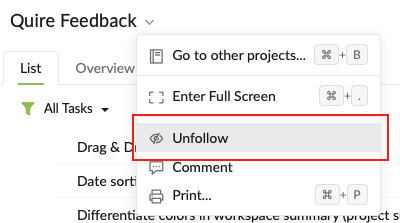
Hi @drwho - You can unfollow the entire Quire Feedback project.
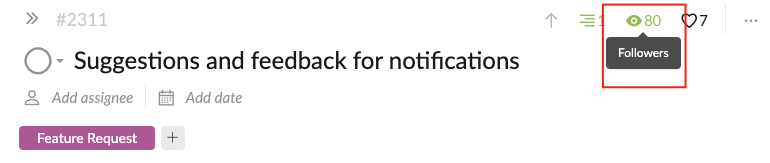
Or if you don't want to receive any notifications about this particular thread, you can click on the 'eye' icon at the upper right corner to unfollow this thread. I hope this helps.
I am sorry for bombarding you with notifications. I am currently organizing the Quire Feedback threads and merging the duplicated ones.
Peggy, Jul 29, 2021
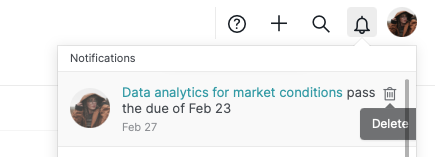
Hey guys, in our latest update, we added a new function where you can delete the notifications from the notification panel. This may not be exactly what you are looking for, but we do hope that this helps a bit with the notifications 👍
Hover over the notification and click the trash icon to remove it from the notification panel.
Peggy, Mar 10, 2023
hi @peggy dunno if it's the right place to submit ideas but here it is...
in mail notification, (I think) a good enhancement will be to organize information inside a table instead of list and sublist. It'll be much more readable ! 😃 thx
Matthieu Guichet, Nov 25, 2021
@peggy I have read through this and dont see a solution that easily stands out, for this item: "Show only the unread notifications in the notification panel". Is there a solution? Thank you in advance!
Benjamin Pendleton, Mar 1, 2023
You could merge my #5841 task in here too I think.
Andy, Sep 5, 2023