
milestones · Sep 22, 2024
Last Quarter is Here: Are You Ready to Reset with Quire?
Last updated: July 20, 2026
Q4 is when teams either close strong or quietly coast. This post walks through Quire's summer updates (milestones, sublist permissions, Outlook add-in, Google Calendar two-way sync) and how to use them to run a real Q4 reset. Cut your plan to three priorities, set hard end dates, and sync everything to the calendar your team actually checks.
- What changed in Quire this summer for your last-quarter push?
- Why do sublist permissions matter more in Q4 than the rest of the year?
- How does the Outlook add-in cut down on Q4 email chaos?
- How does Google Calendar two-way sync change the Q4 finish line?
- What are the common mistakes teams make when planning a last-quarter reset?
- When should you stop pushing on this year and start prepping for next?
- What small Quire upgrades smooth out the Q4 grind?
- Key takeaways
- Frequently Asked Questions
What changed in Quire this summer for your last-quarter push?
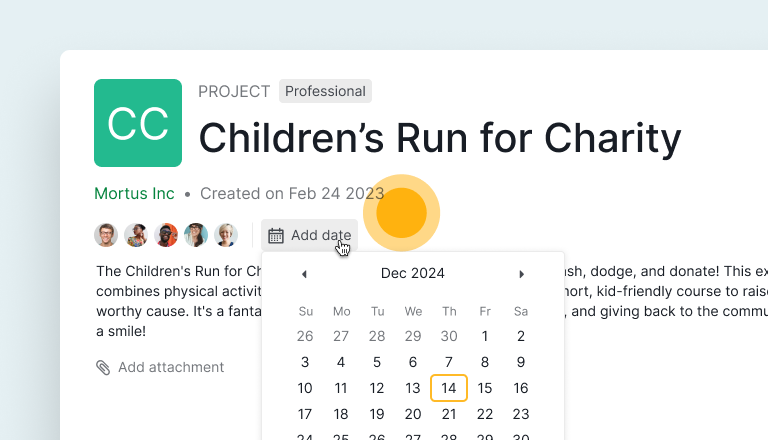
Keeping track of project milestones is now a breeze. You can set due dates (and optional start dates) for projects and sublists, visualize deadlines, and monitor progress. Your team stays aligned with timelines, and you can keep everyone accountable by viewing the entire member list within a project. Your path to project completion has never been clearer.
According to PMI's Pulse of the Profession, roughly 35% of projects fail to meet their original goals, and the damage tends to concentrate in the final quarter when teams stop replanning. Milestones with real end dates, paired with a short list of goals like a well-run OKR cycle, are the cheapest defense against that.
Here's a detailed guide on how to set due dates for your projects and sublists.
How should your last-quarter focus shift by where you are right now?
Not every team enters Q4 the same way. Some are coasting toward a strong finish, some are quietly behind, and a few are openly in trouble. The reset move is different for each.
| Quarter status | What's true right now | Q4 reset move | Quire feature that helps most |
|---|---|---|---|
| On-track | You'll hit your OKRs if nothing breaks | Protect the plan, cut new requests | Milestones with hard end dates |
| Behind | You'll miss one or two key goals | Pick the top 3, defer everything else to Q1 | Sublist permissions to lock scope |
| Way-behind | You'll miss most goals if you don't reset | Replan from scratch, kill ~50% of work | Google Calendar two-way sync for visibility |
The hardest of those three is usually "behind." On-track teams know what to do, way-behind teams have no choice but to cut. Behind teams are the ones that keep grinding on the original plan and arrive in December surprised.
Why do sublist permissions matter more in Q4 than the rest of the year?
We've added a feature that gives you tighter control over who can see your sublists. Instead of sharing with all Project Members and yourself, you can now scope access to specific individuals inside the project.
In Q4, that matters more. You're often working on year-end financials, layoff planning, customer renewals at risk, or roadmap bets for next year. Half the project shouldn't see half of that. Tight permissions also reduce drive-by feedback from people who aren't doing the work, a small dose of the coordination tax that's the single biggest reason Q4 sprints slip.
Here's a detailed guide on how to set sublist members' permissions.
How does the Outlook add-in cut down on Q4 email chaos?
With the Quire Outlook add-in, you can turn an email into a task without leaving your inbox. No tab switching, no copy-paste, no "I'll add it later" that becomes never.
In the last quarter, your inbox gets louder. Customers want commitments before year-end, vendors want sign-off on Q1 contracts, and your boss is forwarding things with "thoughts?" The add-in turns each of those into a real Quire task with an owner and a due date, so nothing lives in your head.
Here's a detailed guide on integrating your projects with Outlook.

How does Google Calendar two-way sync change the Q4 finish line?
Quire is one of the very few project management platforms, and possibly the first, to offer true Google Calendar two-way sync without any third-party apps. Your tasks and projects sync directly with Google Calendar, and any change in either place reflects in the other.
The benefit is simple. People miss tasks buried in tools they don't open every hour. They don't miss meetings. Putting Quire due dates next to standups and customer calls means the team sees the cliff before they walk off it. Block double bookings, kill scheduling conflicts, and stop the "wait, that was today?" Slack messages.
Here's a detailed guide on how to sync your tasks to Google Calendar and get live updates.
What are the common mistakes teams make when planning a last-quarter reset?
The mistakes are predictable, which is the good news. If you know what they are, you can dodge them in the first hour of your reset meeting.
The first one is treating the reset like a status update. People go around the room reporting on what's behind, everyone nods, and the original plan stays in place. A reset isn't a recap. It's a cut. If you leave the meeting with the same number of projects you walked in with, nothing happened.
The second is reopening already-finished work. There's a real temptation in October to "improve" things that shipped in Q2 because the team has bandwidth. Don't. Finished work that's working is the highest-leverage thing in your portfolio. Leave it alone and put the bandwidth into the short list.
The third is starting new initiatives because Q4 feels urgent. Urgency and importance are different. A new project started in October will almost certainly miss Q4 and bleed into Q1, where it competes with planning for next year. Unless it unblocks revenue you'd otherwise lose, push it to January.
The fourth is making the plan in a spreadsheet that nobody opens twice. The reset only works if the new plan lives where the team already works. That's why we wired milestones, sublist permissions, and calendar sync into Quire's core flow. The plan you can see is the plan that gets done.
The fifth is skipping the mid-quarter checkpoint. Teams that run the reset in October and then don't look at the plan again until December rediscover all the same problems, just later. Put a 30-minute review on the calendar for the second week of November. If something's slipping, cut it then.
When should you stop pushing on this year and start prepping for next?
There's a moment in every Q4 where the right move flips from "ship more" to "prep harder." Most teams miss it by two or three weeks.
The rough rule is the first week of December. By then, anything not already in flight will not ship cleanly before year-end. You're either rushing a launch into a quiet week when customers aren't paying attention, or you're asking the team to work through holidays for a deadline nobody outside the company cares about. Neither is worth it.
Use that last stretch to do three things instead. Write the year-end report while the wins are fresh, because your January self will be grateful. Scope the top two Q1 projects so the team can hit the ground running on day one. Run a real retrospective on what worked and what didn't, and put the takeaways somewhere people will actually find them in March.
There's also a softer signal. If your standups have turned into the same three people repeating the same three blockers, the team is done with this year. Forcing more output past that point produces burnout, not results. Trust the signal, close the books, and let people rest. The teams that win in January are the ones that didn't burn out in December.
What small Quire upgrades smooth out the Q4 grind?
Not every update needs a spotlight, but that doesn't mean these little improvements should be overlooked. We've made some subtle tweaks that won't make headlines, but they'll definitely make your workflow smoother. Here are some of them.
- Added a vertical line to highlight task levels in Advanced mode for better clarity.
- Included an option to enable or disable new tag creation in the tag picker.
- You can now undo the deletion of a sublist, because we all make mistakes.
- Copy and paste time inputs with ease.
- Filter tasks by different tags in the Time Report and Timesheet for better organization.
Oh, and here's a small humblebrag. Our team squashed over 100 bugs this summer. We've been working hard behind the scenes to make sure your project management experience is the best it can be. No need to thank us. Just go out there and crush Q4.
In case you'd like to know what we've done day-to-day, you can visit our Changelog that is updated every Friday.

Key takeaways
That's a wrap on everything we've been excited to share. It's just a small peek at how productive we've been over the past few months. We're all set for the final quarter. How about you and your team? Are you ready to take it to the next level and finish the year with something to point at?
The teams that close Q4 well aren't the ones that work the longest hours. They're the ones that cut the plan early, set hard end dates, and put the work where everyone can see it. Quire's summer updates were built with exactly that finish line in mind.
We'll catch you in our year-end summary newsletter. Until then, go run that reset, then go have fun.
More productivity reads: 10 Tips to Improve Your Performance Review and 5 Strategies to Lead Your Team Towards a Successful Last Quarter.
Frequently Asked Questions
What is a Q4 reset and why does it matter?
A Q4 reset is a short replanning sprint at the start of the last quarter: audit what's realistic, cut what isn't, and refocus on fewer outcomes. It matters because most project damage compounds in the final months when teams grind on plans that no longer fit.
How do you decide what to cut from your Q4 plan?
Ask two questions of every initiative: will it move a metric the business reports on in January, and can you finish it cleanly by mid-December? A "no" to either means pause it, hand it off, or push it to Q1.
How long should a Q4 reset planning session take?
Block 90 minutes for a team of five to ten: half for reviewing what's behind, the rest for agreeing on the short list and assigning owners. Longer than that means your scope is still too big.
Should you start new projects in the last quarter?
Usually no. Only start one if it unblocks revenue you'd otherwise lose or if Q1 depends on it being scoped now. Everything else waits until January.
How does Quire help teams run a clean Q4 reset?
Milestones give you hard end dates, sublist permissions lock sensitive work to the right people, and Google Calendar two-way sync puts deadlines where the team already looks.
