
project management · Oct 27, 2026
Project Management Automation: What to Automate First (and What to Leave Alone)

Last updated: October 27, 2026
Automate the handoffs and the reporting before the work itself. The test is shape: an event on one side, a fixed action on the other, no choice in between. Start with recurring tasks, reminders and formula fields inside Quire, then climb to Zapier, n8n, webhooks, Quire CLI and Quire MCP only as far as the handoff needs. Decisions stay with people.
- What is project management automation?
- What is the automation ladder, cheapest rung first?
- Which project management automation examples run inside task management software with no setup?
- How do you automate the handoffs between tools?
- When should a script or an AI client do the work?
- What does an automated Monday look like in Quire?
- What should you leave manual?
- When does project management automation make things worse?
- Key takeaways
- Frequently asked questions
Marisol's week starts with copying. Four requests come out of her inbox and into tasks, with the same fields every time: who asked, what they want, when they need it. Then she opens last week's board to see what closed, so she can tell the client, then she opens the spreadsheet to update the count.
None of that was project management. It was moving information from the place it arrived to the place it lives, and it ate the first hour of the week before a single decision got made.
That hour is what project management automation is for. The software does the moving, and Marisol keeps the decisions.
So this post does two things. It gives you a rule for what to automate first. Then it climbs a ladder of ways to do it, from the switches already inside the best task management tools up to scripts and AI clients, each with a recipe you can run this week.
What is project management automation?
Project management automation: using software to perform the predictable parts of running a project without a person doing them by hand, such as recreating a repeating task, sending a reminder before a due date, creating a task when a request arrives, or rolling up status across projects. The judgment calls, what to prioritize and what to promise, stay with people.
Automate the handoffs and the reporting first, and leave the work itself alone. That ordering is the whole argument, and it runs against the instinct most teams start with, which is to automate the thing they find boring.
Boring is a bad filter. Writing the launch email is boring on a Tuesday and it still needs a human.
The better filter is shape. Does the job have an event on one side and a fixed response on the other, with no choice in between? A request arrives, a task exists. A task completes, a channel hears. A date is three days out, an owner gets nudged.
Those jobs cost the most for the least thinking, and they're the ones a person forgets first when the week gets loud.
Which Monday jobs pass the shape test?
Run Marisol's Monday through that test and the order sorts itself.
| Monday job | Event on one side | Fixed action on the other | Verdict |
|---|---|---|---|
| Re-key inbox requests into tasks | A request arrives | Create a task with who, what and when | Automate first |
| Check what closed last week | A task gets completed | Add it to the week's record | Automate |
| Update the count in the spreadsheet | Any task changes | Recalculate the number | Automate |
| Tell the client what it means | The week turns over | None, because what to say is a choice | Automate the draft, keep the send |
Three of the four pass cleanly. The fourth passes only up to the draft, because the moment Marisol decides what to tell the client, it's her job again.
According to Anthropic's engineering team in Building effective agents, the right start is the simplest solution possible, with complexity added only when it's needed, which might mean not building an agentic system at all. Swap "agentic system" for "automation" and it's the rule for this post.
The handoffs you're about to automate are the same ones that break cross-team projects. The Handoff Gap explains why the moment work changes hands is where it goes missing.
What is the automation ladder, cheapest rung first?
Six rungs, and you climb only as far as the problem needs. Every rung works on the same Quire tasks. A task created by a Zap shows up in the Board, the Calendar and My Tasks like one you typed, and a completion caught by a webhook is the same completion the team sees.
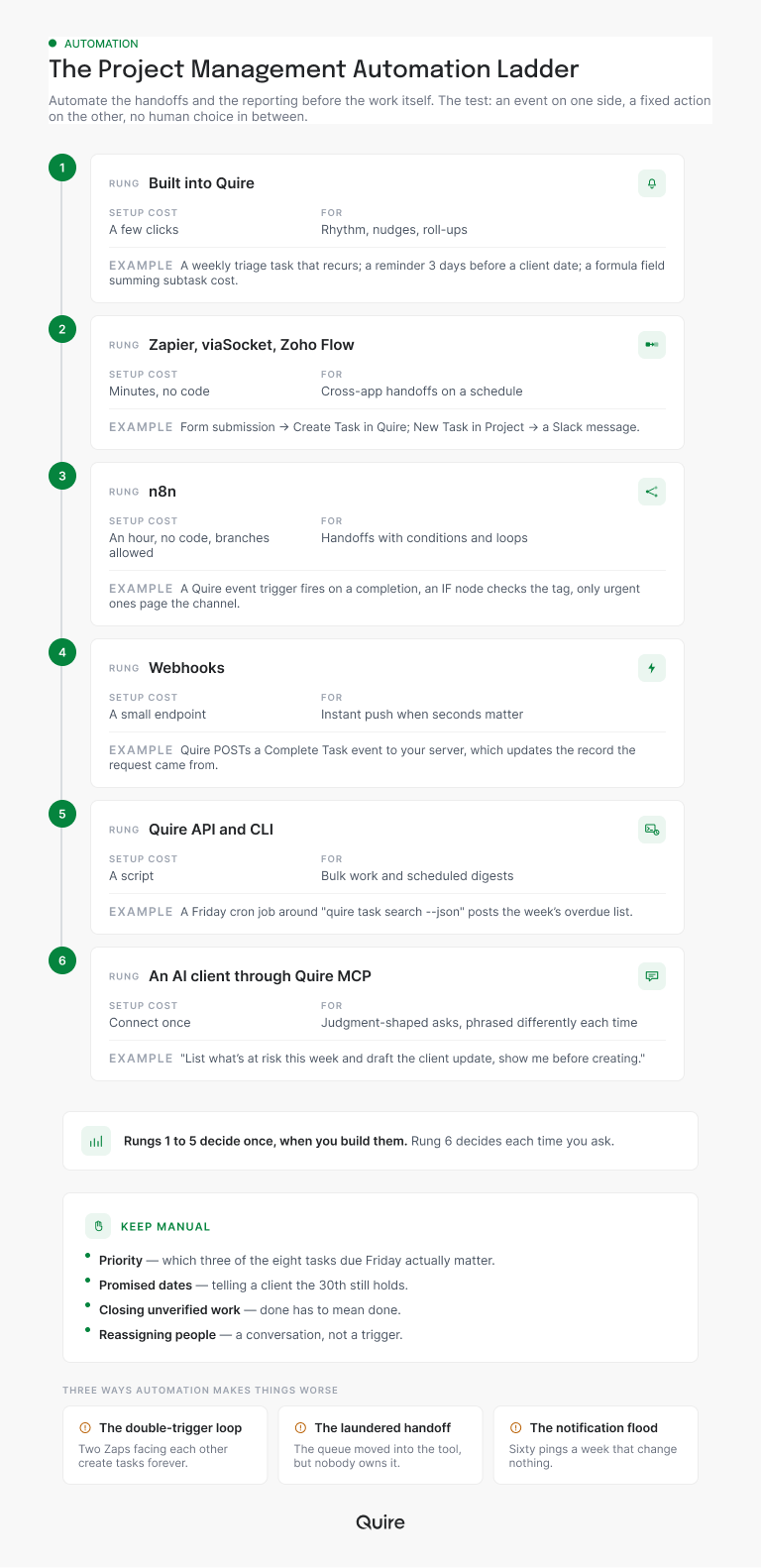
Read the rungs as a question about who decides. Rungs one through five decide once, when you build them, and then react the same way every time. Rung six decides each time you ask, which is why it sits at the top.
Which project management automation examples run inside task management software with no setup?
Rhythm, nudges and roll-ups, and Quire ships all three. Before you open a connector, spend twenty minutes on the switches already inside your workspace, because the roll-up alone retires Marisol's spreadsheet.
Recurring tasks and reminders for the rhythm
Recurring tasks handle rhythm. Set the Monday triage, the monthly report or the review every other Friday to repeat, and Quire recreates it a few seconds after the current one is done.
You still get to check it off (the small pleasure that a permanent to-do never gives you), and the team sees one shared schedule instead of five private ones.
Reminders handle nudges. Attach one to a task, set Notify to a distance before the due date, and share it with the owner and the person who has to react when it lands. One reminder can carry more than one notification, so the client approval due on the 30th can nudge on the 23rd and again first thing on the 30th.
Start a free Quire project, set one task to recur and put one reminder on the date that scares you. The rhythm of your week runs itself before lunch, and you haven't connected a thing.
Formula fields, Smart Folders and Dashboards for the roll-up
Formula fields handle the roll-up. A custom field with subtasks.timeSpent - subtasks.estimated shows the schedule variance of a whole task tree without anyone doing arithmetic, and the same pattern sums cost across subtasks. Array formulas walk through the syntax, and the Table view lays the results out as columns.
And when the roll-up spans projects, a Smart Folder gathers them into one live view. Filter it to overdue and every late task from every client project is on one screen, including the one in the project you haven't opened since Tuesday.
The Friday status gets the same treatment. A Smart Folder's Overview tab already carries Portfolio Activity and Member Workload, and nobody had to build it. A Quire Dashboard adds the widgets you pick, such as Tasks Created vs. Completed for the count Marisol used to type into a spreadsheet.
Dashboard View is available on Professional plans and higher. The revamped Overview tab is on every plan, including Free. Full details are on our Pricing page.
Repeating a whole project rather than a task? Duplicate a template instead of rebuilding it. The templates roundup lists the ready-made ones, and the project menu's Duplicate does the copying.
How do you automate the handoffs between tools?
Pick the connector by how much logic the handoff needs, then let the trigger be the event you were re-keying. This is rung two through four, and it's where Marisol's inbox stops being a to-do list.
Zapier for a straight-line handoff
Zapier is the starting point for a straight-line handoff. Quire's triggers include New Task in Project and New Task Comment, and its actions include Create Task, Update Task and Create Task Comment, with Find Task in Project for lookups.
So the recipe for Marisol is one Zap. It triggers on the form or mailbox where requests arrive, runs Create Task in the intake project, and pastes the requester's answers into the description.
The same shape runs outward. New Task in Project as the trigger, a Slack message as the action, and the channel learns about every request without anyone announcing it. Quire's triggers on Zapier are instant, so the message lands as the task does.
The other app's side can be slower. Zapier checks polling triggers, such as a mailbox, every 15 minutes on its free plan, which is fine for a request queue.
n8n and webhooks when the handoff branches or needs your own code
n8n is the rung for handoffs with conditions. Quire's community node for n8n, @quire-io/n8n-nodes-quire, published under the quire-io npm scope, includes a Quire Event Trigger that fires on real events rather than polling, and n8n adds IF nodes, loops and branches.
So only urgent completions page the on-call channel, and everything else waits for the digest. If your data has to stay on your own server, n8n self-hosts.
Webhooks are the rung underneath both. Register a URL for your Quire app in the Developer Apps portal, add the app as a follower of a project, and Quire POSTs a JSON payload the moment a task is added, edited, moved or completed.
The webhook guide lists the event codes and the retry schedule. If your server misses one, Quire tries again after 15 minutes, an hour, and a day.
Building the receiving end yourself? Create your own app with the Quire API covers the credentials, and the two-way sync guide covers keeping both systems honest.
When should a script or an AI client do the work?
A script when the job is the same every time and runs on a clock, an AI client when the ask changes shape. These are rungs five and six, and teams confuse them in both directions.
Quire CLI and the API for jobs on a clock
Quire CLI is the script rung. Every command maps to a real Quire API endpoint, and most accept --json.
So a Friday cron job can run quire task search "overdue" --mine --json at five o'clock and hand the result to whatever posts it, a Slack webhook, a document or an email to yourself. A few lines of shell replace the report nobody enjoyed assembling.
The Quire API is the same rung without the terminal. POST to /task/id/{projectId} with a name and description and a task exists; add a sourceRef and the task carries a link back to the record it came from, so the origin never gets lost in the copy.
Quire MCP for asks that change shape
Quire MCP is rung six, and it's different in kind. Connect Claude, ChatGPT, Codex, Cursor or another MCP client to Quire once, and the ask can be phrased differently every time: "what's at risk this week," "who is carrying more than six tasks," "draft the client update in plain language." A rule decides once. A prompt decides each time.
Two habits keep rung six safe, both borrowed from the teams already running it. A prompt that only reads can run whenever you like, since a summary you disagree with costs you a skim. A prompt that writes ends with "show me before creating," so nothing lands in a shared project without a nod.
For the reasoning-heavy version of this, where an agent runs a whole workflow rather than a prompt, the Claude Managed Agents build shows what that looks like against a live Quire workspace. The AI project management guide covers where the line sits between the two.
What does an automated Monday look like in Quire?
Three of Marisol's four jobs now run before she sits down, and the fourth arrives as a draft. Here's the build, in one Quire project called Client Requests and a Smart Folder over her client projects.
- The requests are already tasks. A Zap on the request form runs Create Task in Client Requests and drops the requester's answers into the description. Monday's four requests are waiting there, each with who asked, what they want and when.
- Triage is one recurring task. "Monday triage" is assigned to Marisol, due every Monday, and repeats weekly. Inside it she gives each new request an owner and a due date, and splits the big ones into subtasks with their own owners and dates.
- What closed is already in the channel. An n8n workflow built on the Quire Event Trigger catches each completion in Client Requests during the week and posts it to the team channel. Nobody opens last week's board to find out.
- The count is a widget. A Dashboard on the Smart Folder carries Tasks Created vs. Completed, so the number she used to type into a spreadsheet keeps itself current.
- The client update is a draft she signs. In Claude, connected through Quire MCP, she asks for everything completed in Client Requests since last Monday and a plain-language client update. She edits two lines and sends it herself.
Count what's left for Marisol. Who owns what, by when, and what the client hears. Those were always the job.
What should you leave manual?
Anything where the output is a decision someone will be held to. The automation can prepare the facts; a person signs them.
Three calls stay human, however good the plumbing gets:
- Priority. A rule can flag that eight tasks are due Friday. Choosing which three actually matter is the job, and a rule that picks for you picks by whatever field it was told to read.
- Promised dates. Telling a client the 30th still holds is a commitment. Let a prompt walk the dependency chain first, then let a human make the promise.
- Closing work nobody verified. A task completing because a linked record changed state is how "done" stops meaning done.
There's a fourth, quieter one: reassigning people. Workload can be measured automatically, and a prompt can flag anyone carrying more than six tasks, but moving work off someone's plate is a conversation you have with them.
Decisions that stay manual still deserve a record. The Decision Log is the one cross-functional document that holds them, so the call and its reasons outlive the meeting.
The pattern underneath all four is the same. Automate the assembly, keep the decision. Quire records every action in a task's activity history, so when the automation does the assembling you can see exactly what it touched, and when a person makes the call it's their name on it.
When does project management automation make things worse?
When two triggers face each other, when a rule launders a broken handoff, and when the notifications outnumber the work. These are the three failure modes the setup guides skip, and they're worth more than another recipe.
The double-trigger loop
The double-trigger loop is the expensive one. A Zap creates a task whenever an email arrives. A second Zap emails the requester whenever a task is created. The confirmation email arrives, becomes a task, triggers a confirmation, and by Tuesday the intake project has forty tasks named "Re: your request."
Every connector on the ladder can do this. The fix is that only one direction ever creates, and the return trip only comments or updates.
The laundered handoff
Laundering is subtler. A team whose design requests keep stalling adds a Zap so requests become tasks faster, and the requests keep stalling, now one step further down the line. Automation moved the queue, but it didn't give the queue an owner.
If a handoff fails because nobody is responsible on the far side, the fix is to put a name there. Replacing the status meeting with a written update is the same lesson from the reporting side.
The notification flood
Notification flood is the one you notice last. Every New Task in Project posted to the channel felt like transparency at ten tasks a week and feels like weather at sixty. The n8n IF node exists for this: page the channel on urgent, digest the rest on Friday. If a notification never changes what anyone does, it's a cost with no benefit attached.
Run each automation for two weeks, then ask two questions of it. Did it fire when it should have, and did anyone act on it? A rule that passes the first and fails the second is a rule to delete, and deleting it is part of automating well.

Key takeaways
- Automate the handoffs and the reporting first. They're the jobs shaped like an event on one side and a fixed action on the other.
- Start at the rung already inside Quire. Recurring tasks keep the rhythm, reminders cover the dates that bite, and formula fields, a Smart Folder and a Dashboard handle the roll-up before you touch a connector.
- Climb only as far as the handoff needs. Zapier for the straight line, n8n when it branches, a webhook when your own code needs the event, Quire CLI when it runs on a clock, and an AI client through Quire MCP when the ask is a question rather than a rule.
- Keep the decisions. Priority, promised dates and closing unverified work stay with a person, and the automation's job is to put the facts in front of them faster.
- Prune what nobody acts on. Watch for the loop, the laundered handoff and the flood, and delete the rule that never changes what anyone does.
Want Marisol's Monday back? Start free at quire.io/signup, connect your intake form to Create Task, and set your Monday triage to recur. The copying stops this week, and the decisions stay with you.
Frequently asked questions
What is project management automation?
Handing the predictable parts of running a project to software: the task that repeats every Monday, the nudge before a deadline, the handoff when a request arrives, the roll-up someone rebuilds every Friday. In Quire the first layer is built in as recurring tasks, reminders and formula fields; the cross-app layer connects through Zapier, n8n, webhooks and the API.
What should you automate first in project management?
The work with an event on one side and a fixed action on the other: a request arrives and a task exists, a task completes and a channel hears, a due date nears and the owner is nudged. In Quire a reminder covers the deadline nudge with no setup, and one Zap covers the request handoff.
Which project management tasks should never be automated?
Anything whose output is a decision someone will be held to: which task is the priority, whether a promised date still holds, whether a piece of work is actually finished. Automation in Quire can assemble the overdue list, the workload count and the status draft; a person makes the call.
Does Quire work with Zapier and n8n?
Yes. Zapier connects Quire to thousands of other apps with triggers such as New Task in Project and actions such as Create Task, Update Task and Create Task Comment. n8n has a Quire community node, published by Quire, with a Quire Event Trigger that fires on webhooks, so branching workflows run the moment a project changes.
What is the difference between a webhook and a Zapier trigger?
Where the event goes. A Zapier trigger hands a Quire event to a no-code Zap, and Quire's triggers there fire instantly. A webhook posts the event straight to an endpoint you run, with retries after 15 minutes, an hour and a day. Zapier when a Zap can do the job, a webhook when your own code needs the event.
How does automating handoffs help a team be more productive at work?
It removes the copying. Every request re-keyed into a task, every completion announced by hand, every Friday report assembled from five projects is time spent moving information rather than doing the work. When task management software like Quire creates the task, sends the nudge and rolls up the numbers, the team is more productive at work on the part that needed them.
