workstyle · Jun 11, 2026
Quire for Small Business: AI Operating System with Claude

Last updated: October 14, 2026
Most small businesses use AI in disconnected fragments. The fix is a small business AI operating system where Quire holds your real operations (tasks, customers, deadlines) and Claude reads that data to analyze, prioritize, and summarize on top. You get a lightweight Quire CRM, AI morning briefs, marketing ops, and an Insight View BI layer. It's also the layer the new Claude for Small Business skills plug into.
- Why do small businesses need an AI operating system?
- How does Quire fit with Claude for Small Business?
- Why does Quire work as the operational backbone?
- How do you run a lightweight CRM in Quire?
- How do you generate AI morning briefs from Quire?
- How do you run marketing operations in Quire?
- How does Insight View become your BI layer?
- What belongs in an AI operations stack?
- What are best practices for implementing this setup?
- What are the common mistakes to avoid?
- Key Takeaways
- Frequently Asked Questions
You've already tried AI at work. You've asked it to draft an email, summarize a long thread, maybe rewrite a proposal that read like a contract, and it helped. Then the help evaporated, because the moment you closed the tab, none of that thinking was connected to how your business actually runs.
That's the quiet problem with how most small businesses adopt AI. The intelligence is real, but it lives in a separate room from the work.
Your tasks sit in one place, your customer notes in another, your deadlines in a third, and the AI floats above all of it with no memory of what matters this week.
Quire for small business is built to close that gap, the same gap we mapped in our AI project management workflows with MCP piece.
Anthropic sees the same gap. Claude for Small Business, launched this May with Cowork, 15 skills, and a parade of connectors, is their answer for Main Street, and we'll get to exactly where Quire fits into it in a minute.
This guide is about closing that gap with two tools that play distinct roles. Quire as your operational system of record, and Claude as the intelligence layer that reads it. Quire holds the truth. Claude does the thinking on top.
Why do small businesses need an AI operating system?
Here's the uncomfortable math. A team of 1 to 50 rarely has a dedicated operations hire, a data analyst, or a sales ops manager. The owner does three jobs before lunch. So when AI shows up promising to help, it gets used the way a tired person uses any new tool. In bursts, for one-off tasks, with no system underneath.
That's fragmented AI. You generate content, ask questions, paste in a document for a summary. Each interaction is useful and instantly forgotten. The AI never sees your pipeline, your overdue tasks, or the client who's gone quiet for three weeks, because that information isn't anywhere it can reach. That's why a small business AI operating system matters. It gives a tiny team the analytical layer a big company gets from headcount.
An AI operating system flips the order. You keep operations in one structured place and let the AI work on top of the whole thing. The intelligence stops being a series of party tricks and starts being a layer that actually knows your business. An AI workflow that runs on real data is what makes the difference between cute and useful.
For the fuller picture of this shift, see What Is Agentic Project Management? Definition + 5 Workflows.
| Dimension | Scattered AI tools | AI operating system (Quire + Claude) |
|---|---|---|
| Where your data lives | Pasted into chats, lost on close | Structured in Quire as the system of record |
| What the AI sees | Whatever you remembered to paste | Live tasks, customers, deadlines, and Custom Fields |
| Continuity | Each session starts blank | Each session builds on the same operational truth |
| Output | One-off drafts and summaries | Morning briefs, stalled-deal flags, renewal alerts |
| Setup cost | Zero, and zero compounding value | One-time Quire setup; analysis compounds from there |
| Best for | Quick drafts and brainstorms | Running the business |
Two roles make this work. The first is the operational system of record. One place where every task, deadline, and customer record lives, structured and trusted. If half your team keeps "the real list" in their head, you don't have a record, you have a rumor.
The second is the intelligence layer. It reads the record and produces judgment about what's urgent, what's stuck, what's at risk. It doesn't store the data. It reads what's there and tells you which deal to chase first.
Quire plays the first role. Claude plays the second. Mix the roles and Quire turns into a chat log while Claude invents data. Keep them distinct and Quire stays trustworthy, Claude stays useful.
The same logic we wrote up in Quire MCP + Claude-managed agents when we connected the two directly.
How does Quire fit with Claude for Small Business?
In May 2026, Anthropic launched Claude for Small Business, and it's been everywhere since. The package bundles Claude Cowork, 15 ready-to-run agentic workflows, and 15 reusable skills with names that read like a small-business wish list. An invoice chaser. A lead triager. A margin analyzer. A content strategist. Plus connectors into QuickBooks, PayPal, HubSpot, Canva, DocuSign, Google Workspace, and Microsoft 365.
Now scan that connector list one more time. Accounting, payments, design, e-signatures, documents. What's missing is the place where the work itself lives. There's no project or task management tool in the box.
That's not a hole you should fill with a spreadsheet. A skill is a recipe, and recipes need ingredients. The lead triager needs leads sitting in a structured record. The invoice chaser needs to know which project shipped and when. Claude's skills supply the judgment; something still has to supply the operational truth.
That something is Quire. Through the Quire MCP server, Claude reads your tasks, pipeline, deadlines, and Custom Fields directly, which turns those 15 skills from clever demos into analysis that knows your business. Claude for Small Business gives you the skills. Quire gives them something to read.
Other project management tools are wiring themselves into MCP too. See Project Management Tools With MCP Support in 2026 for how the category compares.
Everything in the rest of this guide works with that pairing, whether you're running the official skills in Cowork or just chatting with Claude about your week. If you want the category-level view first, our guide to AI project management covers the three layers this setup sits on top of.
Why does Quire work as the operational backbone?
For the intelligence layer to be useful, the operational layer has to be solid. Flat, half-filled to-do lists produce vague analysis.
Quire holds the real shape of a small business because it was built for nested, evolving work rather than flat lists. A client engagement can hold a proposal, an onboarding checklist, and a renewal task under one parent, in one tree. That structure matters, because structured data is what makes analysis on top possible. Claude can summarize a tidy tree. It struggles with a junk drawer.
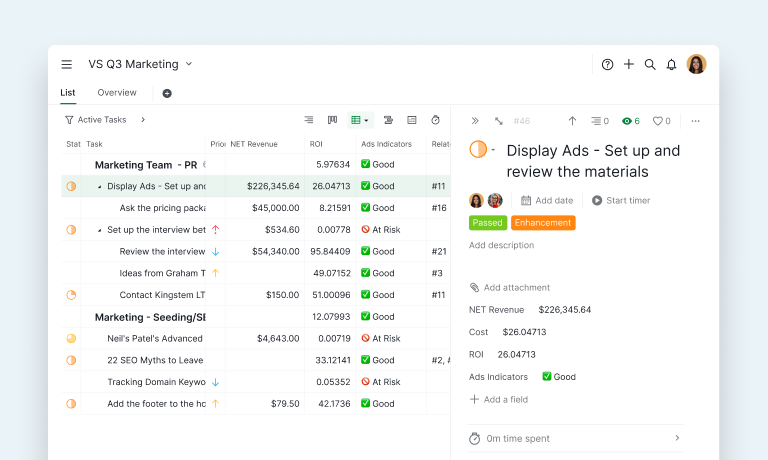
Quire also shows the same data through multiple views: the list you plan in, the Kanban board you run the week from, the Timeline View for deadlines, the Calendar View your marketing lives in, the Table View you treat like a database. One dataset, many angles, no re-entry.
Then there's the structure layer that turns Quire into a system of record. Custom Fields attach the data that defines your work (deal value, renewal date, account owner). Formula Fields compute on top of them. Milestones mark the moments that matter. Task Dependencies encode what blocks what.
A system of record needs some fields nobody edits by hand. Lock those, and the team reads them as written. See how to lock a Custom Field.
And Time Tracking records where hours go. That's the difference between "we have some tasks" and "we have an operational picture an AI can read."
Now let's build a Quire CRM, AI morning briefs, marketing ops, and an Insight View BI layer, one part of the business at a time.
Custom Fields, Formula Fields, Insight View, and Charts are available on Quire's Professional plan and above. The free tier covers the core views (Kanban, List, Calendar, Timeline) plus My Tasks and Smart Folders.
How do you run a lightweight CRM in Quire?
The problem. Most small businesses don't lose deals to a bad product. They lose them because a follow-up slipped, a proposal went quiet, or a renewal date passed while everyone was busy. Full CRMs are heavy and expensive, so customer data ends up scattered across inboxes and one founder's memory.
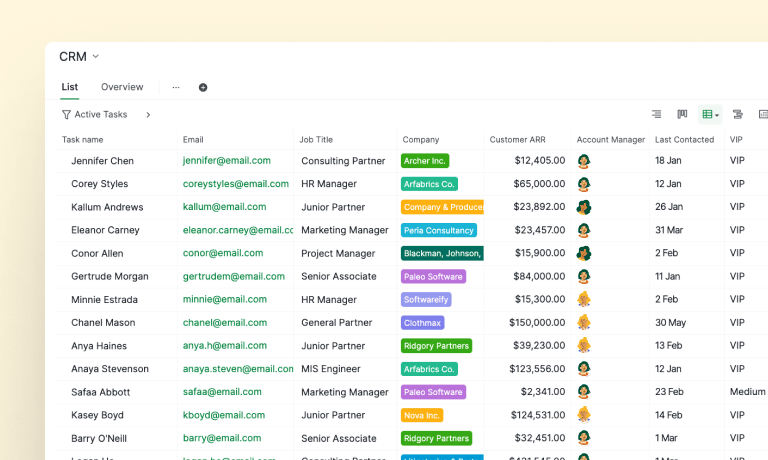
The workflow. Build a lightweight operational CRM in Quire. Use Table View as your customer database, where each row is a lead, opportunity, or account. Then add Custom Fields for Lead Source, Deal Value, Renewal Date, Account Owner, Customer Segment, and a Customer Health Score.
Use Formula Fields to compute weighted pipeline value or days until renewal, so the numbers don't go stale. New inquiries land through Email-to-Quire as tracked tasks, and account notes, call summaries, and proposal drafts live in Document View on each account.
The Quire features. Table View and Custom Fields form the CRM. Formula Fields handle the math. Document View holds the call notes and proposals, and Email-to-Quire feeds new inquiries in as tracked tasks. Insight View then shows pipeline health, deal distribution by stage, and upcoming renewals across account owners.
How Claude helps. Ask Claude to summarize months of client communication into three sentences before a call, draft follow-ups for the deals that haven't moved in two weeks, or flag the renewals where the Health Score dropped and no one's touched the record. It isn't inventing customers. It's reading your Quire record and telling you who needs you today.
The outcome. Fewer dropped follow-ups, earlier warning on at-risk renewals, and a customer picture that doesn't live in one head. You replaced a CRM subscription with a view and got an analyst on top of it.
A quick honesty note. If you're running a 30-person outbound team with commission structures and call recording, you've outgrown this, and a dedicated CRM is the right call. For most teams of 1 to 50, a Quire CRM removes a tool instead of adding one.
Read more: 3 best practices for using Table View, including as a CRM.
How do you generate AI morning briefs from Quire?
The problem. You start the day reactive. You open your laptop and the loudest message wins, not the most important task. By the time you surface, half the morning's gone and you still don't have a clear read on what's at risk.
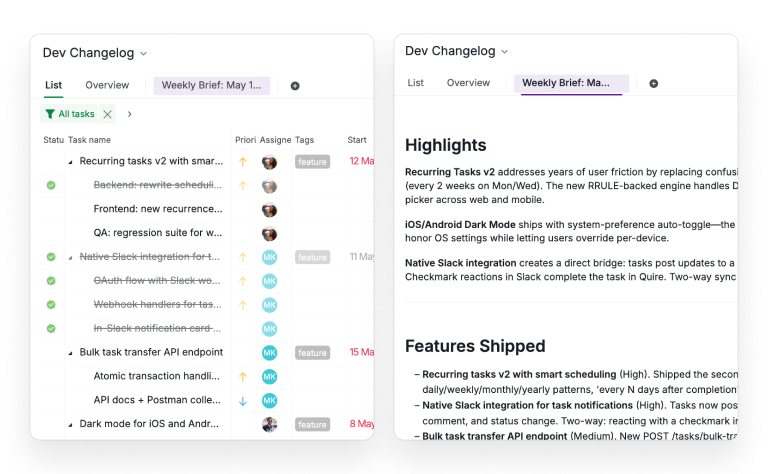
The workflow. Turn the start of each day into a generated operational briefing. Quire holds the raw material: your My Tasks list, Smart Folders that group work by client or priority, overdue items, upcoming Milestones, where hours go in Time Tracking, and recent activity.
Let Claude read that picture and hand you a one-page brief instead of assembling it from six screens. A good brief answers four things: what's on fire, what's quietly slipping, where the team is blocked, and what decision needs you before it can move.
The Quire features. My Tasks shows your own plate. Smart Folders group the wider operation into lenses like "Active Clients." Milestones surface what's due this week, and Charts plus Time Tracking show where the hours actually went. Together they're the source of operational truth Claude reads from.
How Claude helps. Claude turns that data into a plain-language briefing. Top three priorities, the bottleneck worth clearing first, a risk alert on the milestone tracking late, and an executive summary you could forward without editing. Run it on a schedule so it's waiting when you sit down. It only summarizes what's in Quire, which is exactly why it's trustworthy instead of generic.
The outcome. You start proactive. The owner gets executive visibility without a weekly status meeting, and the team's day is shaped by what matters, not who emailed last.
The brief is one prompt, and so is most of the rest of this stack. Our list of prompts that run your projects covers the daily read, the overdue sweep, and the client-facing update.
Read more: how Milestones help you set, track, and reach every goal.
How do you run marketing operations in Quire?
The problem. Small business marketing lives in a swamp of calendars, half-finished docs, and a content schedule that exists mostly as good intentions. Campaigns launch late, posts get written the morning they're due, and nobody can say afterward whether any of it worked.
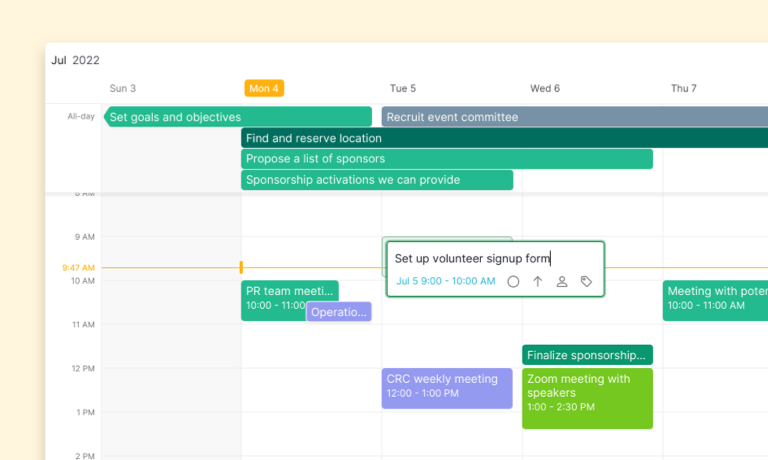
The workflow. Run marketing inside Quire. Build your editorial calendar in Calendar View, and map bigger pushes like a product launch in Timeline View so dependencies and dates are clear.
Use Task Templates for repeated work like a blog production checklist, and Recurring Tasks for the rhythm work: the weekly newsletter, the Monday social batch, the monthly report.
Tag each campaign with Custom Fields like Campaign Type, Channel, Budget, Target Audience, Target Leads, and Actual Leads, and keep briefs and drafts in Document View on the campaign task.
The Quire features. Calendar and Timeline View own scheduling. Task Templates and Recurring Tasks remove the repetitive setup. Custom Fields make each campaign measurable, and Document View holds the actual content.
The Calendar's Week view is the one we lean on most at Quire. Every Monday the team sits down, looks at the next seven days side by side, and slots campaigns, launches, and meetings before the week fills up on its own.
It takes ten minutes and turns a reactive week into a planned one.
How Claude helps. Ask Claude for content ideas around a theme, hand it a one-line goal and have it draft the campaign brief, or take one strong blog post and have it repurpose into a week of social posts and a newsletter section. At week's end, point it at Target Leads versus Actual Leads and have it write the performance summary, including which channel pulled its weight.
The outcome. Marketing stops being improvised. You ship on schedule, reuse instead of rebuild, and finally know which channel earned the budget. A solo marketer ships four campaigns the way a team of three used to.
How does Insight View become your BI layer?
Performance tracking is where the whole system pays off, because the same fields that run the work also feed the reports.
The problem. Small businesses fly blind on their own performance, not because the data is missing but because pulling it together means exporting spreadsheets and building a chart until you quietly stop. So decisions get made on gut feel, and problems arrive as surprises instead of trends.
The workflow. Treat Quire's Insight View as a lightweight operational intelligence layer that sits on top of the tasks you already manage. Because your work carries structure through Custom Fields and Formula Fields, you can build a real performance picture without a separate BI tool.
KPI tracking is a good concrete example. In Table View, a Task Duration field with a WORKDAYS formula counts the working days between a task's start and completion.
A KPI Points field turns that duration into a score: finish inside a week and earn 5 points, drag past a month and earn 1. A Section Weightage lookup gives each part of the project its own importance, and a KPI Weightage field multiplies the two together.
Group the Insight View by Section then Member, sort by KPI Weightage, and you can see exactly who's carrying which area. Conditional formatting flags anything above your benchmark in green and anything below it in red.
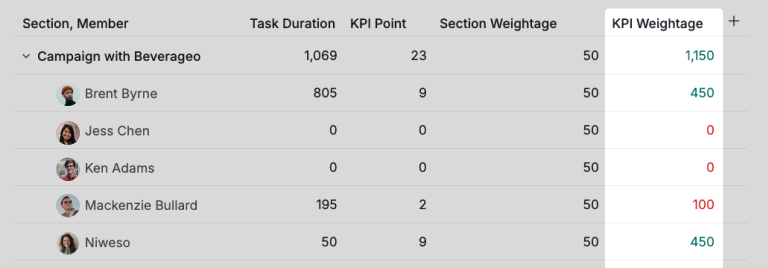
The Quire features. Insight View is the centerpiece. Formula Fields and Lookup fields compute the metrics. Custom Fields and Time Tracking feed the inputs, and Charts visualize the rest. It runs on the same data you manage work in, so it's never out of date. The same pattern handles workload distribution by tag, revenue or ARR per account owner, and onboarding speed, not just KPIs.
How Claude helps. Insight View shows what's happening. Claude tells you what it means. Point it at the KPI table and ask who's quietly slipping below benchmark and why, have it explain last month's anomaly, or have it write the monthly executive report with two or three recommended actions and the risk it would watch. That's the analyst's job. Read the numbers, name the pattern, propose the move.
The outcome. You see problems as trends, early, instead of as fires. And the monthly report that used to eat a Friday now takes ten minutes to review instead of a day to assemble.
Read more: a full walkthrough of Insight View, and how Time Tracking feeds the numbers behind it.
What belongs in an AI operations stack?
Most businesses also run on Gmail, Google Drive, Slack, and a few specialist tools. The question is how those fit without turning a clean setup into a tangle of integrations.
The answer is a principle, not a feature list. Quire is the operational hub, the single source of truth for what's happening and what's next. Everything else feeds it or reads from it. A few connections earn their place:
- Gmail and Email-to-Quire turn inbound messages into tracked tasks.
- Google Drive and Workspace hold the heavy documents your tasks point to, so Claude can read that context when it writes a client summary.
- Slack keeps conversation flowing while the work stays in Quire.
- Your calendar (Google or Microsoft 365) keeps deadlines honest across tools.
Beyond that core, add only what a workflow demands. Stripe data can tell Claude which customers are active when it scores account health. HubSpot, Google Analytics, or Search Console give it marketing numbers to interpret. Zapier or Make can move a record when there's a real handoff.
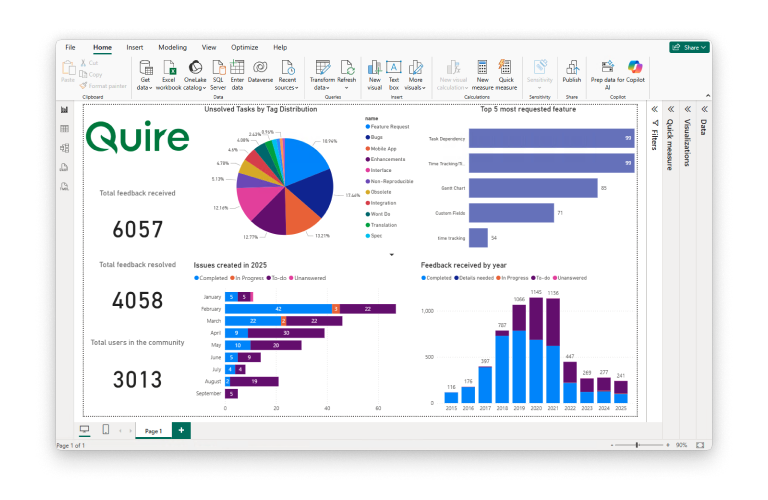
And when you want your Quire data in polished, shareable dashboards, the native Power BI integration turns your project and task data into interactive visuals for the people who live in reports. Airtable or Notion may hold something you don't want to migrate yet, and that's fine.
Here's the discipline. Every tool you connect is one you have to keep in sync, and a place your truth can fragment again. Documents can live in Drive, conversations in Slack, but "what are we doing and when is it due" lives in exactly one place, or it lives nowhere. Don't force an integration because the connectors page looks impressive. Add one when a workflow breaks without it.
Read more: how the Power BI integration turns your Quire data into interactive dashboards.
What are best practices for implementing this setup?
Start with one workflow, not the whole system. Pick the part that hurts most, probably the CRM or the morning brief, build just that, and run it for two weeks before expanding. A two-field CRM you actually update beats a fifteen-field one you abandon by Wednesday.
Make the record honest before you ask for intelligence. Claude's analysis is only as good as the data in Quire. Fill in the fields that drive decisions, and skip the ones that just look thorough. Add structure where a decision depends on it and nowhere else. A Renewal Date field earns its keep because it changes what you do.
Let Claude do judgment, not data entry. Summarizing call notes. Prioritizing tomorrow's list. Drafting the follow-up. Flagging the renewal nobody's touched in three weeks. When you want to know what's real, you look at Quire, not a chat log.
Then put the recurring analysis on a schedule (the morning brief, the weekly marketing summary, the monthly Insight report) and review the whole setup once a quarter. Kill the fields nobody uses before they become the mess you replaced.
What are the common mistakes to avoid?
The biggest is over-building. Fifteen Custom Fields, ten automations, a Smart Folder for every mood. It feels productive and quietly kills the system, because nobody maintains it and the data goes stale. Structure should be the minimum that supports real decisions.
The second is keeping two sources of truth. The founder's spreadsheet, the "real" list in someone's head, the Slack thread where decisions actually get made. The intelligence layer reads the whole picture only when Quire is the single record, so pick one home for work and move everything into it.
The third is asking Claude to invent what isn't there. If the data's missing, fill the record, don't ask the AI to guess. The quality of the brief mirrors the quality of the data.
The fourth is integration sprawl. Connecting every tool because you can and then spending your weeks keeping them in sync.
The last is treating this as a one-time setup. An operating system is a living thing. Build it, then prune it, or in six months you'll have rebuilt the swamp you were trying to drain.
Key Takeaways
The opportunity with AI in a small business isn't another clever tool. It's getting the AI to read your actual pipeline, your overdue tasks, and your renewal dates, instead of starting from scratch every conversation. That only happens when one place holds the truth and one layer does the thinking.
Quire holds the nested work and multiple views that make your operation legible. Claude reads it and hands you judgment. Start small, make the record honest, let Claude analyze it, then expand. You get the upside of AI without the mess.
Ready to give your small business an operating system instead of a pile of disconnected tools?
Start free at quire.io/signup. No credit card, full access, and a workspace your whole operation can finally live in.
More Quire guides: Quire & Beyond: Build great things with Quire API and Quire iOS 2.0: New Features and Even Greater Performance.
Frequently Asked Questions
What is an AI operating system for a small business?
It's a setup where one tool holds your real operational data and an AI reads it to analyze, prioritize, and summarize. Here, Quire is the operational system of record and Claude is the intelligence layer on top. The point is connection. The AI acts on your actual operations, not on scattered snippets.
Can Quire be used as a CRM for a small business?
Yes, as a lightweight operational CRM. With Table View and Custom Fields like Lead Source, Deal Value, Renewal Date, and Account Owner, you track leads, opportunities, and renewals in one place, and Insight View shows pipeline health and renewal risk. For teams of 1 to 50 it removes a separate tool and keeps customer data next to the work.
How does Claude work with Quire?
Claude reads the data you keep in Quire and turns it into daily briefings, stalled-deal flags, account summaries, campaign briefs, and reports. You can connect context through Google Drive, Gmail, and Slack. Quire stays the source of truth, and Claude does the thinking on top.
Does this setup work with Claude for Small Business?
Yes. The May 2026 launch bundles Claude Cowork, 15 agentic workflows, and 15 skills, with connectors to QuickBooks, HubSpot, and Google Workspace, but no project management tool. Quire fills that gap through its MCP server, so the skills read your real tasks and pipeline.
Is Quire good for startups and very small teams?
It's built for teams of roughly 5 to 50, with a free tier that works for solo founders. The nested task tree, multiple views, and templates suit teams that have outgrown Trello but find Asana or ClickUp too heavy. One workspace can run product, marketing, and operations without paying for three tools.
What Quire features matter most for AI-powered operations?
Custom Fields and Formula Fields structure your data so it's analyzable. Table, Calendar, and Timeline View give different angles on the same data. Insight View, Charts, and Dashboard View turn it into operational intelligence. My Tasks, Smart Folders, and Recurring Tasks keep the daily flow tight.
Do I need connectors and integrations to make this work?
Not to start. Run Quire as your hub and use Claude on its own from day one. Connectors to Gmail, Google Drive, Slack, and your calendar help when a workflow genuinely spans tools. Add them when a real workflow needs them.
Will this create more operational complexity, not less?
It can if you over-build. The fix is to keep Quire as the single source of truth, add structure only where a real decision depends on it, and let Claude handle analysis instead of brittle rule chains. Start with one workflow, prove it, then expand.
How is Quire different from Notion for running operations?
Notion is a flexible document space with tasks grafted on. Quire is purpose-built for task and project management, with a real nested task tree, dependencies, milestones, and synchronized views of the same data. For work with structure and deadlines, Quire's hierarchy holds up better than a wiki you keep tidying by hand.