
Task Activity Log Permalink
The Task Activity Log lets you review everything that has happened to a task, helping you understand changes, maintain transparency, and track collaboration history.
View Task Activity Log
- Open the task you want to review.
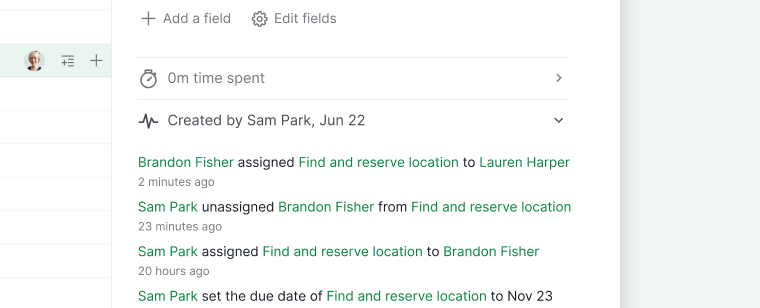
- In the task detail panel, click Created by.
-
The task activity log will appear, showing a chronological list of actions made to the task.

Tip: You can access the Project activity log and the Organization activity log from their respective Overview pages.
How the Activity Log Works
The activity log records edits, status changes, assignee changes, and comments left on the task, so nothing gets lost as multiple people update it over time.
The log covers one task at a time. To see activity patterns across people or projects instead, add a Dashboard tab and use the Member Activity widget, a heatmap of task activity per member, or Portfolio Activity, which does the same per project at the organization level.
If a project includes guests or is accessible through a public or share link, project admins can hide activity and time logs from those viewers in Project Settings.
Frequently Asked Questions
How do I view the activity log for a task in Quire?
Open the task detail panel and click Created by to see a chronological log of all changes made to the task.
Where can I find project and organization activity logs in Quire?
Project activity logs are on the Project Overview page, and organization activity logs are on the Organization Overview page.
What actions does the Quire activity log record?
The activity log records edits, status changes, assignee changes, and comments made to the task.