
Merge Two Quire Accounts Permalink
If you accidentally created multiple Quire accounts (for example, one with a personal email and one with a work email), you can combine access by transferring ownership and linking emails.
Before You Begin
- Decide which account you want to keep (Email A).
- Identify the account you want to remove (Email B).
- Make sure you have access to both accounts.
Transfer Ownership
To move content from Email B to Email A:
- Log in as Email A (the account you want to keep).
- Grant admin permission to Email A for all projects and organizations created by Email B.
- Confirm that Email A has full administrative access.
This ensures no data is lost during the process.
Remove the Old Account
After transferring ownership:
- Log in as Email A.
- Remove the permissions of Email B.
- Delete the Email B account if it is no longer needed.
Only delete the account after confirming that all data has been transferred.
Link the Second Email
To allow both emails to access the same account:
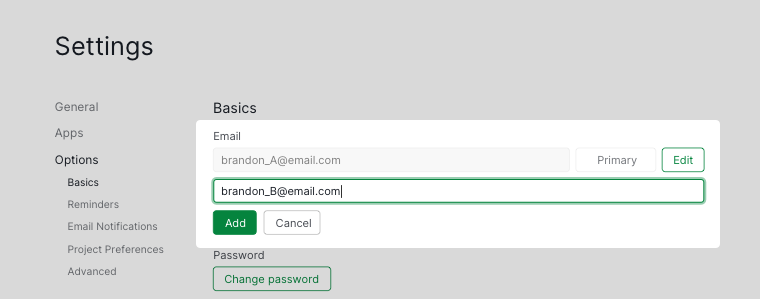
- Go to Account Settings.
- Select the option to add a second email address.
- Enter Email B as the additional email.
- Save the changes.
After completing these steps, both Email A and Email B can access the same Quire account.
Frequently Asked Questions
How do I merge two Quire accounts into one?
Grant Email A admin access to all projects and organizations owned by Email B, then remove Email B’s permissions and delete the Email B account. Finally, add Email B as a second email in Email A’s Account Settings.
What should I do before deleting a Quire account during a merge?
Confirm that Email A has full admin access to all projects and organizations previously owned by Email B. Only delete the Email B account after verifying all data has been transferred.
How do I add a second email address to my Quire account?
Go to Account Settings and select the option to add a second email address. Both the primary and secondary email can then be used to log in to the same account.