
Task Dependency Permalink
Task dependencies control the order work gets done. When one task must finish before another can start, setting a dependency makes that relationship explicit and prevents teams from accidentally working out of sequence. In Quire, you can set dependencies between tasks and see them as connecting lines in the Timeline view, so scheduling conflicts are visible before they become problems.
Task dependency is only available in Professional, Premium, Enterprise plan. More information can be found at our pricing page.
See Tracking Progress & Reporting for how dependencies fit alongside Quire’s other views and reporting tools.
Overview
Task dependency defines how one task is related to another in a project schedule:
- It determines when a task can start or must finish relative to another task.
-
Dependencies are displayed as lines connecting tasks in the Timeline view.
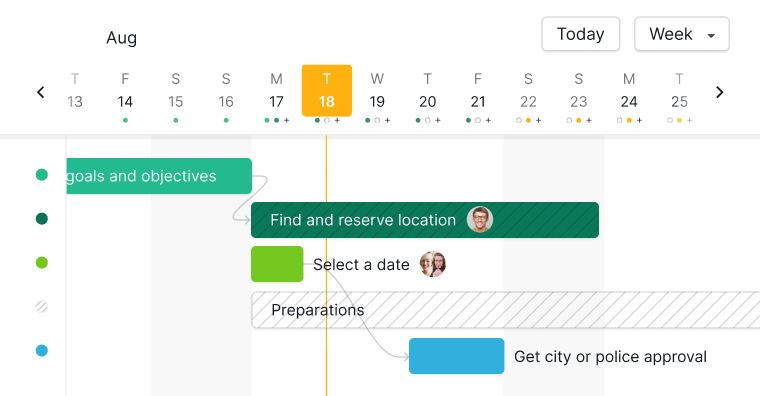

Note: Quire currently supports Finish-to-Start (FS) dependencies only. This means a successor task cannot start until its predecessor is completed. Example: Walls cannot be built until the foundation is finished.
Once dependencies are set, the Blocked Tasks widget on a Dashboard lists every task that cannot move forward yet, paired with the predecessor it is waiting on and who currently owns that predecessor.
Create Task Dependencies
From the Detail Panel
- Open the task’s detail panel.
- Click Add dependency.
- Choose Predecessor or Successor.
- Select a task from the dropdown, type its name, or paste the task URL.
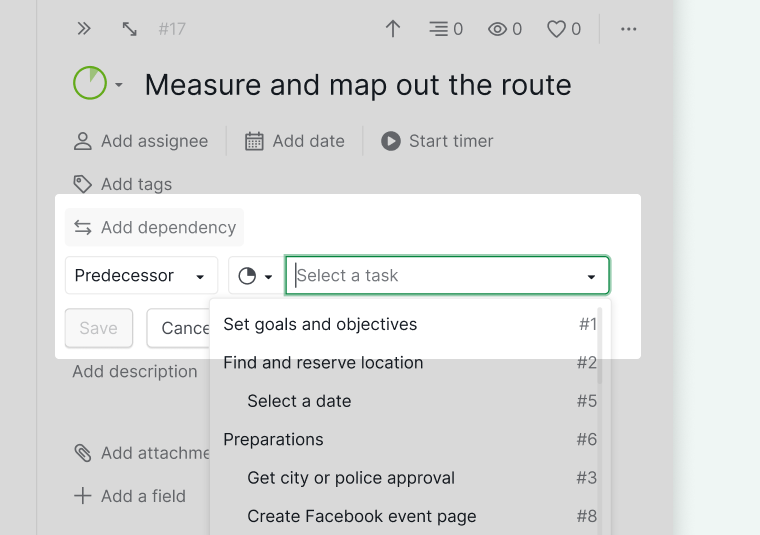
- To add more dependencies, hover over an existing one and click the + icon.
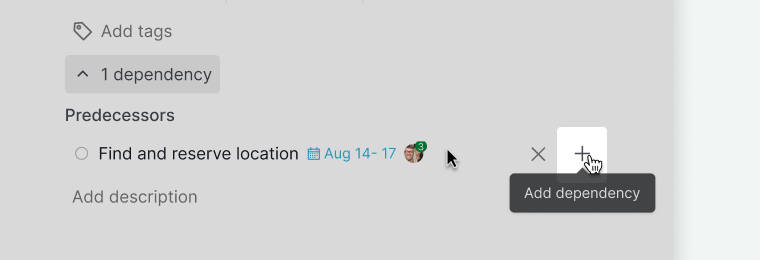


Note: If Add dependency is missing, go to + Add or edit field and enable Add dependency.
Via Right-Click
- Right-click a task in the Tree view.
- Click Set dependency.
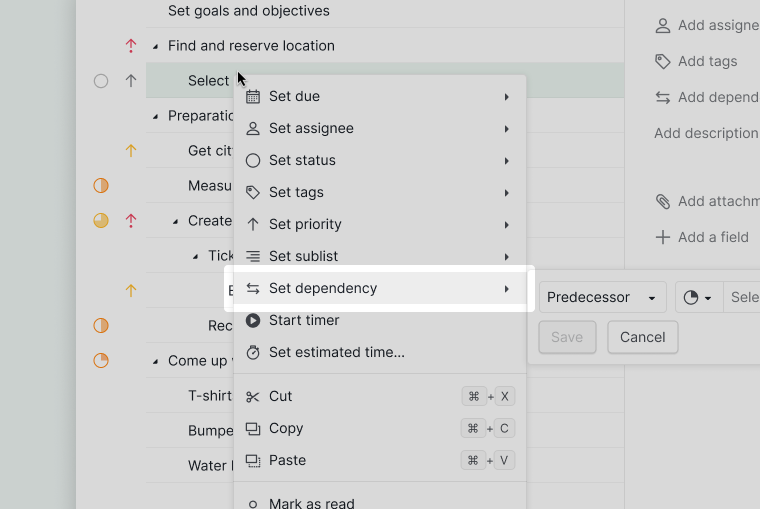
- Select Predecessor or Successor.
- Choose the related task from the dropdown.

Note: Once dependencies exist, Quire shows the number of connected dependencies instead of “Set dependency.”
In Timeline View
- Switch to Timeline view.
- Hover over a task’s timespan bar.
- Click the connector icon.
- Drag the connector to another task to link them.
If the dependency conflicts with task dates, the line turns red to indicate a scheduling issue.
Block Completion on Open Predecessor
When this setting is on, a task cannot be marked complete if it or any of its subtasks still has an unfinished predecessor.
To enable this setting:
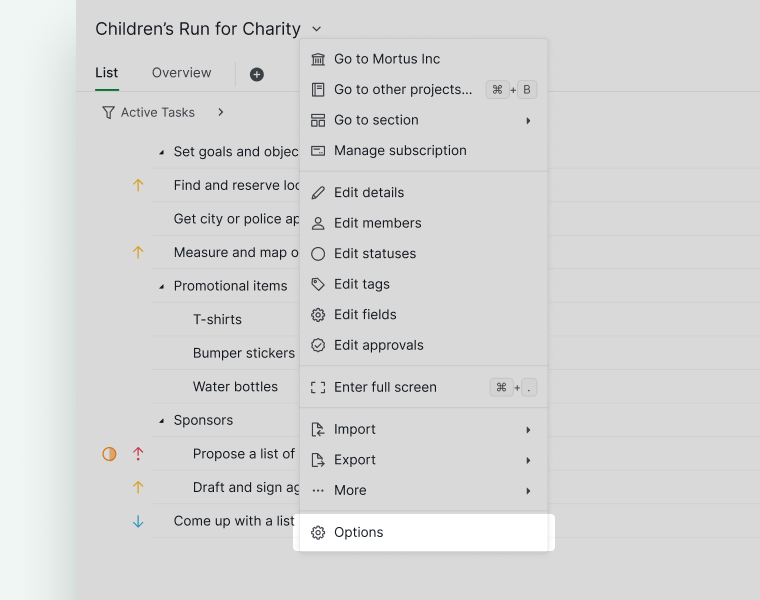
- Click the dropdown menu next to the project name and select Options.
- Under Feature Settings, turn on Block task completion if the task or any subtask has an open predecessor.
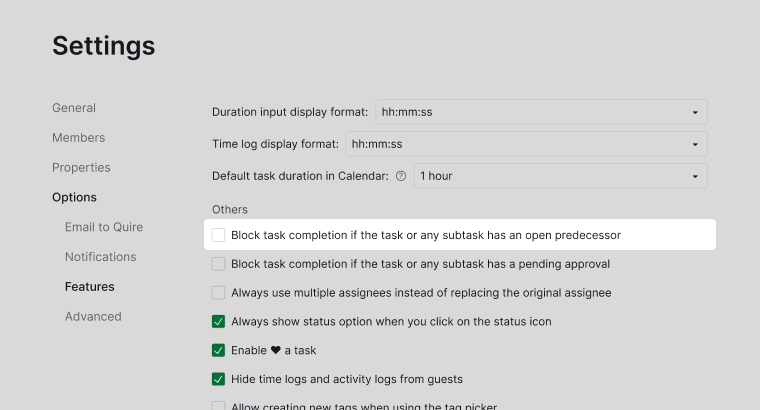


Note: Only project admins can change this setting.
Remove Task Dependencies
From the Detail Panel
- Open the task’s detail panel.
- Hover over the dependency you want to remove.
- Click the x icon.
Note: If Add dependency is missing, go to + Add or edit field and enable Add dependency.

In Timeline View
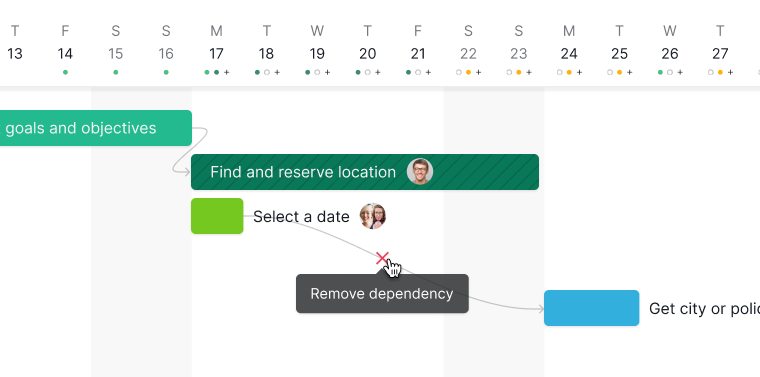
- Click the dependency line between two tasks.
-
Click the x icon to remove the connection.

Learn more about task dependency best practices on our blog.
Frequently Asked Questions
What is task dependency and why do teams use it in project management?
Task dependency defines the order work must be done in. When one task cannot start until another is finished, that is a dependency. Teams use dependencies to keep work from starting out of order, catch scheduling conflicts early, and map the critical path. In Quire, dependencies appear as connecting lines in Timeline View and support Finish-to-Start (FS) only.
What does a red dependency line mean in Quire Timeline View?
A red line means the successor task’s scheduled start is before its predecessor finishes. Adjust one of the task’s dates to resolve the conflict.
How do I add a task dependency in Quire?
Open the task’s detail panel, click Add dependency, choose Predecessor or Successor, then select a task. Hover over an existing dependency and click + to add more.
How do I add a task dependency from the context menu in Quire?
Right-click a task in Tree View and select Set dependency, then choose Predecessor or Successor and pick the related task.
How do I add a task dependency directly in Quire Timeline View?
Hover over a task’s timespan bar, click the connector icon, then drag it to the target task to link them.
How do I remove a task dependency in Quire?
In the detail panel, hover over the dependency and click the x icon. In Timeline View, click the dependency line between two tasks, then click x.
The “Add dependency” option is missing in Quire. How do I enable it?
Click + Add or edit field in the task detail panel and enable Add dependency.
Can I prevent a task from being completed while its predecessor is unfinished in Quire?
Yes. Enable Block task completion if the task or any subtask has an open predecessor in project settings. When on, a task cannot be marked complete until all predecessor tasks are finished. This applies to the task and all its subtasks.