
Delete or Restore a Project Permalink
Deleting a project in Quire moves it to the Trash and removes it from your workspace. Deleted projects can be restored within 7 days. Only project admins can delete a project.
Delete a Project
Only project admins can delete a project. Deleting a project removes it from your workspace and moves it to the Trash.
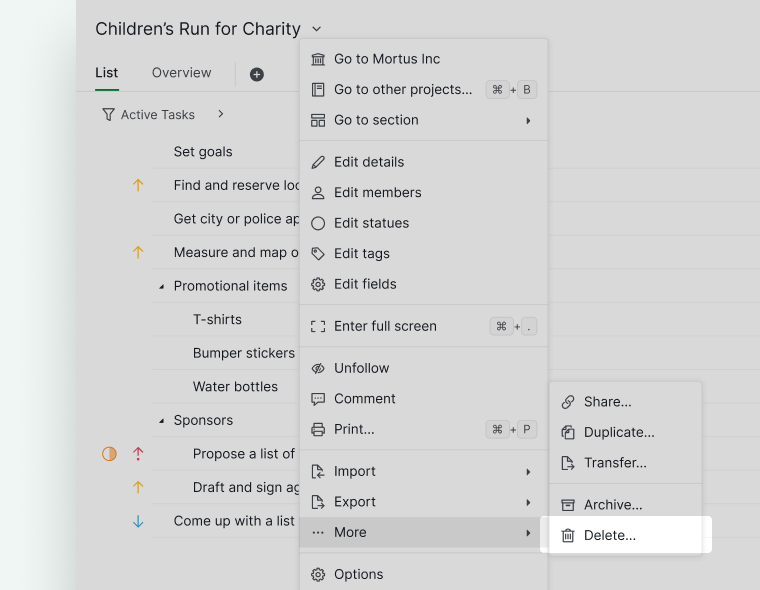
From the Project Menu
- Click the dropdown menu icon next to the project name.
-
Select Delete from More.

From Project Settings
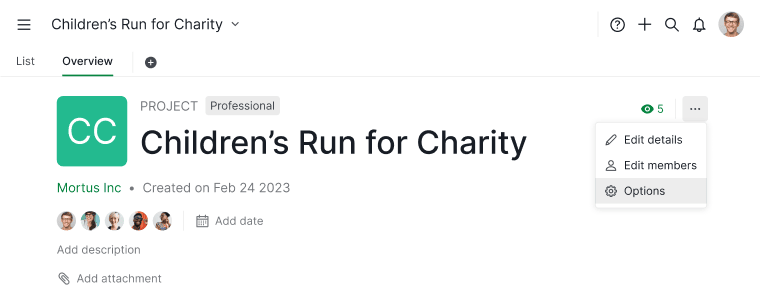
- Go to the project Overview tab.
- Click the More Options icon in the upper-right corner.
- Select Options.
- Scroll to the bottom of the Project Settings page.
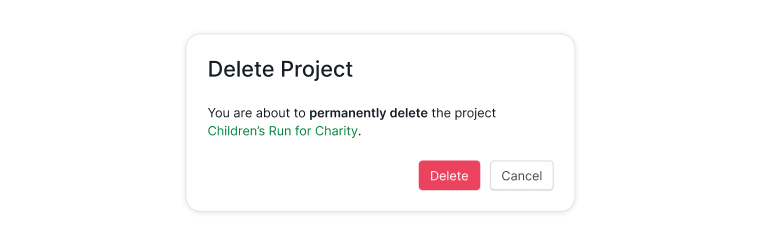
- Click Delete project.


Note: Only users with admin permissions for the project can delete it.
Restore a Deleted Project
Restoring deleted projects is only available in the Professional, Premium, Enterprise plans. More information can be found on our pricing page.
Deleted projects can be restored within 7 days, depending on your plan.
To restore a deleted project:
- Locate the Trash section in the sidebar.
- Find the deleted project.
- Click the More Options icon next to the project.
- Select Restore.
After 7 days, deleted projects are permanently removed and cannot be recovered.

Note:
- Projects in Trash do not count toward your organization’s project limit.
- If your active projects have already reached the limit, you will not be able to restore a deleted project.
Want to hide a project instead of deleting it, or move it to another organization first? See Archive or Unarchive a Project or Move a Project.
Frequently Asked Questions
How do I delete a project in Quire?
Click the dropdown menu icon next to the project name and select More > Delete, or go to Overview tab > More Options > Options, scroll to the bottom, and click Delete project. Only project admins can delete a project.
Can I restore a deleted Quire project?
Yes, within 7 days of deletion. Go to the Trash section in the sidebar, find the project, click the More Options icon, and select Restore. After 7 days the project is permanently removed. Requires a Professional, Premium, or Enterprise plan.
Do deleted Quire projects count toward the organization’s project limit?
No. Projects in Trash do not count toward the active project limit. However, if the limit is reached, you cannot restore a deleted project until space is available.