
Reorder Projects Permalink
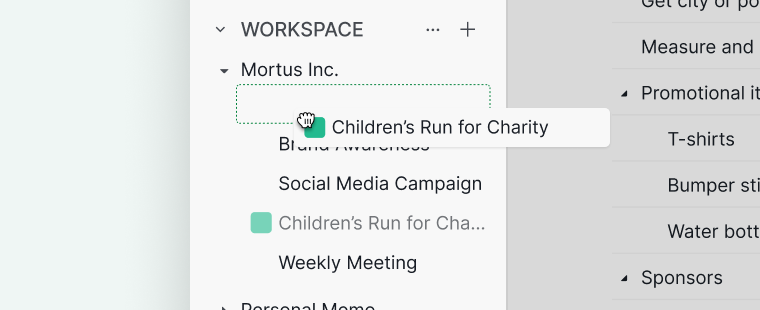
By default, projects in Quire are displayed alphabetically in the sidebar under the Projects section. You can reorder projects to fit your personal workflow using drag-and-drop.
Note: This arrangement only applies to your personal view. Other members in the same organization or projects will not see your custom order.
Reorder Projects
In the Sidebar
- Go to the Projects section in the sidebar.
- Click and hold the project you want to move.
-
Drag the project to your desired position.

Reset to Default Order
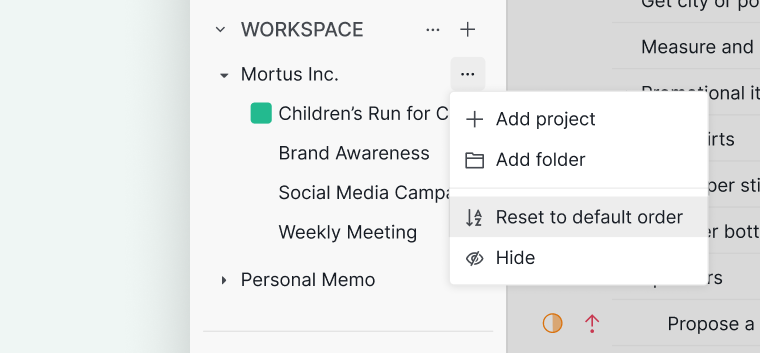
- Click the More Options icon beside your organization name.
-
Select Reset to default order.

On the Organization Overview Page
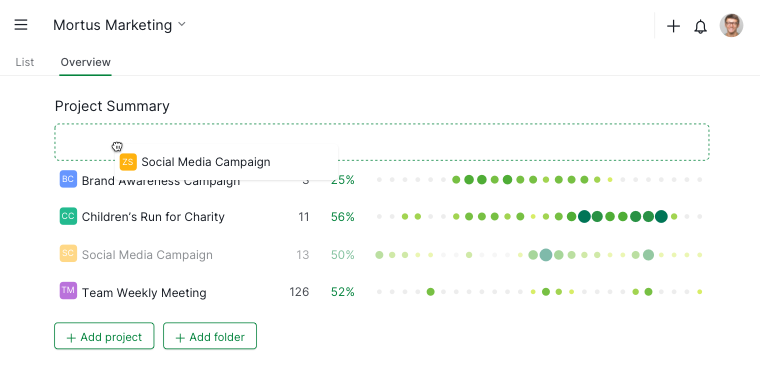
- Go to the Organization Overview page.
- Click and hold a project from the project list.
-
Drag it to the desired position within the organization.

Tip: You can also transfer a project from one organization to another by dragging and dropping it in the sidebar.
Hide and Reshow Projects
Hide Projects
- Hover over the project name in the Workspace section of the sidebar.
- Click the Hide icon.
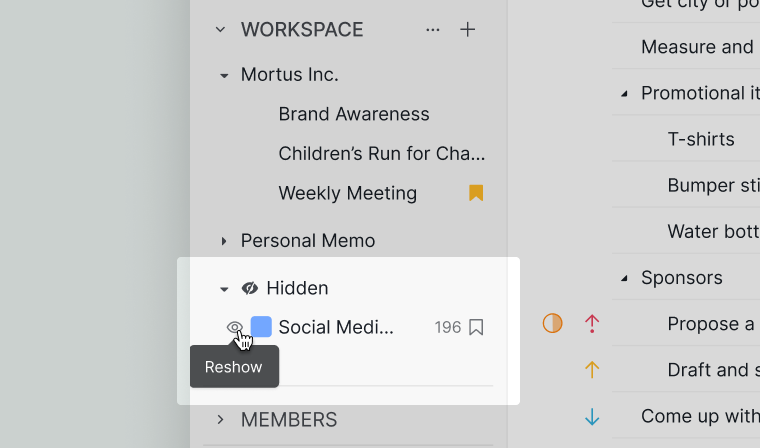
Hidden projects will appear at the bottom of the Workspace section.

Reshow Projects
- Hover over the hidden project in the Workspace section.
-
Click the Reshow icon to restore it to its original position.

Want to reorder your organizations too, or see all your projects in one place? See Reorder Organizations or Organization Overview.
Frequently Asked Questions
How do I reorder projects in the Quire sidebar?
In the sidebar’s Projects section, click and hold a project, then drag it to the desired position. This reordering is personal and does not affect other team members.
How do I reset project order to alphabetical in Quire?
Click the More Options icon beside your organization name and select Reset to default order. Projects return to alphabetical sorting.
How do I reorder projects on the Quire Organization Overview page?
Go to the Organization Overview page, click and hold a project, and drag it to the desired position.
How do I hide a project from the Quire sidebar?
Hover over the project name in the Workspace section and click the Hide icon. Hidden projects move to the bottom of the Workspace section.
How do I reshow a hidden project in Quire?
Hover over the hidden project in the Workspace section and click the Reshow icon to restore it to its original position.
Does reordering projects in Quire affect other team members?
No. Project order in the sidebar is a personal view. Your custom arrangement is only visible to you.